



Sonetel
Sonetel, a leading telecom provider, integrates seamlessly with LiveAgent for free, enhancing call center operations. Benefits include increased sales, cost sav...
2 min read


Discover seamless communication with MultiTEL’s integration in LiveAgent! Enjoy global VoIP services with cost-effective solutions, worldwide coverage, and advanced call analytics. Enhance your call center support and customer experience effortlessly. Integration is free with LiveAgent—start your 30-day trial today and elevate your customer service game!
MultiTEL is a VoIP service provider with cost-effective communication solutions. They provide services on a global scale, with points of presence on all continents. Besides worldwide coverage, MultiTEL also offers analytics tools that can be used for tracking inbound and outbound calls and text message volumes.

Start your free trial today and see results within days.
MultiTEL is one of the VoIP providers supported by LiveAgent help desk software. You can choose it as your provider of telecommunication services. All you have to do is get your call number, connect it to LiveAgent and start making and receiving customer calls as a part of your multi-channel help desk.
LiveAgent call center features can help you with customer call management. Route the calls to the right agents , create custom IVR trees to help your customers reach specific departments , make video calls or listen to your previous conversations stored in LiveAgent’s history .
If you want to know more, watch the video below to see how the LiveAgent call center works in practice.

The latest tips and deals delivered straight to your inbox.
The integration is already included in a LiveAgent plan and you don’t have to pay any extra charges. Once you have access to both MultiTEL and LiveAgent, you can simply connect your MultiTEL number with our help desk and start calling.
MultiTEL is already built into LiveAgent, all you have to do is add your MultiTEL number and do a simple configuration. Follow the guide below to learn how to complete the process.
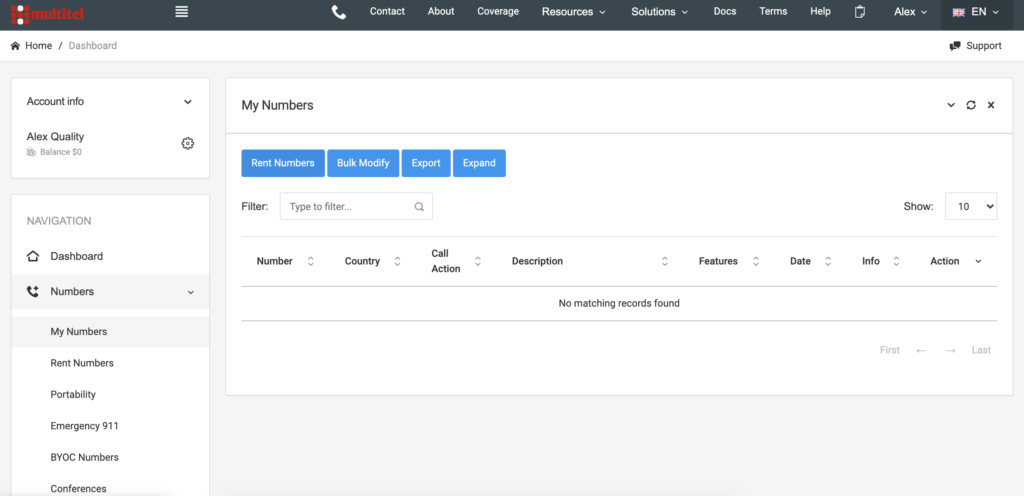
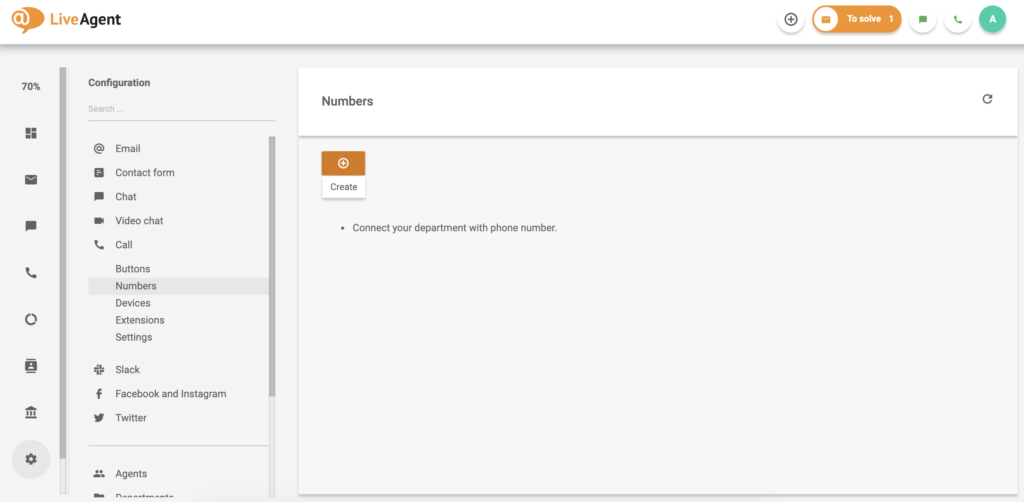
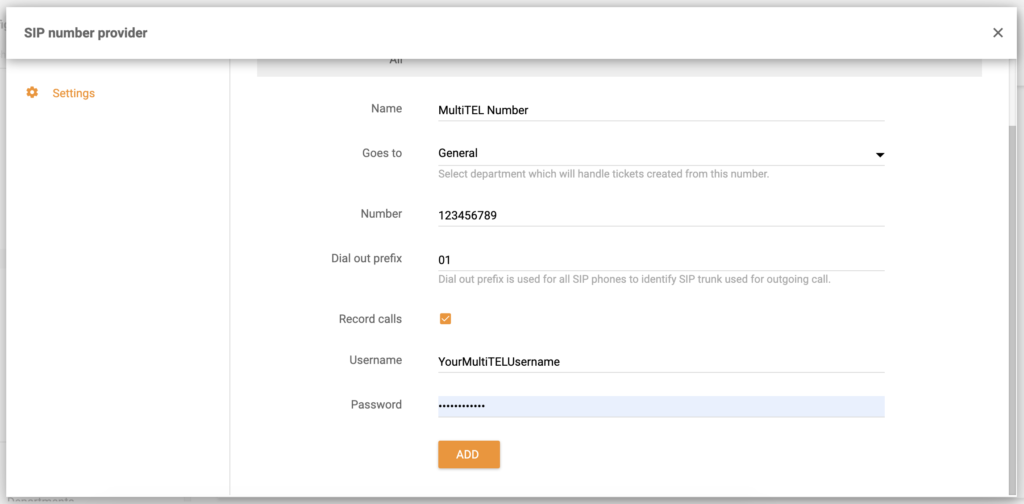
Your MultiTEL number is now connected to LiveAgent and you can answer customer calls. Besides call center, LiveAgent offers a wide range of help desk tools in one ticketing system – emails, live chat , customer portal , or social media like Facebook , Instagram , and Twitter .
Learn more about LiveAgent on our features page or watch the video below to get a full tour of our toolset.

Try LiveAgent with our free 30-day trial and provide better phone support.
Sonetel, a leading telecom provider, integrates seamlessly with LiveAgent for free, enhancing call center operations. Benefits include increased sales, cost sav...
Integrate Placetel VoIP with LiveAgent for free to enhance productivity, customer experience, and cost-efficiency. Access German local numbers seamlessly in you...
TelcaVoIP, a global VoIP provider from Italy, offers easy integration with LiveAgent for seamless virtual call center access on multiple devices. Enjoy reliable...
Join our community of happy clients and provide excellent customer support with LiveAgent.

Cookie Consent
We use cookies to enhance your browsing experience and analyze our traffic. See our privacy policy.