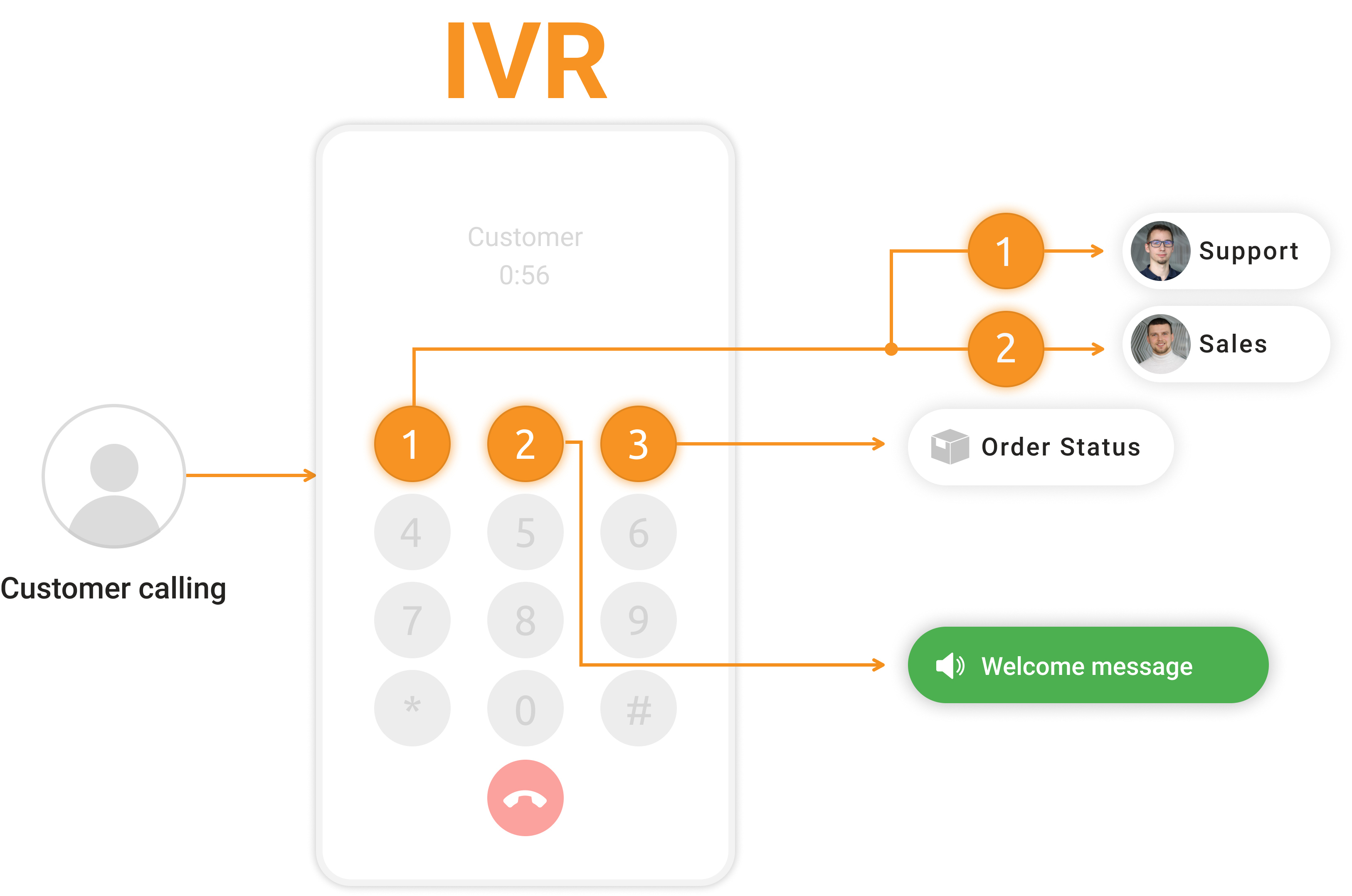
Enhance customer satisfaction with professional IVR scripts. Follow best practices to create seamless experiences and avoid frustration. Access examples for guidance. Start a free trial with LiveAgent to improve your phone support and streamline call routing.
Having a professional IVR system in place can go a long way in helping businesses improve their phone support and increase customer satisfaction. An efficient IVR script not only lets you automatically route incoming calls to the right departments or agents but also eliminates long hold queues and waiting times. IVR greetings and messages that your callers hear when they call your business set the tone for the entire interaction, so it’s important to get them right.
A well-written IVR call script can boost brand perception and create effortless and delightful customer experiences for every caller. Meanwhile, ineffective IVR scripts may frustrate and confuse callers, resulting in a lasting negative impression of the business. Use the following IVR best practices and IVR script examples along with some of the most common phrases for creating your own IVR scripts.
IVR Script Best Practices and Mistakes to Avoid
Avoid too many menu options - A long and complicated IVR menu can be difficult for callers to navigate – it’s generally recommended to provide up to 5 main menu options that should be listed in order of importance.
Place extension numbers at the end - Callers may not know which extension they’re looking for, but they do know which department they need – ensure they always hear the option before the action (‘For sales, press 1", instead of “Press 1 for sales”.)
Keep it simple and write for the ear - Use a language that is clear and easily understandable for everyone who may be calling your support line – avoid any unnecessary specific industry terms, abbreviations, and complicated words.
Inform customers of wait times - Let callers know how long they will have to wait to get connected to a live agent whenever you must place them in a call queue or on hold so they know what to expect and can manage their time accordingly.
Consider a callback option - When the lines are too busy and the hold queues are too long, make sure to enable an automated call-back function to shorten call queues, reduce customer effort and the number of abandoned calls.
IVR Greeting Messages
Welcome to [Company]. Unfortunately, all the lines are busy at the moment. Please be patient and stay on the line. Your call will be connected to one of our customer support representatives as soon as possible. Your current hold time is [number] minutes.
Hello and thank you for calling [Company], [the company’s mission statement or slogan]. Currently, all our lines are occupied. We ask for your patience. Your call will be answered by the next available agent. Your estimated hold time is less than [number] minutes.
Welcome to [Company]. Thank you for your call. Currently, all of our agents are occupied. Please hold, we will be with you shortly. Your current position in the queue is [number], and your estimated hold time is [number] minutes.
You have reached [Company]. This call may be monitored and recorded for training or quality assurance purposes. Please do not hang up. You will be connected to the next available agent as soon as possible. Your current hold time is approximately [number] minutes.
Thank you for calling [Company]. If you’re happy to share your feedback with us at the end of the call, by answering one simple question, press 1 now and help us improve this experience in the future. Please stay on the line and your call will be answered in the order it was received.
IVR Menu Options
Hello and thank you for calling [Company]. If you know the extension of the person you wish to reach, please enter it now. Otherwise, please choose from the following options:
To speak with the operator, press 0 at any time.
For sales, press 1.
For technical support, press 2.
For billing, press 3.
For information about our company, press 4.
To repeat this message, press 9.
Hello and thank you for calling [Company], [the company’s mission statement or slogan]. Our normal business hours are Monday through Friday, 8 AM to 5 PM. If you already know the extension you wish to reach, you may enter it at any time. Otherwise, please listen to the following menu:
To continue in Spanish, press 1.
To continue in French, press 2.
To reach the [name] department, press 3.
To reach the [name] department, press 4.
To speak with an operator, please stay on the line and the next available agent will be with you shortly.
Hello and welcome to [Company], [the company’s mission statement or slogan]. Calls may be recorded for training and quality purposes. Please choose from the following menu options:
To speak with a sales representative, press 1.
To reach a customer support agent, press 2.
To reach our billing department, press 3.
For more information about [Company], press 4.
To leave a voicemail, press 5.
To review your options, press 9.
Thanks for calling [Company]. Our offices are currently closed. Our business hours are from Monday to Friday 9 AM to 8 PM Eastern Time.
To leave a message in our general voice mailbox, press 1. A representative will contact you the following business day.
To reach our company directory, press 2.
For directions to our office, press 3.
For more information about our products and services, please visit [website].
To repeat this message, press the # key.
Waiting on Hold
We apologize for the long wait. If you’d prefer to leave a voicemail, press 0 and leave your name, phone number, and inquiry. We will call you back as soon as we can. Otherwise, feel free to continue to hold, and the next available agent will take your call.
All lines are still busy and we ask for your patience. Your hold time is estimated at [number] minutes. While you wait, feel free to check out our website at www.website.com
. We’re offering [details of your offer].
All our agents are still assisting other callers. To leave a message, press 1. To have an agent call you back, press 2. Otherwise, please stay on the line and your call will be answered in the order it was received.
All of our agents are still busy. If you would like to receive a callback, please press 1 and the next available agent will return your call. Otherwise, please stay on the line and someone will be with you as soon as possible.
Thank you for holding, our support agents are still busy with other customers. If you want to leave us a message and hang up, please press 1. We will contact you during our office hours. Otherwise, please continue to hold and the next available agent will answer your call.
Join our newsletter
The latest tips and deals delivered straight to your inbox.
Maximum Wait Time Reached
You have exceeded the waiting limit for this queue. Please hang up and try your call again in a few minutes.
All of our agents are still busy. Sorry for the inconvenience. Please hang up and try your call again later or reach out to us via email at [email address].
We apologize but we are currently experiencing high call volume. Please hang up and try your call again, send us an email at [email address] or chat with us online at www.website.com
.
We’re sorry your call cannot be completed at this time as we are experiencing unusually high call volume. Please hang up and try your call again.
Your call cannot be connected at present because of overloading. Please hang up and try your call again. We apologize for the inconvenience.
Queue Callback Messages
You have requested to have the next available agent call you back from the queue. You may now hang up and wait for our call. Goodbye.
Thank you for requesting a callback from [Company]. A member of our staff will be in contact with you soon. You may now hang up and wait for our call. Goodbye.
Thank you for requesting a callback. One of our representatives will be in touch shortly to answer all of your questions. Please hang up and wait for our call. Goodbye.
Your place in the waiting queue has been recorded. The next available agent will call you back. Goodbye.
You have requested a callback from [Company]. We look forward to speaking with you and will be in touch shortly within our business hours. Goodbye.
After-Hours Messages
Thank you for calling [Company]. Our office is currently closed. Office hours are Monday through Friday 8 AM to 5 PM. Please leave your name, phone number, and your request. A representative will return your call as soon as possible. If you need immediate assistance, check out our knowledge base or our FAQs in the ‘help’ section of our website.
Thanks for calling [Company]. Our office is currently closed. Our business hours are Monday through Friday 9 AM to 8 PM. To leave a message, press 1. A representative will contact you within a business day. For information about business hours, press 2. You may also email us at [company email]. For more information about our products and services, please visit www.website.com
.
Welcome to [Company]. Unfortunately, you are calling outside our normal business hours. You can reach us Monday through Friday from 9 AM to 6 PM. Please leave a message with your name and our customer support representative will get in touch with you as soon as possible. Thank you.
Thank you for calling [Company]. To learn more about our products and services, visit our website at www.website.com
. Our offices are currently closed. You can reach us Monday through Friday from 8 AM to 6 PM except on major holidays. Please leave a message with your name, contact information, and the nature of your call and someone from the appropriate department will contact you on the next business day.
Thank you for calling [Company]. We are currently unavailable to take your call. Please leave a message after the beep, or contact us during business hours: Monday through Friday between 9 AM and 5 PM Eastern Standard Time.
Holiday Closure Messages
Welcome to [Company]. Due to our company holiday, our customer care team is currently out of the office but will be available again for you from [date]. In the meantime, you are welcome to send your request to our email [email address] or through our contact form at www.website.com
. Thank you.
Thank you for calling [Company]. We are currently closed in observance of [holiday name]. We will return on [Date] at 8 AM Eastern Standard Time. To leave a voicemail, press 2. To repeat this menu, press the # key. Happy holidays!
Happy [holiday name]! You’ve reached [Company]. We are closed from [date] till [date] for the celebration of [holiday name]. On [date] we will reopen, resuming our standard business operations from 8 AM to 7 PM Eastern Standard Time. Looking forward to hearing from you after [date].
Welcome to [Company]. Our offices are now closed for a holiday. You can reach us on working days Monday through Friday from 9 AM to 6 PM. For general inquiries, you can also send us an email to [email address]. Thank you.
Hello! You have reached [Company]. We are closed for [holiday name] from [date] till [date]. We will reopen on [X date] with the usual working time from 8 AM to 8 PM. In case of emergency, please call the following number [telephone number] or email us at [email address]. Happy [holiday name]!
Voicemail Messages
Thank you for calling [Company]. Unfortunately, all lines are busy at the moment. Please leave a message after the beep with your name, phone number, and your request. We’ll ensure a representative will return your call as soon as possible. Thank you, and have a nice day.
We apologize but we are currently experiencing high call volumes. Please leave a message after the tone, send us an email at [email address], or chat with us online at www.website.com
. Thank you.
Thank you for calling [Company]. We apologize but we were unable to connect you to any available agents. Your call is important to us. Please leave us a voicemail after the tone and we will reach out to you as soon as possible. Thank you.
Thank you for calling [Company]. You have reached this message either because all of our agents are currently busy assisting other callers or it is after business hours. Please leave a message after the beep and we will return your call as soon as possible.
Hello, you have reached the voicemail of [Company]. Please leave a detailed message with your name, phone number, or email address and we will get back to you within twenty-four hours. Thank you.
IVR stands for Interactive Voice Response. IVR is a system that allows users to interact with companies by phone and automatically chooses a course of action for the user to follow.
The number of options an IVR system should have depends on the specific needs and preferences of the users and the organization implementing the system. In general, it is recommended to keep the number of options to a manageable amount, usually between 3 to 6 choices, to avoid overwhelming the user. However, in some cases, more options may be necessary to adequately cover the range of potential user needs.
To write effective IVR scripts, start by identifying common reasons why people call and what assistance they are seeking, keep the language easy to understand, clearly outline the available options and provide clear instructions on how to navigate through the IVR system, use direct prompts to guide the caller, provide self-service options within the IVR to allow callers to complete tasks without speaking to an agent. By following these steps and considering the user's experience, you can write IVR scripts that effectively guide callers and provide a positive interaction with your system.
IVR scripts, or Interactive Voice Response scripts, are pre-recorded voice prompts that guide callers through a phone system. These scripts are designed to provide a seamless and efficient experience for callers by giving them options to navigate through the system, such as selecting different departments or services, entering account information, or speaking with a live agent.
You can record your IVR message by using the voice recording option in your call center software. First, you need to create an IVR group for a department or a service, and then you can record your voice.
When greeting a customer on a call, you can use the phrase Hi, [NAME], how are you? or Hi, [NAME], how can I help?
Learn to create effective call center scripts for high-quality customer service. Get templates for greetings, handling difficulties, and apologies. Tips for des...
Explore LiveAgent's call center automation for enhanced customer satisfaction and agent workflow. Features include IVR, automatic callback, call routing, CRM in...
4 min read
Call center automation
IVR
+2
Cookie Consent We use cookies to enhance your browsing experience and analyze our traffic. See our privacy policy.