



Help Desk Security features
LiveAgent's help desk security includes IP bans, 2-step verification, HTTPS encryption, and GDPR compliance. Start a free 30-day trial!
4 min read
Security
Data Protection
+1

LiveAgent’s Search & Replace feature masks sensitive data in messages automatically, protecting private information and ensuring compliance.
LiveAgent’s Search & Replace feature enhances helpdesk security by automatically masking sensitive data in messages. Do your customers send you private information, which you don’t want to show in your helpdesk? LiveAgent can automatically search for strings in every incoming message and replace it with something else before being displayed or stored in a database.
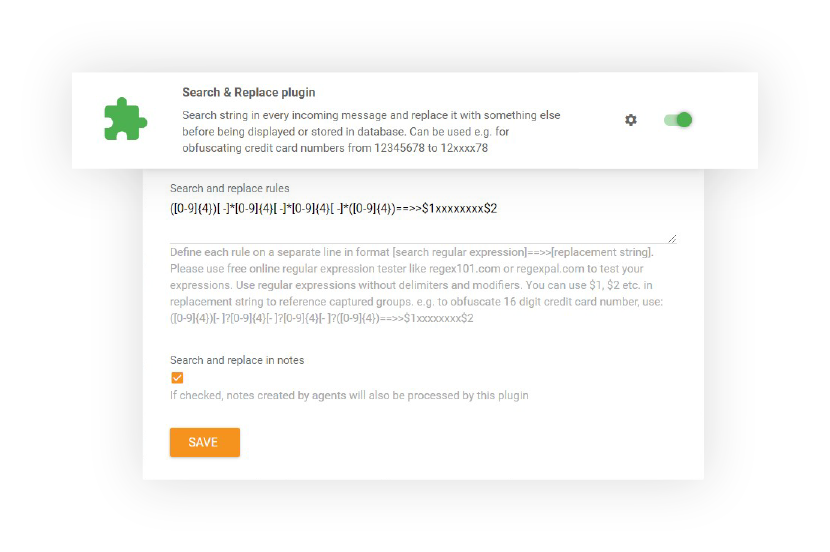
You can hide delicate data with random characters or data. The main reason for applying masking of a data field is to protect data that is classified as personal sensitive data.
It can be used, for example, for preventing helpdesk operators from viewing credit card numbers in billing systems (obfuscating credit card numbers from 123456789 to 12xxxx789).
The Search & Replace feature is designed to work seamlessly in the background, automatically masking sensitive data as messages arrive. Your helpdesk operators can focus on providing excellent customer support without being exposed to unnecessary sensitive information.
Whether you’re handling payment information, personal identification numbers, or other confidential data, the Search & Replace feature ensures that sensitive information is protected while maintaining the integrity of your support tickets.

The latest tips and deals delivered straight to your inbox.
Search & Replace is one layer of LiveAgent’s broader help desk security setup. Pair automatic data masking with IP bans, two-step verification, and HTTPS encryption to protect both your agents’ accounts and the sensitive data customers send you, keeping your help desk compliant without adding manual review work.
Learn more details about implementing and using the Search & Replace feature: Anonymizing sensitive data with Search & Replace feature
LiveAgent's help desk security includes IP bans, 2-step verification, HTTPS encryption, and GDPR compliance. Start a free 30-day trial!

Boost privacy and save costs with call masking. Enhance customer engagement and manage calls efficiently. Try LiveAgent free today!

Ticketing filters in LiveAgent help you quickly locate specific tickets by applying settings and rules to search queries. Enhance your ticket management and str...