



Help Desk Integrations
Boost workflow efficiency with LiveAgent's help desk integrations like Slack, Zapier, and API. Automate processes, share data, and enhance customer service. Try...
7 min read
Integrations
Automation
+4


Activate LDAP in LiveAgent to import agents and enhance customer support. Discover seamless LDAP integration today!
LDAP stands for Lightweight Directory Access Protocol. It is an application protocol used over an IP network to manage and access the distributed directory information service. The primary purpose of a directory service is to provide a systematic set of records, usually organized in a hierarchical structure.
Note: Only agents with filled email fields can be imported into LiveAgent.
To activate your LDAP plugin, please follow the instructions below:
Activate the LDAP extension inside LiveAgent. Go to Configuration → System → Plugins and activate the plugin named “LDAP.”
LiveAgent will restart, and you will see a new options menu → Configuration → LDAP. The configuration window will look like this:
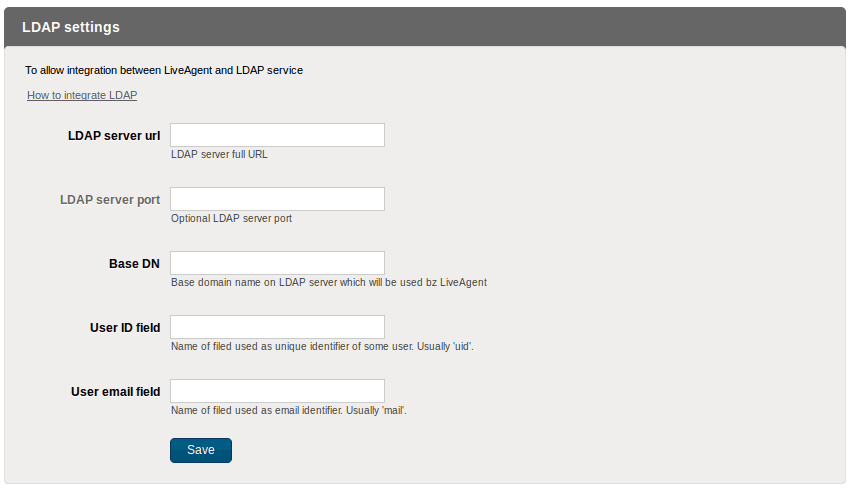
Fill in all the required fields (except ‘LDAP server port’ which is optional):
dc=example,dc=comcn or uid.mailNote: The mail field must contain valid email, otherwise users cannot be imported into LiveAgent as agents. If the user has more than one email, only the first email is used as an identifier in LiveAgent.
Save your settings. New options will appear just under the save button.

The latest tips and deals delivered straight to your inbox.
Boost workflow efficiency with LiveAgent's help desk integrations like Slack, Zapier, and API. Automate processes, share data, and enhance customer service. Try...

Email forwarding in LiveAgent connects different email providers to your help desk for seamless ticket creation. Instantly transfer email communication without ...

Integrate Sendmail with LiveAgent for secure, efficient email routing and enhanced customer support. This open-source solution supports various mail-transfer me...