


AI Autoresponder
Transform your customer support efficiency with LiveAgent's AI Autoresponder, an intelligent automation tool that delivers instant, personalized responses to in...
4 min read
AI Features
Automation
+1

Discover LiveAgent’s AI Answer Assistant, designed to streamline customer service with smart, AI-generated responses. Enhance your team’s productivity, reduce costs, and improve customer satisfaction with quick, personalized replies powered by ChatGPT. Perfect for businesses of all sizes, this feature integrates seamlessly into your existing setup, offering increased scalability and reduced human error. Available in Medium, Large, and Enterprise plans. Try it free today!
AI Answer Assistant is a new feature in LiveAgent’s customer service software, designed to streamline and enhance your email responses. Powered by ChatGPT and leveraging your own OpenAI API key, AI Answer Assistant generates polished replies to customer inquiries.
As this feature is currently in its Beta version, we are offering it temporarily for free in our trial, as well as in the Medium business, Large business and Enterprise subscription plans. The Legacy, Free and Small business plans are not included.
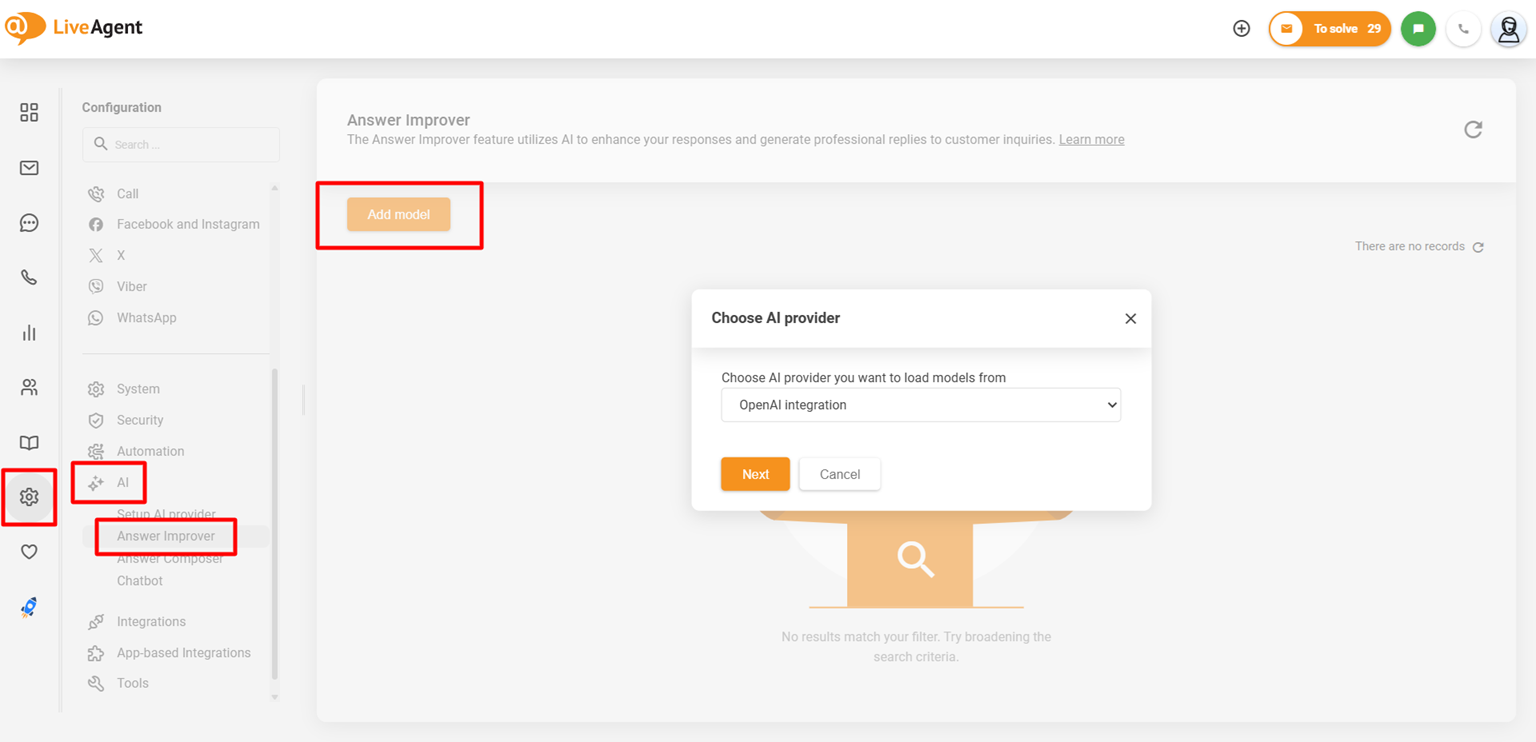
To get this AI Agent up and running, you need to integrate LiveAgent with an AI Agents provider. The AI functionality of LiveAgent is currently provided exclusively by FlowHunt . Quality Unit develops both LiveAgent and FlowHunt. This allows us to keep your data safe, as well as provide priority support to LiveAgent users.
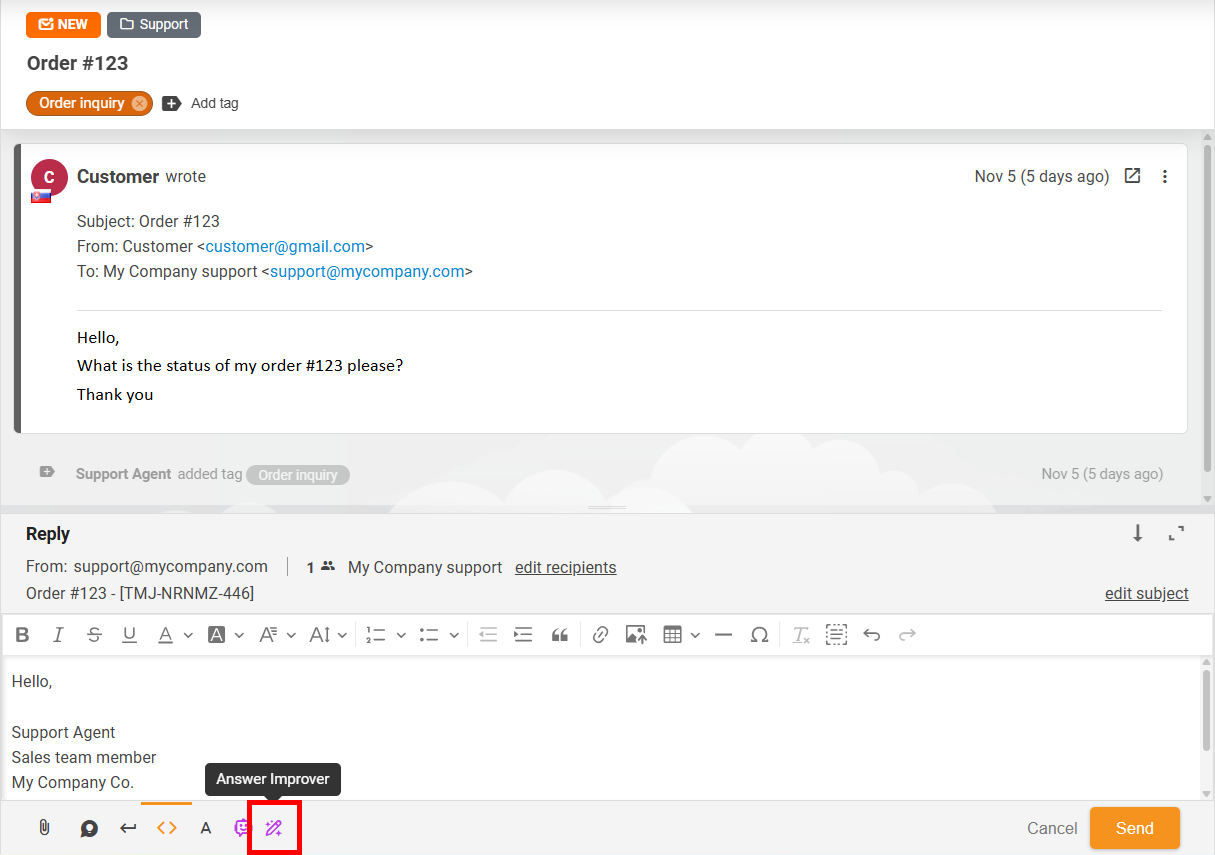
After the initial setup, which will be detailed later in this article, you can access this feature for any ticket by clicking the ‘Answer Assistant" button at the bottom of the ticket interface.
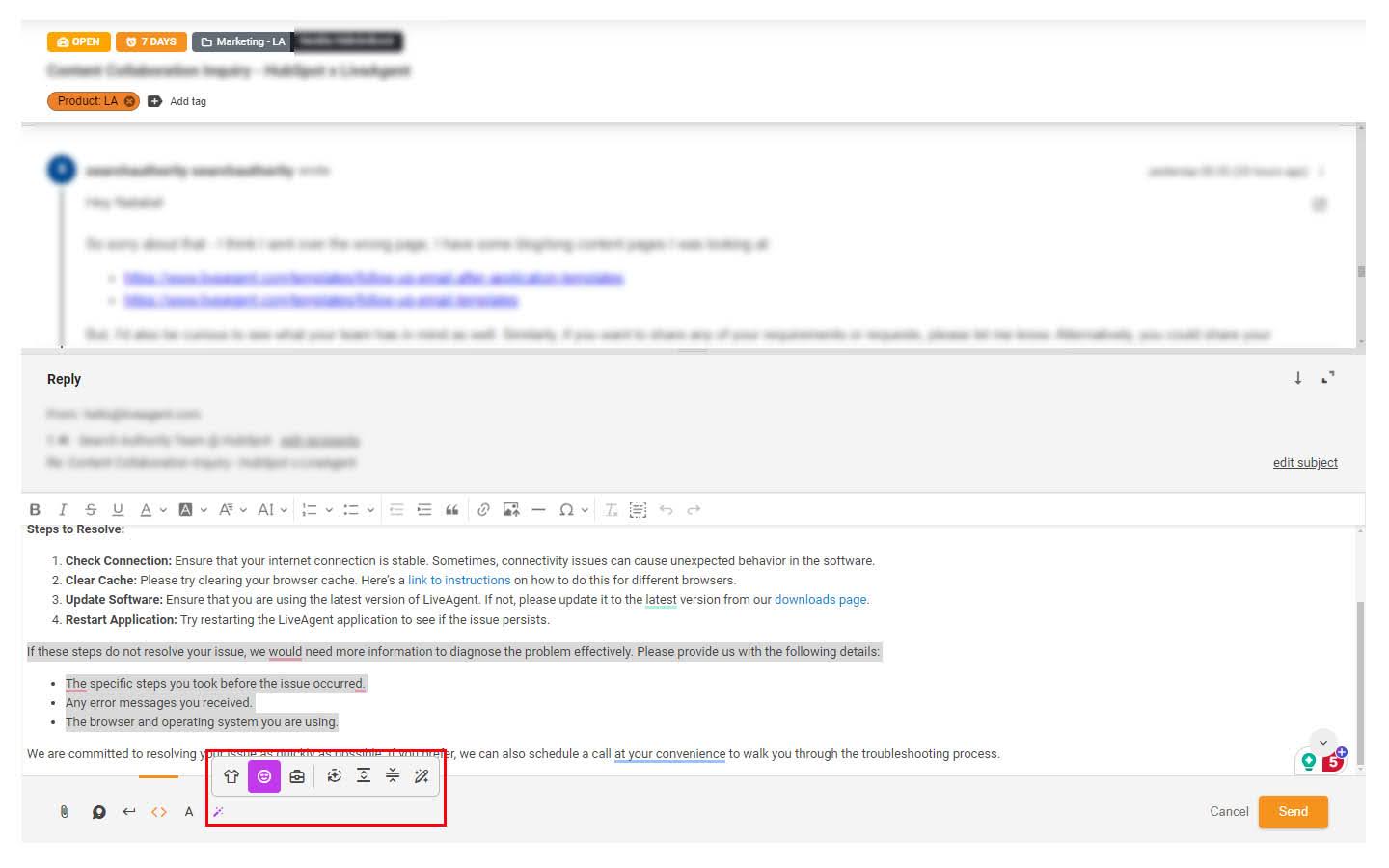
The AI Answer Assistant offers multiple options for optimal results. To adjust the formality of your messages, you can choose from three tone styles (casual, neutral, and business).
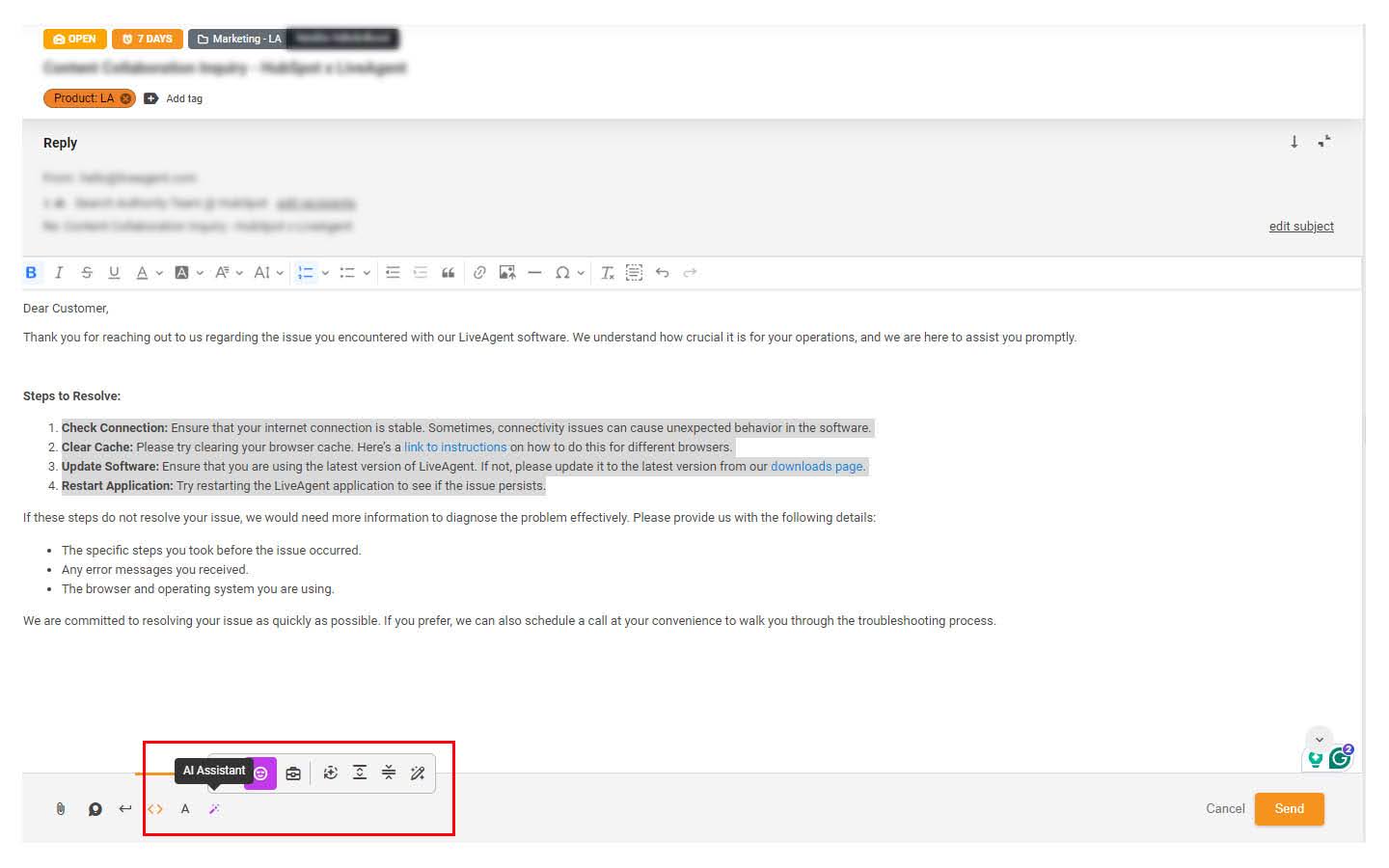
Additionally, we offer preset options for text enhancements: Improve, Extend, Simplify, and Custom Answer Assistant. The first three options are self-explanatory, but let’s examine the fourth one, Custom Answer Assistant.
LiveAgent does not charge any additional fees for setting up this feature. Usage is billed through FlowHunt’s credit-based pricing model, and the cost per ticket processed is generally low since each run involves a single, focused classification task. Your overall expenses will depend on ticket volume and the AI model selected. You can use this guide to estimate your AI costs.
The Custom Answer Assistant window lets you input your own commands and prompts to get tailored results. You can either type in your reply message or ask the AI Answer Assistant to draft one for you. You’ll see two windows: one for your custom prompt and another for the message you want to adjust.
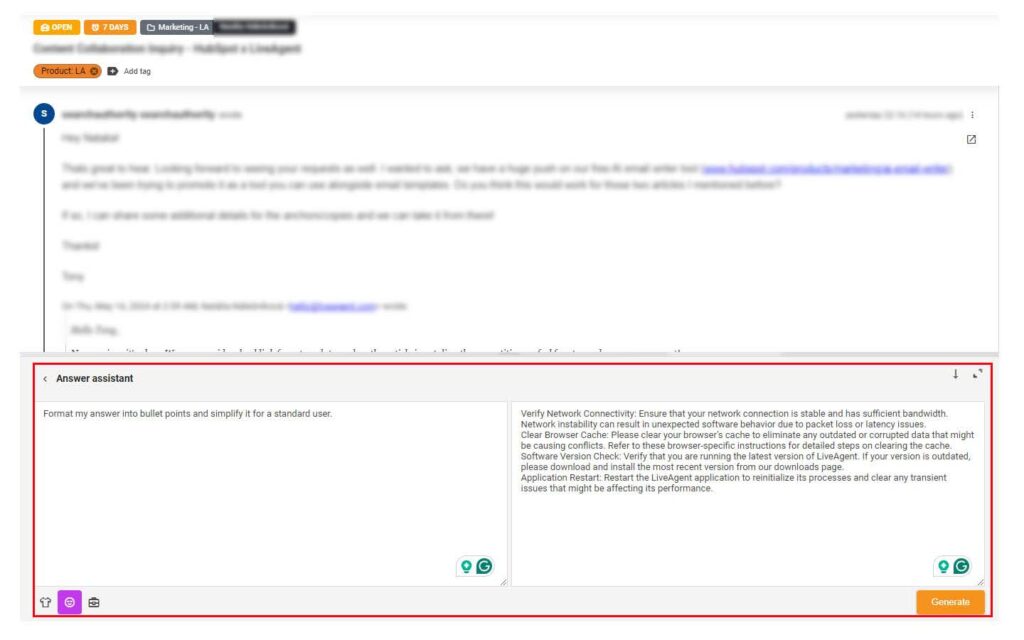
Use your creativity, and if you are unsatisfied with the outcome, simply click the “Try Again” button. You can also alter the formality of the message and make further edits using additional prompts or by selecting from the preset options.

The latest tips and deals delivered straight to your inbox.
To utilize the AI Answer Assistant feature, you must configure it with the OpenAI model. Note that this feature relies on your own OpenAI API key for full functionality. Below, you will find a step-by-step guide to getting started.
Navigate to Configuration > AI > Setup AI Provider. Currently, we support only the OpenAI provider. You’ll need to add an API key, which can be generated for free from your OpenAI account. You can also change the API key later.
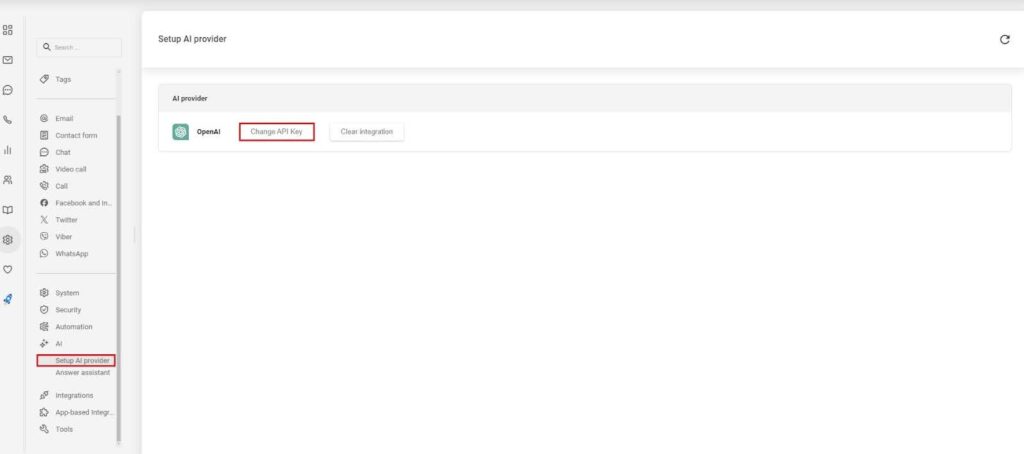
You can create your API key with a free account, but it’s essential to note that OpenAI offers five API usage tiers, each with different limits and requirements. Learn more about how to get the key below.
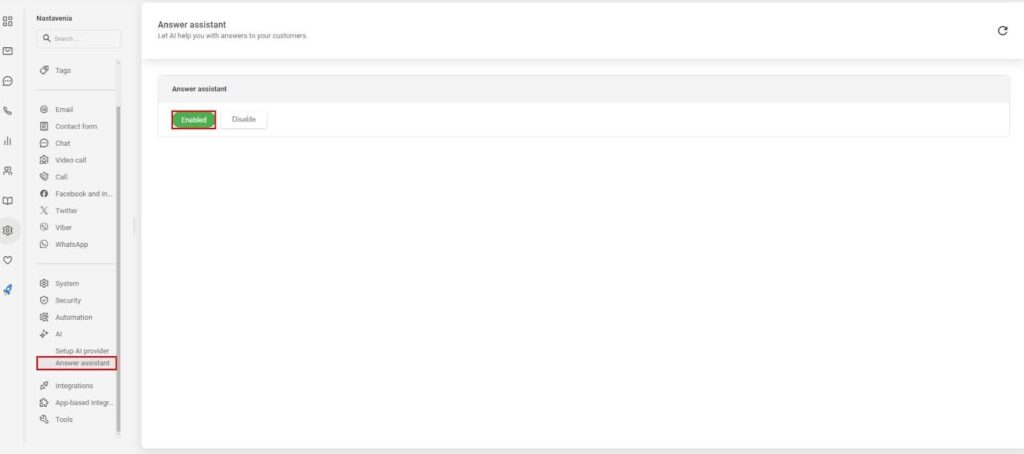
In LiveAgent’s settings, go to the AI section and enable the Answer Assistant option for your agents. Remember to reload LiveAgent to ensure proper functionality of the AI Answer Assistant.
Open a support ticket, and you should see a new AI Answer Assistant icon at the bottom of each ticket. Click on it to explore the available options. To use the preset options (Improve, Extend, Simplify, Custom Answer Assistant), highlight the text you want to apply the prompt to and select the desired option.
Businesses of all sizes working in many industries can use AI Answer Assistant to handle customer email queries. Whether you operate a large help desk with dozens of agents, or you’re a one-person operation, AI Answer Assistant can elevate your and your customer’s experience to the next level.
Usually with a tighter budget, small businesses, and startups often look for quality over quantity. That’s exactly where AI Answer Assistant plays an important role. High-quality AI-powered communication is a great option for all those who want to invest in a solution that doesn’t cost much but can hold its own.
A larger clientele means more strain on your customer service team. So why not help them out with an assistant that is ready whenever they need help and has answers within seconds?
When you operate a large company with heaps of customer inquiries every day, it costs a lot of time and money. Even though you may have highly qualified and well-trained staff, sometimes it’s just too much. AI Answer Assistant can take a load off your agents’ backs and provide quick and effortless service to your customers.
AI is on the rise in many different industries. Let’s look at the top reasons why you should implement AI-powered features like AI Answer Assistant today.
In today’s tech-fuelled age, customers expect nothing less than excellence when it comes to customer service. Quick and accurate responses with high levels of personalization are no longer optional luxuries. AI Answer Assistant can provide all of these very quickly and effectively, leading to strong customer relationships and a dedicated client base.
Did you know that, according to Kolsky, as much as 72% of customers share their positive brand experiences with 6 or more people? Building rapport with clients through outstanding customer service leads to repeat purchases, a continuous increase in paying customers, and overall, your increased bottom line.
AI-powered Answer Assistant offers a unique opportunity to quickly handle large volumes of customer interactions without additional costs.
As much as 61% of employees claim that AI helps to improve their productivity. If your agents don’t need to type out long, repetitive messages, they can focus on more demanding tasks.
Humans make mistakes, that’s a fact of life. Using AI Answer Assistant can help reduce and prevent human error from damaging your company’s reputation.
Most businesses experience peak hours, days, or even weeks when their shared inboxes are flooded with emails from customers. And hiring a new customer service team just for these occasions is not only costly but vastly inconvenient. AI can handle these increases in customer communications with ease.
If you’re worried about third parties getting hold of your customers’ information, LiveAgent got you covered. You can choose to provide OpenAI only with your external knowledge base to learn from. This way, the only customer data it receives is the question itself.
Although some don’t like it, AI is the future. So why not hop on the train early and stay ahead of the competition by providing faster response times, enhanced personalization, and an overall better user experience?
Are you ready to add a real wow-factor to your customer service? Don’t just take our word for it, give AI Answer Assistant a try!
Transform your customer support efficiency with LiveAgent's AI Autoresponder, an intelligent automation tool that delivers instant, personalized responses to in...
Empower your support with LiveAgent's AI Answer Improver—refine, extend, or simplify replies instantly. Start your free trial today!
LiveAgent's AI-powered chatbot automates customer interactions, improves response times, and reduces agent workload. Integrated with FlowHunt, it handles FAQs, ...