


Event Reminder Email Templates
Craft effective event reminder emails with best practices and customizable templates from LiveAgent. Keep attendees informed and engaged to ensure a successful ...
7 min read
LiveAgent
Email Templates
+1


Discover 18 ready-to-use reminder email templates and 7 expert tips to boost communication effectiveness. Learn when and how to send reminders, covering various scenarios like overdue payments, event notifications, and more.
Did you know that on average, an office worker receives over 120 emails per day, while the average open rate is only 16.97%? With so much information flooding our inboxes, it’s no wonder that sometimes important messages can get unnoticed or forgotten. That’s why we want to show you how to write an effective reminder email that will grab the attention of the receiver. Whether you are trying to follow up on a meeting, inform colleagues about an upcoming event, or remind your clients about their overdue payment. These templates and tips will help you craft the perfect reminder message that gets the response you need.
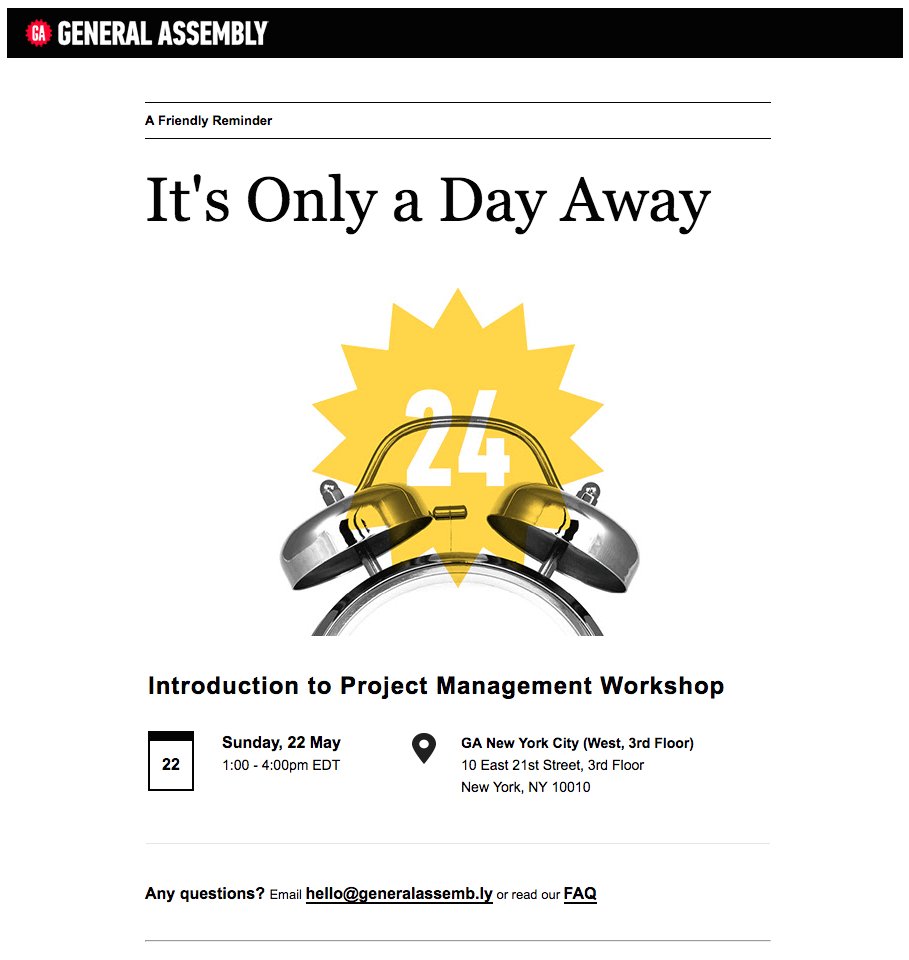
A business reminder email is a powerful tool for marketers that reminds the recipient of something important that is coming up, something that is expected of them, or should have happened but didn’t. Here are some scenarios in which sending a nice reminder email can benefit your business:
We are daily bombarded with information from all directions. Therefore, sending friendly email reminders has become essential in ensuring that important messages are not overlooked or lost. For example, the statistics show that if you send a webinar reminder 1 hour before the webinar, you will receive a 138.41% open rate and a 64.41% click-through rate. But, if you send the reminder at the time the webinar starts, you will get a 108.01% open rate and a 39.26% click-through rate.
By understanding the importance of these reminder messages and using them strategically, you can enhance your communication skills and improve the effectiveness of your message.

Determining the best time to send an email reminder can greatly impact its effectiveness. While there is no one-size-fits-all answer, some general guidelines can help you choose the optimal timing. Here are some general rules based on the purpose of the reminder email:
Emails regarding an upcoming meeting should be sent 1-2 days ahead of time to give people some time to prepare questions or any issues they want to address. When it comes to emails about upcoming events, they should be sent 3 to 14 days before the event. You can also send multiple reminders leading up to the event in order to build enthusiasm. Past-due payment emails can be sent one day after the due date. This is a great time to remind people and show them that you’re waiting for them to take action.
However, when sending these emails, consider the following:
Consider the nature of the reminder: The timing should be based on urgency or importance of the message. For example, if you’re reminding someone about an upcoming meeting, sending a quick reminder a day or two in advance is usually sufficient. On the other hand, if you’re reminding customers about an expiring trial, it’s best to send the reminder a few days before the expiration date to give them enough time to take action.
Avoid sending reminders last-minute: While it may seem tempting to send a reminder right before the deadline or event, this can backfire in many cases. People are often focused on other tasks, which means that your reminder may be easily overlooked.
Think about time zones: If you’re dealing with recipients in different time zones, consider sending the reminder during their business hours to increase the likelihood of it being seen promptly.
Look at the data: Look at your past reminders to identify trends. For example, you might notice that sending a reminder on a Tuesday morning consistently improves higher response rates. Use these insights as a starting point to create your timing strategy.
Here are some gentle reminder email examples you can use in various scenarios:
This is a friendly reminder sample that can be used in multiple different scenarios:
Reminder email subject lines:
Hi [Name],
I hope this email finds you well. I wanted to reach out to remind you about [mention the subject/topic]. As the deadline [or event/appointment] is quickly approaching, I wanted to make sure that it stays on your radar, and doesn’t slip through the cracks. To ensure a smooth process and avoid any last-minute rush, I kindly request that you take a moment to review the details [provide any necessary information or attachments].
If you have any questions, please feel free to reach out to me directly. Your prompt attention to this matter is greatly appreciated.
Thank you for your time and cooperation. I look forward to [desired outcome or next steps].
Best regards, [YOUR SIGNATURE] [Your contact information]
If you don’t know how to remind someone politely regarding an upcoming meeting, you can use this template:
Reminder email subject lines:
Hi [Name],
I want to give you a quick heads up about our upcoming meeting scheduled for [Date] at [Time]. I am excited about the opportunity for us to [Purpose of the meeting].
Here are the key details for your reference: – Date: [Date] – Meeting time: [Time] – Location/Venue: [Location] – Meeting agenda: [Briefly mention the topics that will be discussed]
Please take a moment to review any materials or prepare any questions you may have. Your input and participation in the meeting are crucial to its success.
If you have any questions or need further information, please feel free to reach out to me. Otherwise, I look forward to seeing you at the meeting.
Thank you, [YOUR SIGNATURE] [Your contact information]
Reminder email subject lines:
Dear [Boss/Manager’s name],
I hope this email finds you well. I wanted to bring your attention back to an important matter that we discussed previously regarding [briefly explain the topic]. As the deadline [or next steps] approaches, I wanted to give you a kind reminder and provide a progress update. Since our last conversation, I have been working on [briefly describe progress made]. However, there are a few points that require your attention. It is important that we take action promptly to ensure [desired outcome or goal].
To provide a quick recap, here are the key points of the matter: – [Summarize the project or issue] – [Mention any important deadlines/milestones]
I would like to request your input, approval, or further guidance at this stage in order to move forward successfully.
If you have any questions, need further information, or would like to discuss this matter further, please let me know.
Thank you for your attention to this matter.
Best regards, [YOUR SIGNATURE] [Your contact information]
Reminder email subject lines:
Hello team,
We wanted to take a moment to recognize and celebrate the significant milestones you have achieved in your journey with [Company Name]. Each milestone represents a stepping stone towards your personal and professional success, and we want to acknowledge and honor your achievements along the way. To express our gratitude for your commitment and dedication, we have rewards and benefits in store for you as you reach specific milestones. These rewards may include [name the rewards/benefits].
Keep up the great work, stay motivated and focused on progressing through the milestones. By doing so, you not only demonstrate your capabilities but also contribute to the overall success of our organization. We look forward to celebrating many more milestones along your journey with us.
Thanks! [YOUR SIGNATURE]
This is a gentle reminder message example that can be used to ask your customers for their feedback/experience:
Reminder email subject lines:
Hello [Name],
Your opinion matters to us, and we want to ensure that your voice is heard. We would greatly appreciate your feedback on [Specific topic/experience]. Your input helps us understand how we can improve our products/services to better meet your needs. We understand that life gets busy, and providing feedback may slip your mind. That’s why we wanted to send you a follow-up email reminder to take a few minutes and share your thoughts with us. To provide your feedback, please click on the following link [Link to the feedback survey]. Your responses will remain confidential, and we appreciate your honesty and suggestions.
If you have any questions or encounter any issues, please feel free to reach out to our customer support team [provide contact information]. We are here to assist you.
Thank you for supporting us. We truly appreciate your feedback and look forward to hearing from you soon.
Best regards, [YOUR SIGNATURE] [Your contact information]
Reminder email subject lines:
Hey [Name],
As a valued customer, we want to make sure you don’t miss out on our special promotion and give you the opportunity to take advantage of the amazing savings and benefits it offers. But time is running out, and the promotion is ending soon. Here are the key details of the promotion:
– Promotion name: [Insert name] – Promotion period: [Start Date] – [End Date] – Promotion details: [Briefly mention the benefits offered in the promotion]
This promotion is our way of showing our appreciation for your continued support. We want to provide you with the best value for your money and make your experience with us even more rewarding.
Simply visit our website [Website link] or contact our sales team [Contact information]. They will be happy to assist you and answer any questions you may have.
Thank you, [YOUR SIGNATURE]
Reminder email subject lines:
Hello [Name],
I wanted to send a gentle reminder email about the upcoming deadlines and milestones for our highly anticipated product launch. It’s important that we stay on track to ensure a successful launch. Here’s a quick recap of the key dates and tasks that require your attention:
It’s important that everyone involved completes these tasks by the stated deadlines to keep the project moving forward smoothly. Together, we can increase our chances of a successful product launch.
If you have any questions or concerns about any of the tasks or deadlines, please do not hesitate to reach out to the project manager or the team responsible.
Thank you for your dedication and efforts. Let’s make this launch a memorable one!
Best regards, [YOUR SIGNATURE] [Your contact information]
Reminder email subject lines:
Dear [Customer’s Name],
We hope that you are enjoying the benefits of being a member of our loyalty program. We wanted to give you a friendly reminder to check your loyalty points and ensure you are taking full advantage of the rewards available to you.
At [Company name], we want to make sure you get the most out of your membership. Here are a few reasons why it’s worth checking your loyalty points balance:
To check your loyalty points balance and explore the available rewards, simply log in to your account. If you have any questions or need assistance, our customer support team is here to help [provide contact information].
Thank you for your continued loyalty and being a part of our loyalty program.
Enjoy! [YOUR SIGNATURE]
This reminder message example can be used to help someone remember an upcoming event:
Reminder email subject lines:
Hey [Name],
We are less than two weeks away from the [Event Name] event where we’ll be talking about how to [achieve specific goals] as well as the latest trends in [industry].
We wanted to remind you that [Event Name] ticket prices go up on [date]. Be sure to grab your ticket before the price increases. After [date] tickets will increase to [price], so don’t miss out!
Register Today
Some of our speakers: [Speaker 1 – short bio] [Speaker 2 – short bio] [Speaker 3 – short bio]
Event schedule: [Event schedule details]
You can find more information on our event page. If you have any questions, please feel free to reach out.
Hope to see you there! [YOUR SIGNATURE]
Reminder email subject lines:
Hello [Name],
As I haven’t heard back from you, I wanted to follow up on my previous message regarding [topic/project]. I understand that things can get busy, and messages may get overlooked. However, I wanted to send a gentle reminder email for no response, just to make sure that my previous email reached you and hasn’t been lost in the shuffle.
If you could kindly confirm that you have received my previous message or provide a quick update on the status of [topic/project], I would greatly appreciate it. Your response will help me determine the next steps and ensure that we can move forward.
In case you missed my earlier email, I have attached a copy [attach previous email or relevant documents if applicable]. Please review it and let me know your thoughts or any updates you may have.
If you need any additional details or clarifications, please don’t hesitate to reach out.
I look forward to hearing from you soon.
Best regards, [YOUR SIGNATURE]
Note: To read more about follow-up emails and find additional email templates for various situations, you can take a look at our separate article on follow-up emails after no response.
Reminder email subject lines:
Hello [Name],
I am sending you a quick reminder regarding the action that needs to be taken regarding [specific task or request]. As a valued [client/customer/colleague], your involvement is important to ensure the smooth progress of [project/task].
We understand that life gets busy, but we kindly request your immediate attention to this matter to prevent any further delays.
If you require any clarification or additional information, please do not hesitate to reach out to us. Our team is available to assist you and provide any guidance or support you may need.
Thank you for your understanding and prompt action. We look forward to hearing from you soon.
Best regards, [YOUR SIGNATURE] [Your contact information]
Reminder email subject lines:
Hi [Name],
Hope things are going well for you. This is just a quick payment reminder that the invoice [invoice number] which we sent on [date] will be coming due on [invoice due date].
I’m sure you’re busy, but I’d appreciate if you could take a moment and look over the invoice when you get a chance. I’m happy to answer any questions you might have. Thanks again for your business!
Sincerely, [YOUR SIGNATURE] [Your contact information]
Reminder email subject lines:
Hi [Name],
Our records show that we haven’t yet received a payment of [amount] for Invoice [invoice number], which is overdue by one week. I would appreciate it if you could check this out on your end. I know that all of us often have busy lives, and details can be missed. I’ve attached a copy of the invoice to this email, in case the original was lost or deleted.
If the payment has already been sent, please disregard this message. If you have any questions regarding this invoice or payment details, please reply to this email and I’d be happy to answer them.
Thanks, [YOUR SIGNATURE] [Your contact information]
Reminder email subject lines:
Hi [Name],
We tried to charge your credit card for your subscription renewal at [Product], however, it failed.
This typically happens due to a change in your credit card number, card expiration, card cancellation, or the bank not recognizing the payment and taking action to prevent it.
To ensure you don’t experience any interruption of your service, please update your credit card details, and we’ll give it another try. You should be able to do it in less than a minute by clicking here: [link to the update page].
If you have any questions, concerns, or issues, please visit our Help Center, call us at [number], or start a chat with our customer support team. We’re here to help!
As always, thanks for being a [Company] customer.
Best, [YOUR SIGNATURE]
Reminder email subject lines:
Hello [Name],
We wanted to give you a heads up. The payment information you have on file for your [Product] subscription (card ending with ****) is going to expire in a few days. Unfortunately, if we don’t have a valid card, we will have to cancel your subscription when this payment cycle ends.
If you’ve got 30 seconds, would you mind updating your payment information?
Let us know if you have any questions or if there’s anything we can do to help.
Thanks so much! [YOUR SIGNATURE]
Reminder email subject lines:
Hi [Name],
Time flies! Can you believe that your [Product] trial is almost coming to an end?
You still have 3 days to get up to speed with all the awesome things you can do with [Product] like:
[Benefit 1 using feature 1] [Benefit 2 using feature 2] [Benefit 3 using feature 3]
If you’re ready, you can navigate to the Plans page to select a subscription that best suits your needs. Our plans start at [price], and you can change your plan at any time.
You’ll also get access to our rockstar customer support team who can guide you through any challenge and recommend best practices for getting the most value out of our [tool/ platform/ software].
Choose My Plan
Still evaluating and could use a hand before your trial is up? Let us know – we’re here to help!
Best, [YOUR SIGNATURE]
Reminder email subject lines:
Hi [Name],
It looks like you haven’t signed into your [Product] account for a while. Just a friendly heads up that [Product] accounts are automatically deactivated after [number] days of inactivity.
We’d love for you to stick around. To keep your account open, please log in at least once by [date].
[SIGN IN]
As a reminder, with [Product] you can:
[Use feature 1 – benefit 1] [Use feature 2 – benefit 2] [Use feature 3 – benefit 3]
In case you need a refresher course – check out our tour to get you up and running again.
If you have any questions or need any help, reply to this email or jump on a live chat with our customer care team. We’ve got your back!
Cheers, [YOUR SIGNATURE]
Reminder email subject lines:
Hello [Name],
We wanted to reach out with a friendly reminder regarding the cancellation of your account with us. Your account will be permanently closed in [number of days/remaining time]. After that, all your data and access to our services will be lost. We also wanted to take a moment to highlight the numerous benefits you will be missing out on by canceling your account. With an active account, you will continue to enjoy:
– [Benefit 1] – [Benefit 2] – [Benefit 3]
If there is anything we can do to address any dissatisfaction or improve your experience, please don’t hesitate to reach out. We strive to provide the best experience possible and we are here to help find a solution that meets your needs. If you would like to reactivate your account and take advantage of all the benefits, simply click the button below: [Reactivate account link]
If you have any questions or need assistance, feel free to contact our support team via our live chat, phone, or email [provide contact details].
Thank you for being a valued customer.
[YOUR SIGNATURE]
Do’s
Don’ts
Do’s
Don’ts
Do’s
Don’ts
Do’s
Don’ts
Do’s
Don’ts
Do’s
Don’ts
Do’s
Don’ts
The goal is to send a polite reminder email that is effective in prompting a response. Start by referencing your previous email and kindly state that you haven't received a response yet. Politely repeat the purpose of your initial message and the action you are seeking. Offer any additional information if necessary, and express your continued interest in hearing from them. Don't forget to thank them for their attention and consideration at the end.
The number of reminder emails depends on several factors. In general, sending one or two strategically timed reminder emails is typically sufficient. However, it's essential to measure the recipient's response and adjust it accordingly. Be mindful not to overwhelm the recipient with too many reminders, as it can lead to annoyance or be perceived as spam.
Instead of using the phrase 'gentle reminder,' you can try alternative phrases, such as 'friendly reminder,' 'kindly remember,' 'a quick note to remind you,' or 'just a heads up.' These variations maintain a polite and approachable tone while providing a reminder in a slightly different way.
To be able to send a personalized email, you need to understand your target audience. Start by addressing the recipient by name and referencing any specific details related to their previous engagement. Tailor the tone of voice and language to match their communication style. Segment your audience based on their preferences/behavior, and create content that speaks directly to their interests.
Tracking the effectiveness of reminder emails can be done by monitoring various metrics, such as open and click-through rates, response rates or conversion rates. Additionally, keeping an eye on any increase in overall engagement, such as inquiries or conversions, can indicate the effectiveness of your reminder emails. Use analytics tools or email marketing platforms to gather this data and analyze the results to further optimize your strategy.
LiveAgent is the most reviewed and #1 helpdesk software for small to medium-sized businesses. Try it today with our free 30-day trial. No credit card required.
Craft effective event reminder emails with best practices and customizable templates from LiveAgent. Keep attendees informed and engaged to ensure a successful ...

Explore invitation email templates on LiveAgent to effectively promote your customer portal. Discover subject line ideas, templates, and tips to engage clients ...
Discover 10 renewal email templates designed to retain customers and boost loyalty for subscription-based businesses. These templates help craft effective campa...
Join our community of happy clients and provide excellent customer support with LiveAgent.
