



Integrate WhatsApp with LiveAgent for efficient customer service, improving response time and gaining a competitive edge. Easily manage WhatsApp messages via th...
3 min read



Connect your Telegram bot to LiveAgent and manage customer conversations directly from your help desk. Turn Telegram messages into support tickets and deliver fast, organized customer service.
Telegram is a cloud-based messaging platform with over 900 million users worldwide, available on Android, iOS, Windows, macOS, and Linux. Known for its speed, security, and powerful bot capabilities, Telegram offers instant messaging, voice and video calls, file sharing, and broadcast channels.
Delivering professional customer service through Telegram becomes straightforward when you have the right infrastructure. LiveAgent makes it possible.
When you connect your Telegram bot to LiveAgent, every message sent to your bot automatically creates a support ticket in your Universal inbox. Your team gets instant notifications and can respond directly from the LiveAgent dashboard—no app switching required.
This setup eliminates the need to constantly check Telegram on multiple devices while keeping every conversation organized and accessible to your entire support team.
The Telegram integration for LiveAgent unlocks powerful support capabilities:
Automatic ticket creation: Every message sent to your Telegram bot becomes a trackable support ticket in LiveAgent. No manual data entry, no missed messages—just seamless conversion from chat to ticket.
Dashboard-based responses: Your team can handle all Telegram conversations without ever opening the Telegram app. Customers message your bot, agents reply from LiveAgent, and responses appear instantly in the customer’s Telegram chat.
Complete conversation history: Access and search through all past Telegram interactions from your LiveAgent panel. Tag conversations, add internal notes, and maintain organized records without scrolling through endless chat histories on your phone.
Integrating Telegram into LiveAgent is a simple way to let your customers reach you via Telegram. The only thing you need is to create a Telegram bot account and connect it to LiveAgent. We are going to show you how to do that step by step.
Note: It’s required to create a Telegram bot because regular Telegram accounts with linked phone numbers cannot be integrated.
To create a Telegram bot and get an API token for connecting it to LiveAgent, it is required to contact @BotFather bot on Telegram. For a detailed step-by-step guide, please refer to our knowledge base article .
See also the General Bot Platform Overview and Detailed Guide to Bot Features Telegram articles for more information about bots.
After creating a new bot, BotFather will provide an API token that is required for integration. This token will be visible in the BotFather’s confirmation message.
Go to your LiveAgent panel → navigate to Configuration → Telegram → Telegram accounts → click on the “Add bot” button.
Note:
If you can’t find the Telegram accounts section, ensure that the integration is enabled in Configuration → Telegram.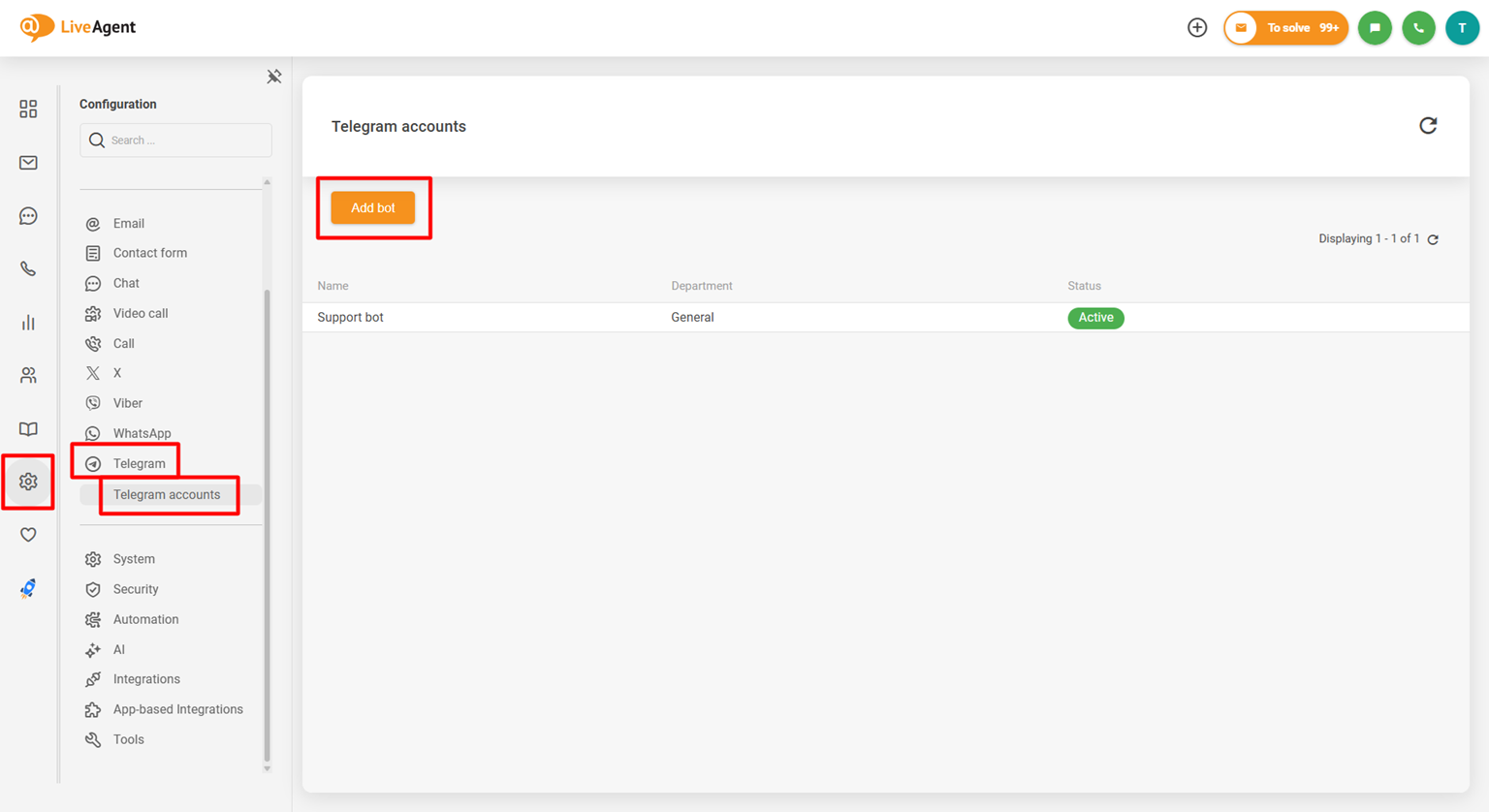
Select the department to which your Telegram messages should be fetched → click “Save”.
Tip:
The API token can be found in the BotFather’s confirmation message about new bot creation. Alternatively, you can retrieve the API token of your bot by sending the /mybots command to the BotFather, select the desired bot, and click “API token”.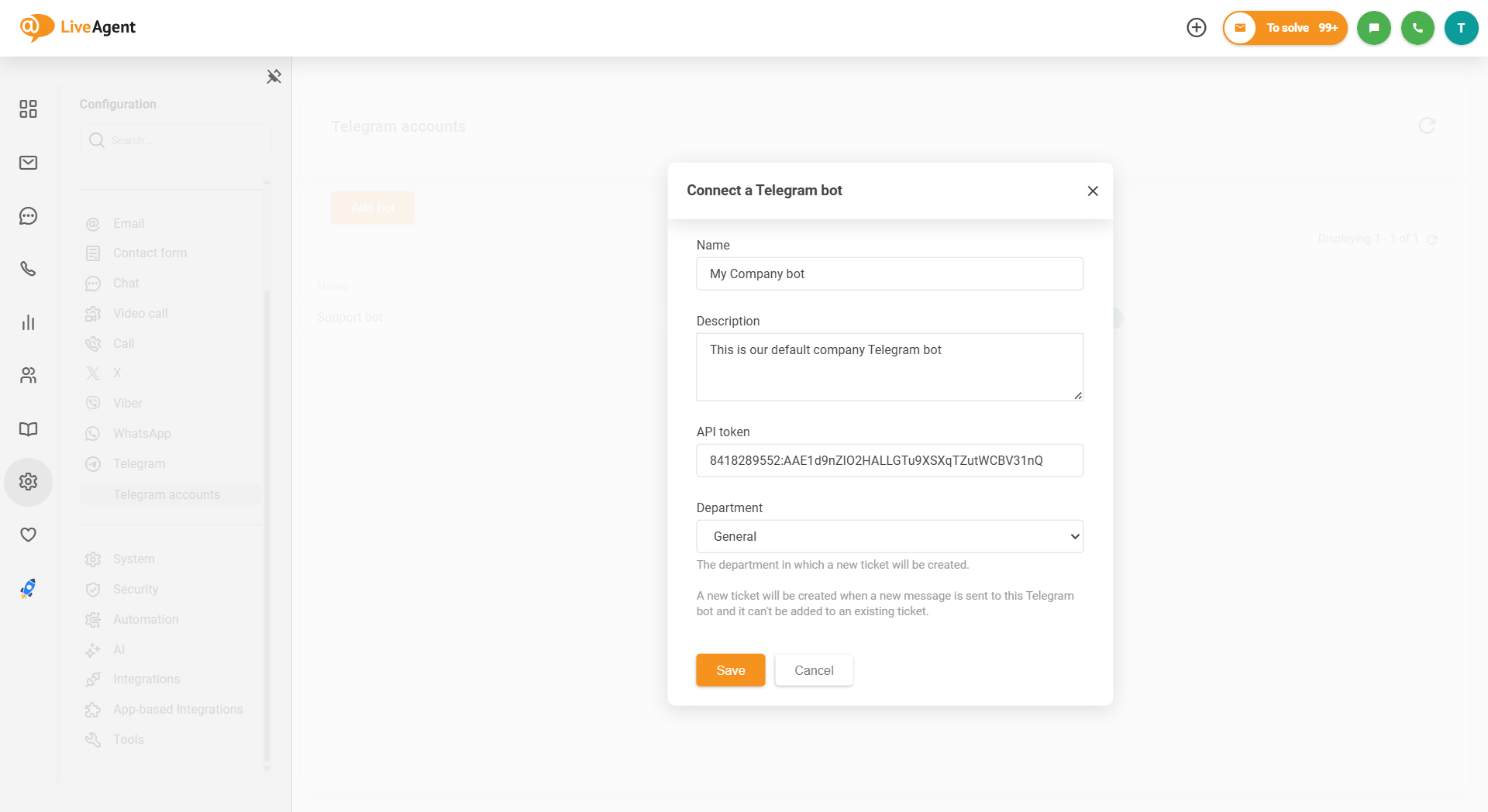
Note:
In order to allow your customers to contact you via Telegram, add a link or a button that opens your Telegram bot on your website. It is not possible for them to contact you through a regular Telegram account. Only the messages sent through the Bot will be fetched to LiveAgent.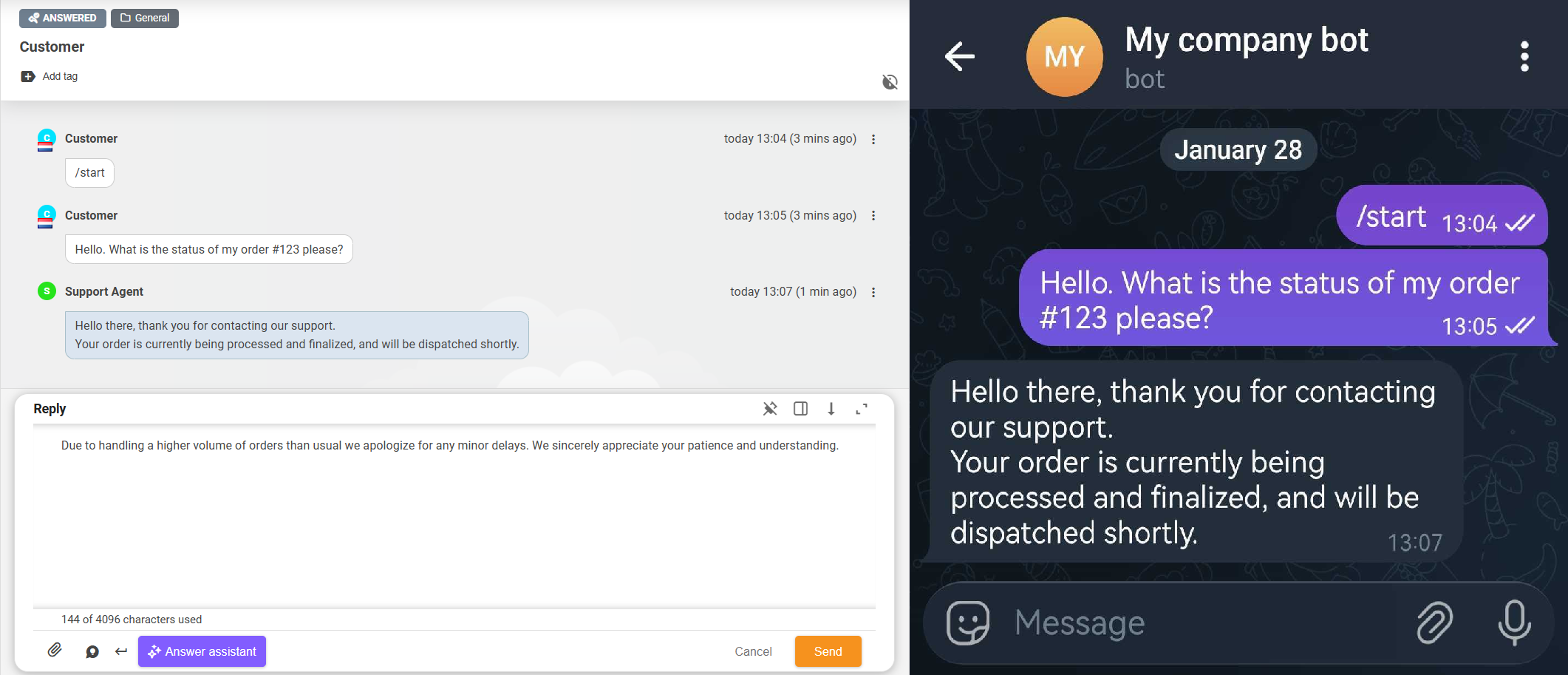
To enable your customers to contact you via Telegram, add a link or a button that opens your Telegram bot in the app on your website. To do this, use a link to https://t.me/{BotUsername}. Do not forget to replace the {BotUsername} with the username of your bot which you set during creation of the bot, e.g. https://t.me/MyCompanyBot.
Basic example:
<a href="https://t.me/MyCompanyBot">Contact us via Telegram</a>
Alternatively, customers can also find your bot by searching for its username, e.g. @MyCompanyBot, in the Telegram app.
If you need more detailed information, you can check out our detailed guide on How to create a Telegram bot .
Let’s take a look at some of the benefits LiveAgent and Telegram integration can bring to your business.
Reach customers where they are: With over 900 million active users worldwide, Telegram is one of the fastest-growing messaging platforms. By integrating it with LiveAgent, you can meet your customers on their preferred communication channel without adding complexity to your workflow.
Leverage Telegram’s unique features: Telegram users value privacy and security. By offering support through their trusted messaging app, you build confidence and make it easier for customers to reach out, especially in regions where Telegram is the dominant messaging platform.
Centralized bot management: Managing a Telegram bot becomes effortless when all conversations flow directly into your Universal inbox. No need to switch between the Telegram app and your support desk - everything happens in one place.
Better team collaboration: Multiple agents can handle Telegram conversations simultaneously without confusion. Internal notes, ticket assignments, and collaboration features ensure seamless handoffs and consistent support quality.
Data-driven decisions: Track metrics specific to your Telegram channel - response times, resolution rates, and agent performance. Use these insights to optimize your Telegram support strategy and improve outcomes.
No device dependency: Your support team doesn’t need personal Telegram accounts or dedicated devices. Everything is managed through LiveAgent’s secure platform, making it easy to onboard new agents and maintain business continuity.
Telegram is a popular cloud-based messaging app with over 900 million users globally. It is a popular platform for communication, both for personal and business purposes, offering features such as voice and video calls, messaging, file sharing, and channels for broadcasting to unlimited audiences.
Thanks to the integration, you can centralize all your Telegram messages and inquiries in the LiveAgent dashboard, allowing agents to quickly and efficiently respond to customer inquiries without switching platforms. Additionally, features such as real-time notifications and automation tools ensure that agents can promptly address and prioritize messages, leading to improved response times and enhanced customer satisfaction.
It allows you to expand your customer reach and engage with a wider audience on a popular messaging platform. The integration also streamlines your customer support process by centralizing messages and inquiries in one dashboard, enabling efficient management and prompt responses, ultimately enhancing customer satisfaction and loyalty.
Yes, you need to create a Telegram bot account. Regular Telegram accounts with linked phone numbers cannot be integrated. Creating a bot is simple and free through Telegram's BotFather.
Yes, multiple agents can handle Telegram conversations simultaneously through LiveAgent without confusion. Internal notes, ticket assignments, and collaboration features ensure seamless handoffs and consistent support quality across your team.
No problem! LiveAgent offers a 30-day free trial where you can test the free Telegram integration!
Integrate WhatsApp with LiveAgent for efficient customer service, improving response time and gaining a competitive edge. Easily manage WhatsApp messages via th...
Expanding reach with Telegram integration LiveAgent is about to roll out an integration with Telegram, one of the world’s most popular messaging platforms...
Discover LiveAgent's February 2026 updates featuring Telegram integration, enhanced AI Answer assistant, and targeted UI/UX improvements for smoother workflows.
Join our community of happy clients and provide excellent customer support with LiveAgent.
