



hMailServer
hMailServer is an open-source email server for Windows offering spam and virus protection. Integrate it with LiveAgent for efficient customer support and seamle...
4 min read



Progress IMail Server is a versatile email system offering low maintenance and enhanced security. Integrate with LiveAgent for advanced ticketing features, boosting customer support efficiency. Ideal for businesses, educational, and government use.
Progress IMail server makes a reliable and versatile email messaging system that can be easily set up and maintained. It makes a great business email system, and it’s also used by educational and government organizations. Progress IMail provides low maintenance while providing an easy and high-value way of communication. It’s used by over a million users worldwide and protects their communication with antivirus protection and enhanced security.
If your business requires a reliable and easily maintainable email server, the Progress IMail server is the right choice. It’s also highly affordable so it won’t ruin your company budget. Progress IMail server allows sharing one domain amongst 10 users with the free starter edition. If you want to improve your email support and handle a larger volume of customer issues, it’s a great idea to connect your Progress IMail server with the LiveAgent help desk system.
LiveAgent can support help desks running Progress IMail server with its advanced ticketing system. This can help customer support agents handle larger numbers of customer requests, increase efficiency and provide better quality support. All customer communication is converted into tickets that can be filtered, organized, and tagged as needed by each individual agent. There are also plenty of more ticketing features that make the job easier for everyone.
Besides filtering and organizing, ticketing features include time rules, responsibility, and departments to help agents get through the everyday nuances of the jobs efficiently. Manage contacts or agent profiles to create an efficient company, or set up business hours along with pause breaks to keep the work-life balance steady. When you feel ready, let agents collect badges thanks to gamification features that can make the job more entertaining.
Another benefit is that LiveAgent connects with other communication channels as well. Creating a live chat widget for your website, setting up an effective call center, and creating informative articles for your customer portal all help to improve customer satisfaction. Make use of your social media channels – Facebook, Twitter, Instagram, and even Viber, and reach customers right where they spend their time.
LiveAgent can easily connect with the Progress IMail Server via IMAP/POP3. The process can be easily handled in LiveAgent settings, and it takes just a few minutes to complete it. Find out how to connect your email account with the LiveAgent ticketing system below.
If you do not have an account for Progress IMail Server email set up yet, go to their website and download everything you need. Once you set it up, continue with the next steps which explain the configuration process.
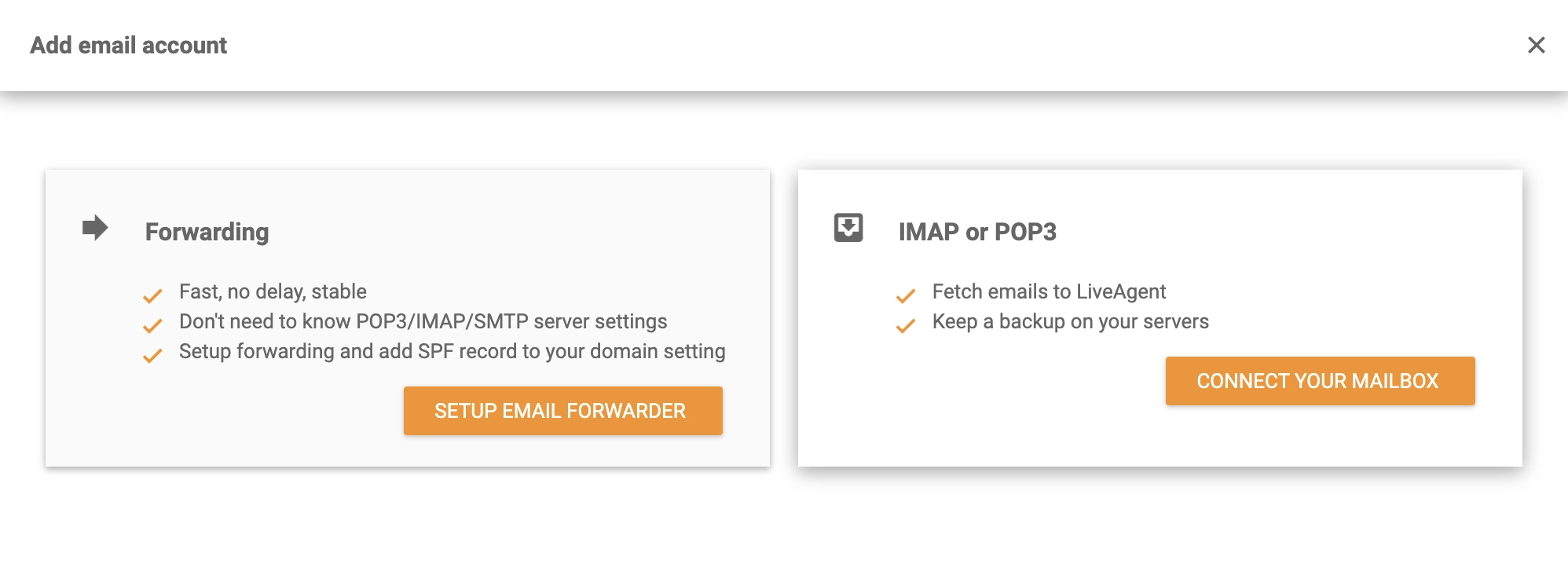
When Progress IMail Server has been configured and is ready for use, open LiveAgent Configuration > Email > Mail Accounts. Tap the orange Create button and select Other. Then select IMAP/POP3.
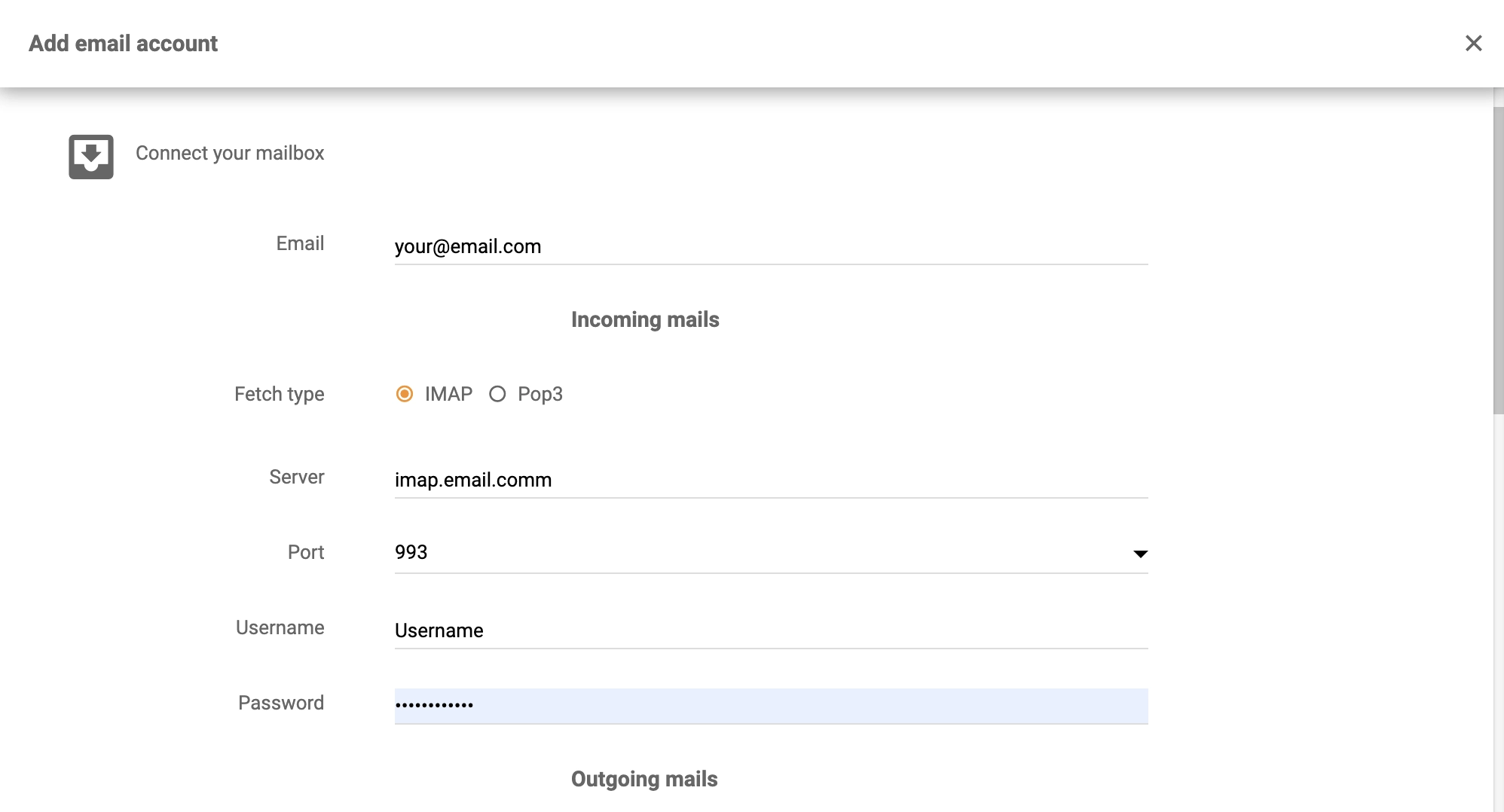
Now you just need to enter your details – email, username, password, which fetching method you want, and what server and port you need. Furthermore, you can select the department the tickets from this email should be sent to, and an authentication method. Click on Save to complete the process.
You’re done and your ticketing system will now fetch all customer emails from the Progress IMail server. Make sure to check them regularly, respond and solve customer issues. Have a look at the tour video below to see more of LiveAgent capabilities, or browse through features and Academy articles to learn more about using help desk software.

No problem! LiveAgent offers a 30-day free trial where you can test the free Progress IMail Server integration!
hMailServer is an open-source email server for Windows offering spam and virus protection. Integrate it with LiveAgent for efficient customer support and seamle...
Integrate Sendmail with LiveAgent for secure, efficient email routing and enhanced customer support. This open-source solution supports various mail-transfer me...
CommuniGate Pro is a carrier-grade unified communications server with flexible email handling, advanced SPAM and antivirus protection. Seamlessly integrate with...
Join our community of happy clients and provide excellent customer support with LiveAgent.
