



Sinch
Sinch offers global VoIP solutions, including voice, video, SMS, and API integration for diverse industries. Easily integrate Sinch with LiveAgent to manage mul...
4 min read



Integrate Office Maker with LiveAgent for seamless call management, low-cost SIP Trunk offers, and enhanced customer support.
Office Maker is a Local Digital Services Operator for Voice, Internet, and Cloud solutions. Through innovative technologies and comprehensive solutions, Office Maker meets the main expectations of organizations wishing to have a single point of contact to manage telephony, internet, cloud, and computer security.
Make and receive your calls in LiveAgent with Office Maker’s simple and economical SIP Trunk offer, fully controllable online from your customer interface. Activate your phone lines and select your numbers in a few clicks through their online tool and keep complete control of your telephony.
The SIP Trunk is subscribed according to the number of outgoing calls desired. For each outgoing call subscribed, Office Maker offers you an incoming call.
Example: If you take 15 SIP Trunks, you can make up to 15 simultaneous outgoing calls (if there are no more than 15 incoming calls at the same time), and receive up to 30 simultaneous incoming calls (if there are no outgoing calls at the same time).
Order your line here: https://officemaker.fr/telephonie-sur-ip/trunk-sip/
If you’re looking for a VoIP provider to connect with your LiveAgent call center , Office Maker is a great choice. LiveAgent’s call center will handle your calls and tickets, while Office Maker will provide the rest. Laptop or smartphone microphones and speakers are everything you need to establish a starter call center. You might require other hardware if you want to improve your call quality later on.
Even though some people prefer digital customer experiences, others crave a deeper personal connection with the brands they interact with. Call centers are a great way to improve your customer relationships, sell products, gain new customers and service users, or provide general customer services. With the fall of traditional call centers and the rise of call center software like LiveAgent, it’s easy to provide these types of experiences for your customers without breaking the bank. Call centers are now accessible to all types of businesses, big or small.
LiveAgent makes managing and running a call center easier for businesses with the help of its advanced features. For example, you can create custom IVR (Interactive Voice Response) trees , that will automatically route your customers to the right departments and agents. The best part? LiveAgent’s IVR feature does all the work and creates a hassle-free experience for your customers. All they have to do is listen to the IVR menu, and press the appropriate dial pad key (like press 1 for sales) to be connected with the right person for the job.
Did your customer connect to the wrong department by accident? The solution is simple, use call transfers to route the customer to one of your colleagues and save their time. Have a hard time remembering what your customers said? No worries, LiveAgent records all incoming and outgoing calls and stores them inside the system. If you need to refresh your memory, simply locate the ticket and listen to the full call recording. Call recording can also be used for training new agents and showing them the correct responses to customer calls.
Want more information about our call center’s features? Check out our Call Center feature page that has all the information about LiveAgent’s call center capabilities.
If you want to create your LiveAgent call center with Office Maker as your VoIP provider, follow this simple guide:
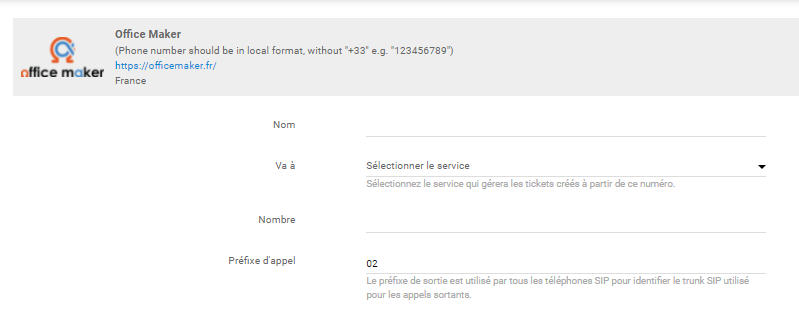
Open LiveAgent and go to Configuration > Call > Numbers. Click on the orange Create button at the top.
Select Office Maker from the list of VoIP providers.
Are you looking for more information about establishing and running a call center? If you’re interested, have a look at the LiveAgent academy for more information regarding call centers and other topics from the world of customer support.
Curious about what else can LiveAgent do? Check out the video below to see the full tour of our customer support software.

No problem! LiveAgent offers a 30-day free trial where you can test the free Office Maker integration!
Sinch offers global VoIP solutions, including voice, video, SMS, and API integration for diverse industries. Easily integrate Sinch with LiveAgent to manage mul...
VoIP.ms offers reliable, feature-rich VoIP services worldwide. Integrating with LiveAgent enables a free virtual call center, connecting VoIP.ms numbers for sup...
SendMyCall is a VoIP provider offering virtual and toll-free numbers, PBX systems, and call management. It integrates with LiveAgent for efficient call center m...
Join our community of happy clients and provide excellent customer support with LiveAgent.
