



Facebook Integration for Customer Support
Integrate LiveAgent with Facebook to enhance customer support by managing messages and comments directly from LiveAgent, boosting productivity and satisfaction....
5 min read
Facebook
Social Media
+1



Feederloop integration with LiveAgent enables seamless video calls, co-browsing, and session replays directly from your live chat. Connect with customers via video, screen sharing, and co-browsing without leaving your website. Easy to implement and use.
Feederloop is a service that offers live inbound and outbound video calls, co-browsing, and session replays that can be placed on any website as a widget. It also offers great analytics features, a voice message service, as well as team management features. Feederloop can be used in many scenarios, such as providing convenient communication options for clients or customers, improving hiring and onboarding processes, as well as increasing sales team capabilities with a handy tool.
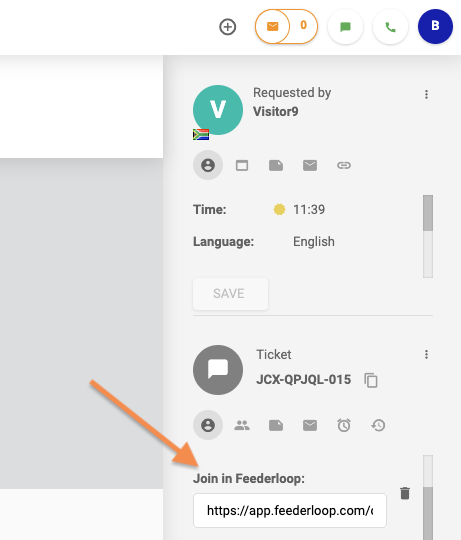
The Feederloop integration lets you connect with a customer via video chat directly from the LiveAgent live chat. Whenever you’re chatting with your customers, you can see a link to join the customer’s session in Feederloop in the ticket panel on the right. When you join, you have access to all features available in Feederloop, so you are not limited to just video calling. You can start screen sharing and co-browsing. Your customers don’t even have to leave your website, everything is available to them in one place.
The integration with Feederloop is simple and takes just a moment to complete. Follow the steps and integrate Feederloop with LiveAgent in no time.
Step 1: The first step is to login to Feederloop or create an account at the Feederloop registration page and implement Feederloop according to the handy guide available on the introduction page. Once you get done, go to Admin > Integration and activate the slider on the LiveAgent card.
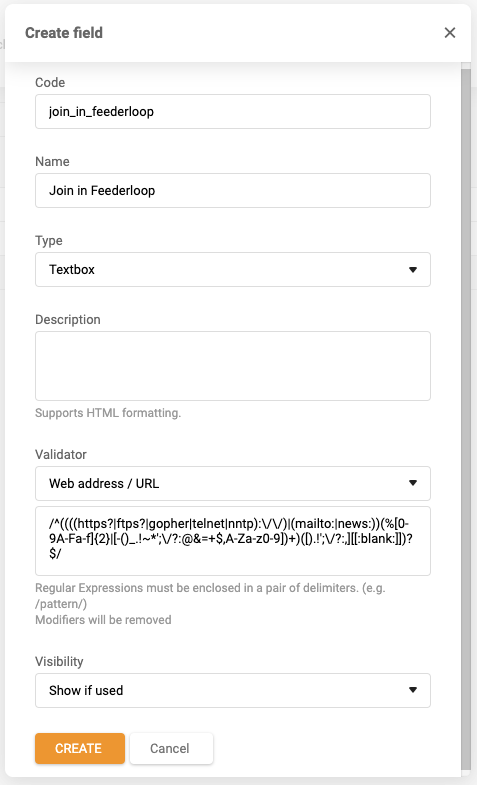
Step 2: Now go to your LiveAgent account and open Configuration > System > Ticket fields. Create a new ticket field and fill out the fields with the information below and save the changes.
That’s it! Now you can join in a Feederloop video chat with your customers at anytime during the live chat sessions in your LiveAgent ticketing system. You can find a link for joining a Feederloop call in the right ticket panel.
Get started with LiveAgent and enjoy over 200 smooth integrations with popular business software solutions. Start your free trial today!
Integrate LiveAgent with Facebook to enhance customer support by managing messages and comments directly from LiveAgent, boosting productivity and satisfaction....

Salesflare is a CRM for small B2B businesses, automating data collection to enhance sales efficiency. Integrating with LiveAgent streamlines workflows, allowing...
Integrate LiveAgent with Facebook to manage inquiries, posts, and comments from one platform, boosting agent productivity and customer satisfaction. Streamline ...
Join our community of happy clients and provide excellent customer support with LiveAgent.
