



Open-Xchange
Open-Xchange is a productivity software with email, document management, and social media integration, suitable for offices or help desks. Integrate with LiveAg...
3 min read



Axigen is an email server with collaboration features, offering easy maintenance and 24/7 support. Integrating Axigen with LiveAgent enhances ticketing and customer support. It’s secure and ideal for companies seeking reliable groupware solutions.
Axigen is an email server and groupware with multiple collaboration features available for their plans. It allows users to share calendars, files, and contacts as well as check user availability and access to the software from multiple devices. Axigen has multi-layered security and offers effortless administration, making it ideal for companies with smaller IT teams.
Axigen is an email server and groupware with multiple collaboration features available for their plans. It allows users to share calendars, files, and contacts as well as check user availability and access to the software from multiple devices. Axigen has multi-layered security and offers effortless administration, making it ideal for companies with smaller IT teams.
Axigen can be used both as an office collaboration solution and an email server. It’s easy to maintain so it’s ideal for companies that are looking for a simple, yet reliable email solution with groupware functionalities. It’s also very secure for those who are looking for extra protection. Axigen provides 24/7 customer support for every client, so there is no need to worry about troubleshooting. It can be integrated with LiveAgent. This is ideal for companies that want to improve their help desk with a dedicated customer support solution.
Add secure email communication to the ticketing system from LiveAgent, and provide the best customer support. Take advantage of email archiving and ticket history to keep track of customer communication. LiveAgent offers much more than email messaging, the ticketing system can handle live chat, call center, social media, and customer portal. Everything is supported by advanced features that make your work easier.
A universal inbox with a hybrid ticket stream can help you keep your communication organized. Reply to contacts with canned messages or predefined answers to provide faster customer support. Set up rules to create automations that take care of common repetitive tasks. Have a look at the entire list of ticketing features and see how they can help your help desk.
Axigen can be integrated with the LiveAgent ticketing system via IMAP/POP3. The option is easy to find in the LiveAgent configuration options. Have a look at the step-by-step guide below to learn how to integrate Axigen with your ticketing system.

Do you need to set up Axigen first? Go to the Axigen website and pick a plan you want to start with. Axigen offers a helpful documentation section with installation guide and other resources you might need. Once you get access to Axigen and set it up, switch to LiveAgent and continue with the next step.

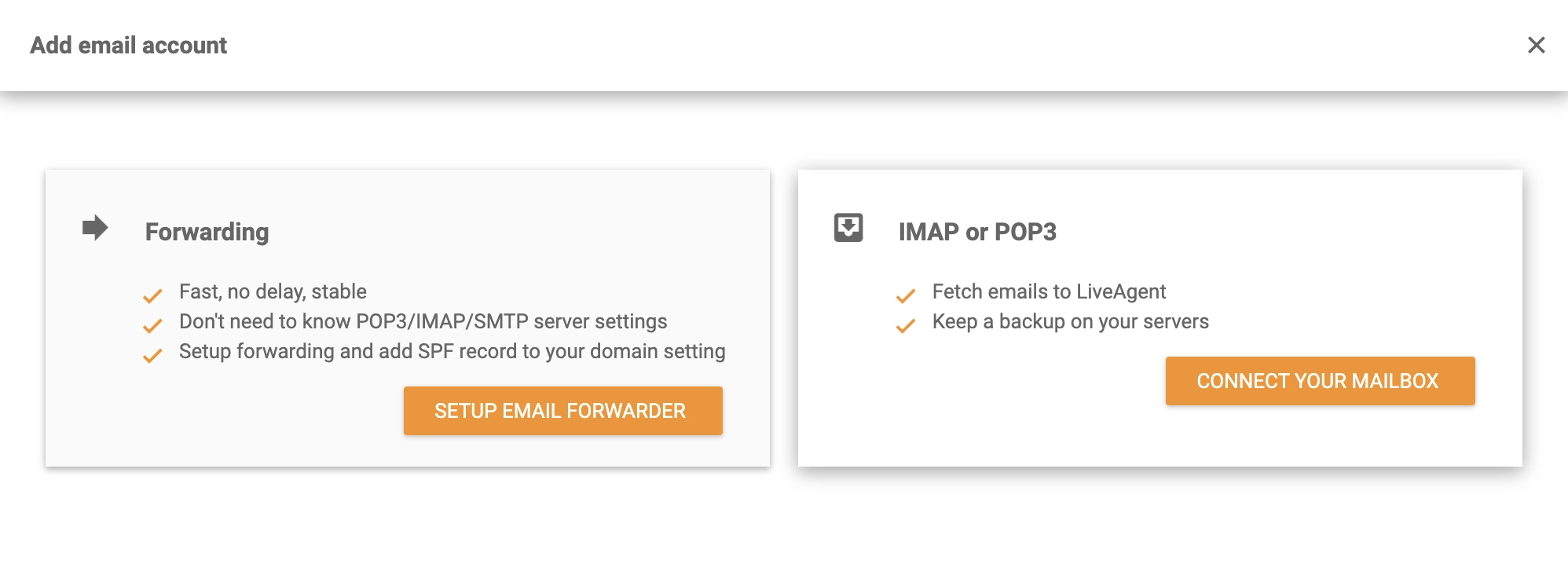
With Axigen set up and ready for use, go to your LiveAgent account. Create your free trial first if you don’t have one yet. Now head over to Configuration > Email > Mail Accounts and click on the Create button at the top. A list with email providers will open up. Select Other at the bottom and click IMAP/POP3 in the next window.
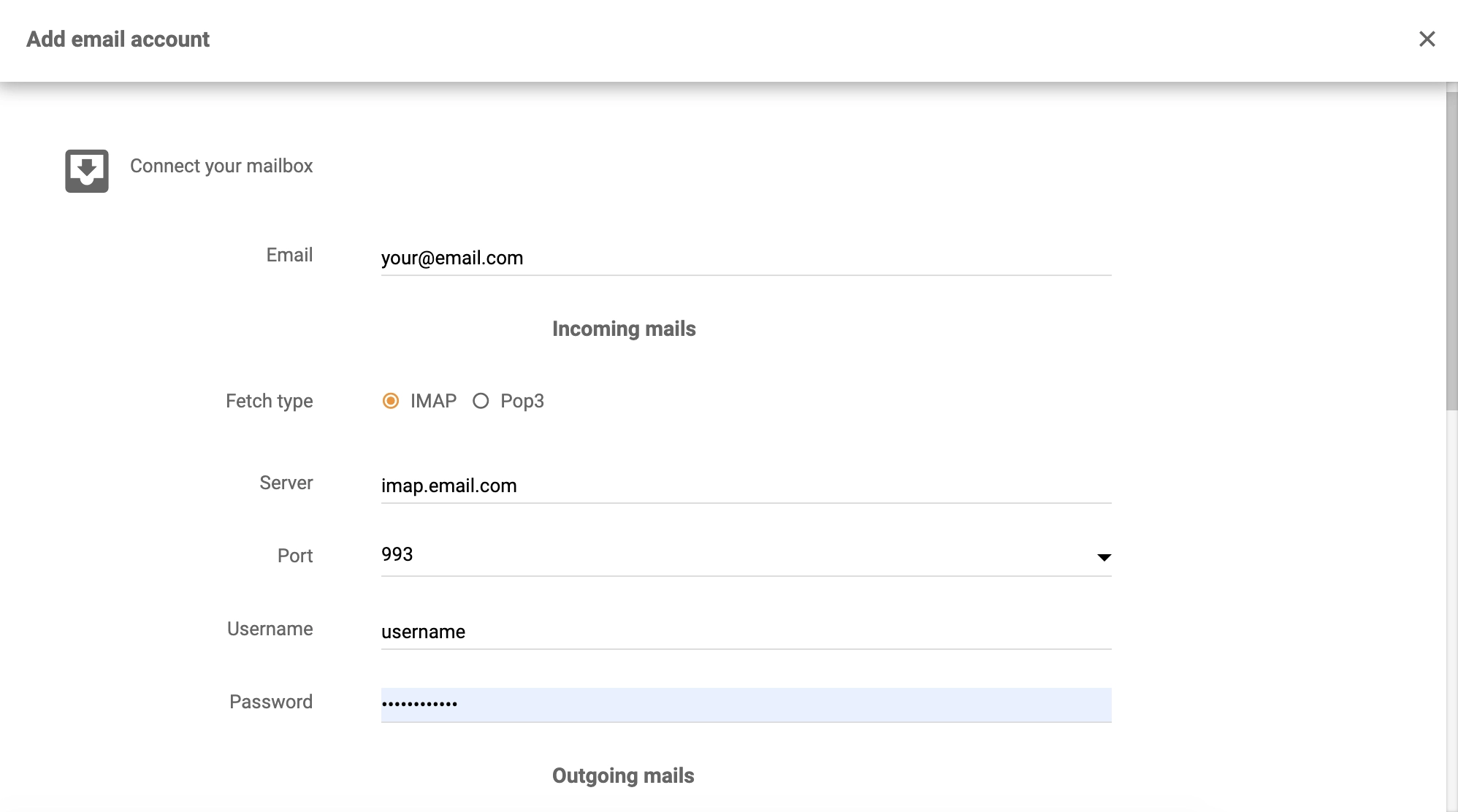
Now you have to provide your Axigen details into LiveAgent to finish the integration. Fill out the username, password, and email address. Then select fetching method, as well as server information and port. Don’t forget to select the department responsible for handling tickets from this email address. When you’re satisfied with the configuration, finish by clicking the Save button at the bottom of the window.
You’re done. LiveAgent will now fetch emails from Axigen into your ticketing system. Watch the video below and see what else can LiveAgent do. You can also browse the features page to see more options or have a look at the Academy page to learn more about customer support.

Enhance your help desk with ticketing and add secure email communication to provide the best customer support.
Open-Xchange is a productivity software with email, document management, and social media integration, suitable for offices or help desks. Integrate with LiveAg...
Enhance your customer support with Microsoft Exchange Server integration in LiveAgent. Streamline email, calendaring, and collaboration on any device, boosting ...
Avoxi is a cloud communications and VoIP provider offering toll-free and local numbers for call centers and more. Integrated with LiveAgent, it enhances communi...
Join our community of happy clients and provide excellent customer support with LiveAgent.
