Valentine's Day promotion background
14.Feb - 13.Mar 2026

Valentine deal

AI UNLOCKED
For new and existing customers for 3 months
Time Report

Time Report

Reporting Analytics Time Tracking Performance

What is time tracking?

Time tracking lets you track time spent by each agent supporting customers and thereby gain a deeper visibility of the overall help desk performance. The time spent is tracked automatically for each ticket when this feature is turned on. Additionally, you can force agents to submit the time spent manually, and add a note if necessary.

Time is tracked only if an agent is active in a ticket (time tracking stops after 30 seconds of inactivity).
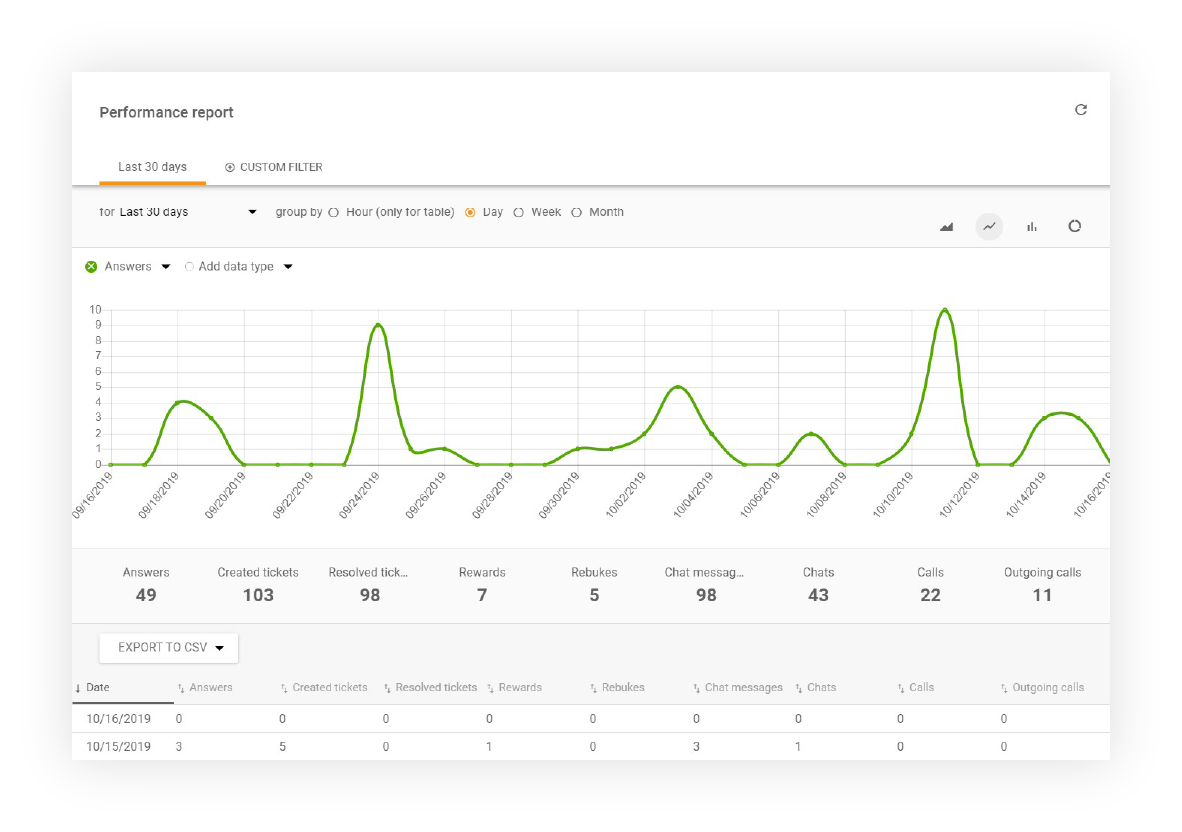
Performance report display in LiveAgent

Time report features

LiveAgent enables reporting of time spent on all tickets from a specific time range. Individual entries can be sorted by agent, ticket, customer, company, report date, billed date, type (manual, auto). A time report can be exported to a CSV file.
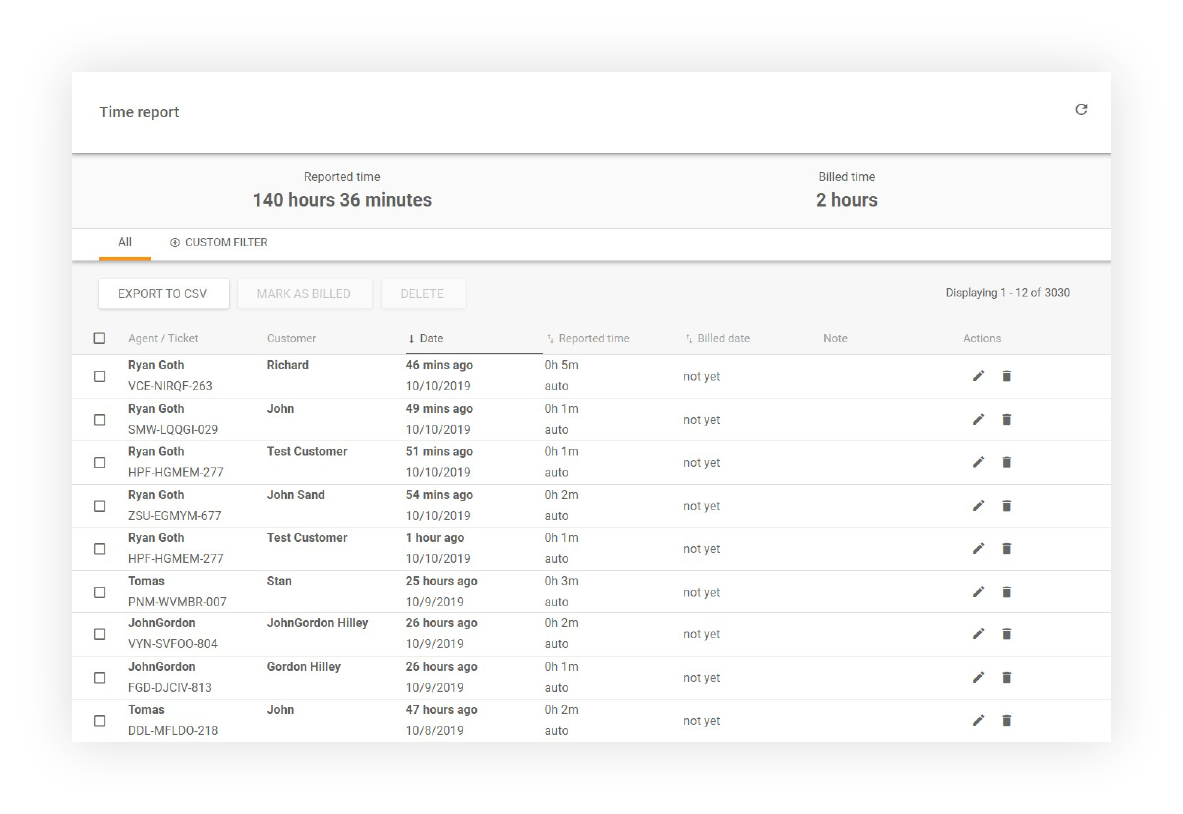
Time Report display showing all agents

Automatic and manual time tracking

LiveAgent offers flexible time tracking options to suit your team’s needs:

  • Automatic Tracking - Time is automatically recorded when agents are actively working on tickets
  • Manual Tracking - Agents can manually submit time entries with optional notes for additional context
  • Hybrid Approach - Combine both automatic and manual tracking for comprehensive time management

Time report sorting and filtering

Customize your time reports with multiple sorting and filtering options:

  • Sort by Agent - View time spent by individual team members
  • Sort by Ticket - Analyze time allocation across specific tickets
  • Sort by Customer - Track time invested in each customer relationship
  • Sort by Company - Monitor time spent on different company accounts
  • Sort by Report Date - Filter reports by specific date ranges
  • Sort by Billed Date - Track billable hours for client invoicing
  • Sort by Type - Distinguish between manual and automatic time entries

Export and analysis

All time report data can be easily exported to CSV format, allowing you to:

  • Share reports with team members and stakeholders
  • Perform advanced analysis in spreadsheet applications
  • Integrate data with billing and accounting systems
  • Create custom visualizations and dashboards
  • Archive historical time tracking data

Why time tracking matters

Time tracking provides critical insights for your support operation:

  • Performance Monitoring - Understand how much time agents spend on different types of tickets
  • Resource Allocation - Identify where your team’s effort is being invested
  • Billing and Invoicing - Track billable hours for client-based support services
  • Productivity Analysis - Measure efficiency and identify optimization opportunities
  • Capacity Planning - Make informed decisions about staffing and workload distribution
  • Quality Assurance - Correlate time spent with ticket resolution quality

Available in all plans

Time Report features are available in the following LiveAgent plans:

  • Small - Basic time tracking and reporting
  • Medium - Enhanced reporting with advanced filtering
  • Large - Comprehensive time analytics and export options
  • Enterprise - Custom reporting solutions and dedicated support

Knowledge base resources

For more detailed information about time tracking and reporting, visit our knowledge base: Time Tracking Guide

Frequently asked questions

What is time tracking?

Time tracking is a feature that automatically or manually records the time spent by support agents on customer support tickets. This helps organizations gain visibility into help desk performance, agent productivity, and resource allocation.

How does automatic time tracking work?

Automatic time tracking records the time an agent spends actively working on a ticket. The timer starts when an agent opens a ticket and stops after 30 seconds of inactivity, providing an accurate measure of actual work time.

Can agents manually submit time entries?

Yes, you can force agents to manually submit the time spent on tickets and add notes if necessary. This provides flexibility for situations where automatic tracking may not capture all relevant work.

What data can be included in time reports?

Time reports can include data sorted by agent, ticket, customer, company, report date, billed date, and type (manual or automatic). Reports can be filtered by time range and exported to CSV format for further analysis.

Create a self-service portal

Create a customer portal with knowledge base articles, forums, or feedback boards. Try it today. No credit card required.

Learn more

TrackingTime
TrackingTime

TrackingTime

TrackingTime is a collaboration-focused time tracking app for projects and employee productivity. Integrate seamlessly with LiveAgent via Zapier for precise tim...

3 min read
Agent availability features

Agent availability features

Monitor your agents' availability in real-time with LiveAgent's comprehensive reporting tools. Easily filter stats by department, export data, and identify top-...

2 min read
Reporting Agent Management +1
Agent Report Features

Agent Report Features

Get detailed insights into agent performance with LiveAgent's Agent report. Track work time, tickets, chats, calls, and more. Export data to CSV and use charts ...

3 min read
Reporting Analytics +1

You will be in Good Hands!

Join our community of happy clients and provide excellent customer support with LiveAgent.

Post Affiliate Pro Dashboard - Campaign Manager Interface