Valentine's Day promotion background
14.Feb - 13.Mar 2026

Valentine deal

AI UNLOCKED
For new and existing customers for 3 months

Split Tickets

Ticket Management Efficiency Support

What is the Split Ticket Feature?

Have you ever wondered how to deal with a ticket where a customer needs to solve multiple issues suitable for different agents or departments? With the Split Ticket feature, you can solve both problems faster and more effectively than ever before.

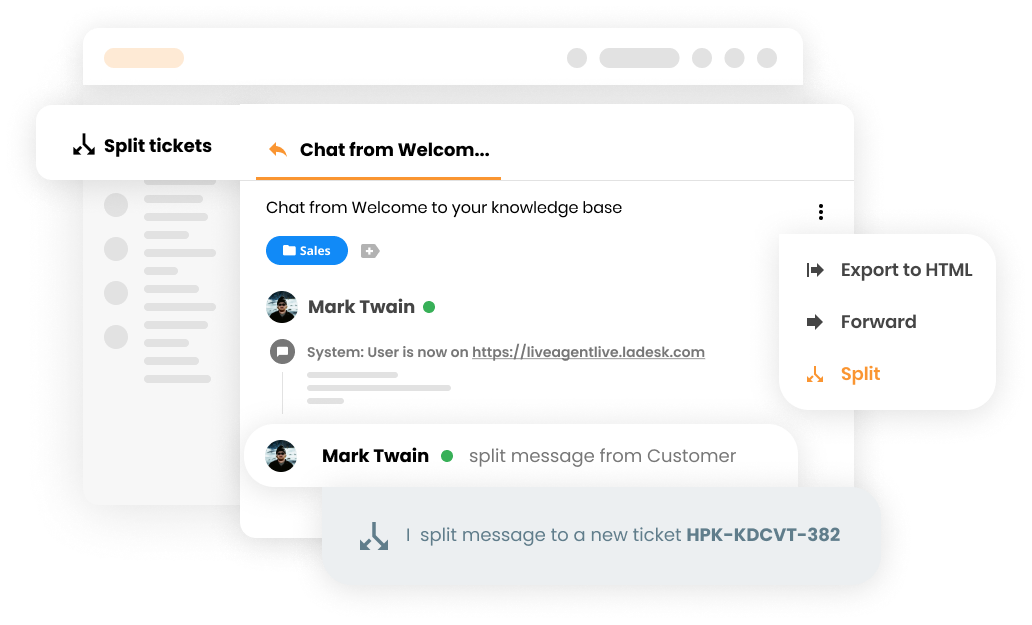
Split tickets feature mockup

How Does It Work?

When you receive a ticket where a customer needs to solve two or more different issues, you simply click the Split button. This will create a copy of the original ticket within your ticketing tool with a new reference number. You can use it as a normal, valuable ticket with all features as usual.

Example Scenario

Your customer David is wondering how to setup and configure his default email address for email communication with customers and also if there is a possibility to customize the chat buttons by your designers. You can clearly see this is a case suited for two different departments.

Your customer support agent will now use the Split Ticket feature to split and assign the ticket to other, more suitable agents or departments.

The Split button will simply duplicate the ticket with a new reference number and the agent can assign it to the right Department.

  • Communication in Ticket A regarding the setup and configuration of an email address will continue in the original ticket
  • Communication in Ticket B regarding design possibilities will be handled with a new reference number and assignee

Why Is This Feature Valuable?

The Split Ticket feature provides numerous benefits for your support team:

  • Faster Problem Resolution - Route each issue to the most qualified agent or department
  • Improved Efficiency - Agents focus on their area of expertise rather than handling unrelated issues
  • Better Organization - Keep related communications together with clear reference numbers
  • Enhanced Tracking - Monitor progress on each issue independently
  • Increased Customer Satisfaction - Faster resolution times lead to happier customers
  • Reduced Confusion - Clear separation of issues prevents miscommunication
  • Scalability - Works seamlessly as your support team grows

What Can You Do With Split Tickets?

By using the Split Ticket feature, you can:

  • Create multiple tickets from a single customer request
  • Assign each ticket to the most suitable agent or department
  • Maintain separate communication threads for each issue
  • Track resolution progress independently
  • Keep your ticket system organized and efficient
  • Reduce response times for complex customer requests

Knowledge Base Resources

Need more help with this feature? Check out these detailed guides: Split ticket action

Frequently asked questions

What is the Split Ticket feature?

The Split Ticket feature allows you to duplicate a ticket with multiple issues and assign each copy to different agents or departments. This ensures faster problem resolution by routing each issue to the most suitable team member.

How does the Split Ticket feature work?

When you receive a ticket with multiple issues, you click the Split button. This creates a copy of the original ticket with a new reference number. You can then assign each ticket to the appropriate agent or department for their specific issue.

When should I use the Split Ticket feature?

Use Split Tickets when a customer has multiple unrelated issues that require different expertise or departments to resolve. For example, if a customer needs both technical setup help and design consultation, you can split the ticket to route each issue to the appropriate team.

Can I split a ticket into more than two tickets?

The Split Ticket feature creates one copy of the original ticket. If you need to address more than two issues, you can split the original ticket and then split one of the resulting tickets again.

Solve problems more efficiently

Split tickets that contain multiple requests into two to ensure faster problem resolution. Try it today. No credit card required.

Learn more

Multiple ticket tabs

Multiple ticket tabs

Discover LiveAgent's multiple ticket tabs feature, enabling agents to handle multiple customer queries simultaneously for maximum efficiency. Opt for the 'To so...

3 min read
Ticket Management Productivity +1

Ticket ID
Ticket ID

Ticket ID

Learn how LiveAgent's unique Ticket ID system streamlines customer support by organizing, prioritizing, and managing inquiries efficiently.

4 min read
Customer support Ticketing system +1
Web Helpdesk
Web Helpdesk

Web Helpdesk

Streamline customer support with web helpdesk software! Manage tickets, CRM, assets, and analytics to boost efficiency and satisfaction.

7 min read
Customer support Help Desk software +1

You will be in Good Hands!

Join our community of happy clients and provide excellent customer support with LiveAgent.

Post Affiliate Pro Dashboard - Campaign Manager Interface