



LiveAgent 5.39 – Improvements and fixes
Discover LiveAgent 5.39, featuring SSO integration with Google, Microsoft, Facebook, and Okta, improved email parsing, and enhanced WhatsApp and Facebook functi...
4 min read
Updates
Features
+1


Single Sign-On (SSO) allows secure access to multiple systems with one login. Set up SSO in LiveAgent using Microsoft, Google, Facebook, or Okta for faster, safer logins. Simplify authentication and enhance security by using a single strong password.
SSO stands for Single Sign-On, which is an authentication scheme that allows users to sign in to multiple software systems with a single identity. This means that users can use just a single set of login credentials to log into multiple systems.
Single Sign-On also makes your browsing and work much safer because you only have to log in just one time every time you want to access your applications.
Users who have to manage multiple accounts with different passwords at once tend to create much simpler passwords which can be more easily guessed or hacked. With SSO, you can focus on creating a single very strong password that can keep your apps and data safe.
SSO works great with multi-factor authentication and helps you keep your accounts even safer from potential breach.
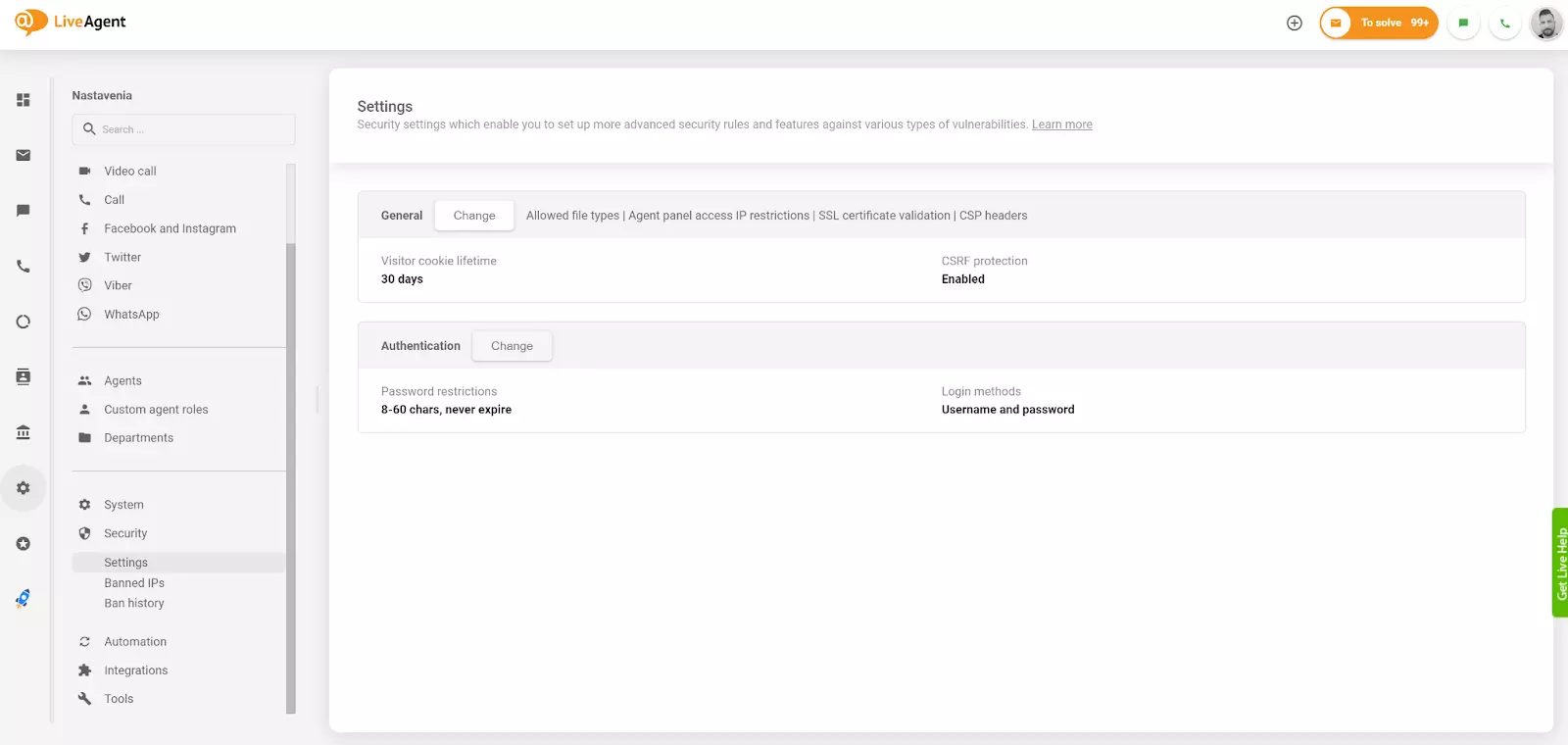
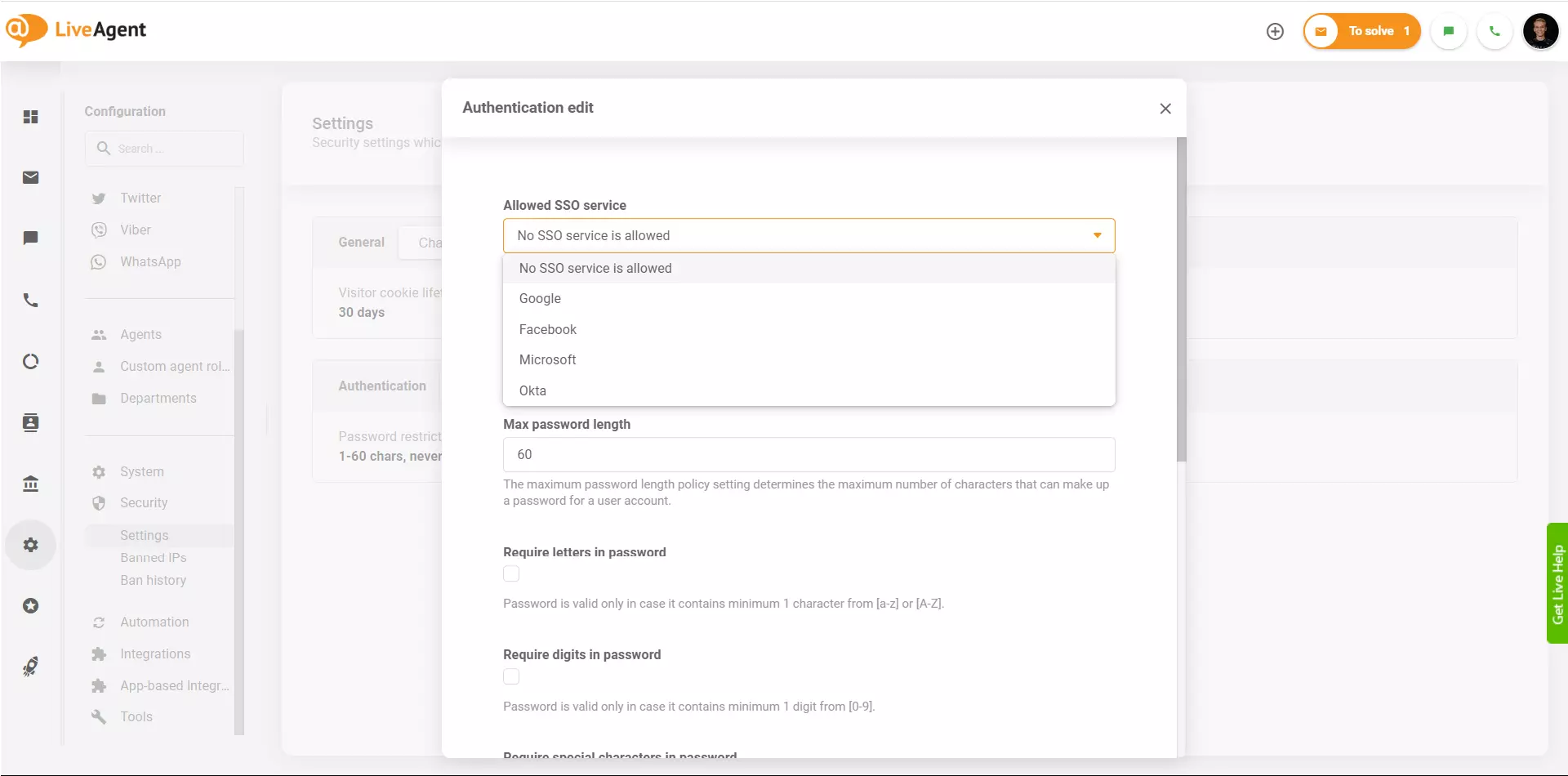
SSO in LiveAgent can be set up in the Configuration section. Currently you can access and set up SSO for your Microsoft, Google, and Facebook account or use SSO with the Okta provider. You can activate one provider.
SSO does not create new users in the system, they still have to be manually created prior logging-in using SSO. For hosted LiveAgent accounts, the SSO for Google, Microsoft and Facebook accounts only needs to be turned on to function. Users of the standalone LiveAgent version need to set up identity providers manually.
Setting up your Single Sign-On can help you with faster logins using your Microsoft, Google, Facebook, and Okta accounts. This type of SSO login can help you save more time while keeping your accounts safer in some regard. You can spend less time logging in and typing in your sensitive information into the system.
Think of SSO as your master lock for all of your application accounts – it’s single but strong and can help you keep everything significantly safer. Combine it with Two Factor authentication for maximum security of your data.
If you want to set up Single Sign-On in LiveAgent, follow these steps:
Faster Logins Access all your applications with a single set of credentials, eliminating the need to remember multiple passwords and reducing login time.
Enhanced Security Create and maintain a single strong password instead of multiple weak passwords. SSO reduces the risk of password-related security breaches and makes your accounts significantly safer.
Improved User Experience Reduce password fatigue and the frustration of managing multiple login credentials. Users can focus on their work instead of managing passwords.
Better Compliance SSO helps organizations maintain better security policies and compliance standards by centralizing authentication and reducing the number of passwords in circulation.
Multi-Factor Authentication Support Combine SSO with two-factor authentication for maximum security of your data and accounts.
Discover LiveAgent's powerful features that streamline communication, increase efficiency, and boost customer satisfaction.
Discover LiveAgent 5.39, featuring SSO integration with Google, Microsoft, Facebook, and Okta, improved email parsing, and enhanced WhatsApp and Facebook functi...
Trust LiveAgent for top-tier security & privacy. GDPR compliant, 2FA, HTTPS, DDoS protection, & global data centers for ultimate data safety.

Secure your LiveAgent account with 2-Step Verification using Google Authenticator for extra security. Enable it to require a 6-digit code every login. Try it fr...
Join our community of happy clients and provide excellent customer support with LiveAgent.
