



Departments

Departments

Departments Ticket Management Organization

What are help desk departments?

A help desk department is a part of an organization that’s made up of specific people who are dedicated to solving specific problems. Usually, the agents in each department have different levels of product/service knowledge and different responsibilities.

As an example, agents that are a part of the sales department are usually responsible for answering sales questions, while agents from the tech department are responsible for resolving customer’s issues with products/services.

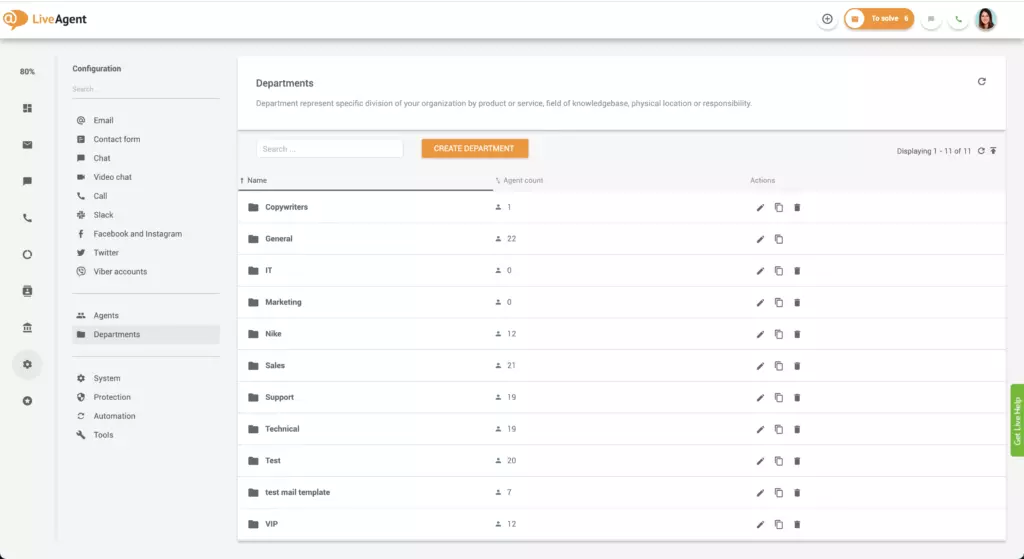
Departments overview

What are help desk departments for?

Generally, help desk departments are created to keep help desks organized. They can be compared to inbox labels that you can find in Gmail. Just like these Gmail labels, help desk departments ensure you can find customer queries with ease.

Gmail labels

Departments are also great for specifying workflows for different sets of agents.

What else can you do with departments?

  • Restrict ticket access (only agents within that department will be able to view their department’s tickets).
  • Customize your e-mail communication templates.
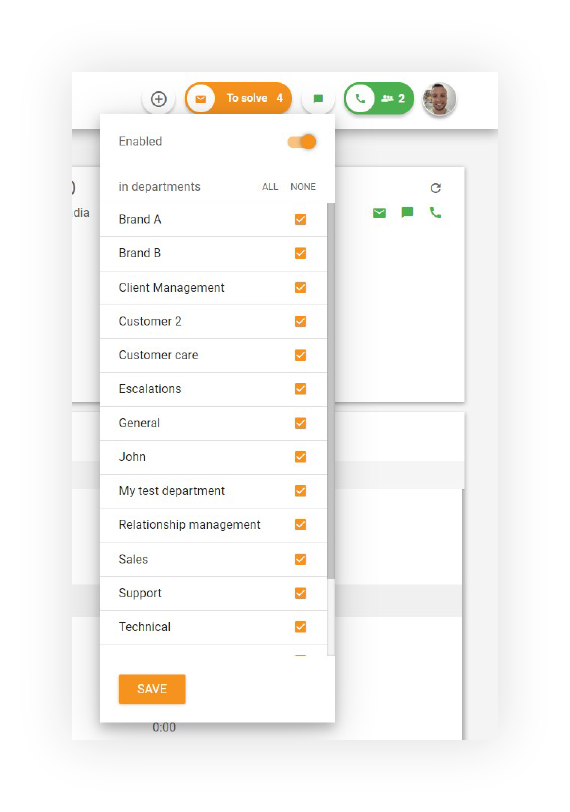
  • Configure the availability of chat, phone, and messaging services.
  • Define filters and automation rules (ticket routing rules).
  • Specify different email signatures, phone and chat answering rules.
  • View how many new, open, and resolved tickets are in each department.
  • Specify different support processes.
  • Configure support e-mail addresses.
  • Define service-level agreements and business hours.

Examples of help desk departments

  • Business/organizational departments that are responsible for resolving queries within different fields such as human resources, IT, accounting, sales, marketing, or legal.
  • Departments that are responsible for answering queries about different products/services such as help desk software, affiliate marketing software, or customer relationship management software.
  • Departments that are responsible for handling different types of customers such as resellers, affiliates, VIPs, or partners.
  • Departments that are responsible for serving customers in different geographic locations such as North America, Europe, or Asia.
Departments feature in LiveAgent

How can I benefit from setting up help desk departments?

Creating departments within your customer service ticketing software can be very beneficial for multiple reasons:

  • They group teams of specialists together.
  • Help desk departments improve the effectiveness and quality of ticket handling.
  • They decrease ticket response and resolution time.
  • Help desk departments keep your universal inbox organized.
  • Departments showcase clear ticket ownership.
  • They ensure that agents only answer the tickets they’re best equipped to handle.
  • Help desk departments reduce stress levels.
  • Departments make it easy to find past tickets.
  • They improve agent efficiency and workflows.

How to create departments in LiveAgent

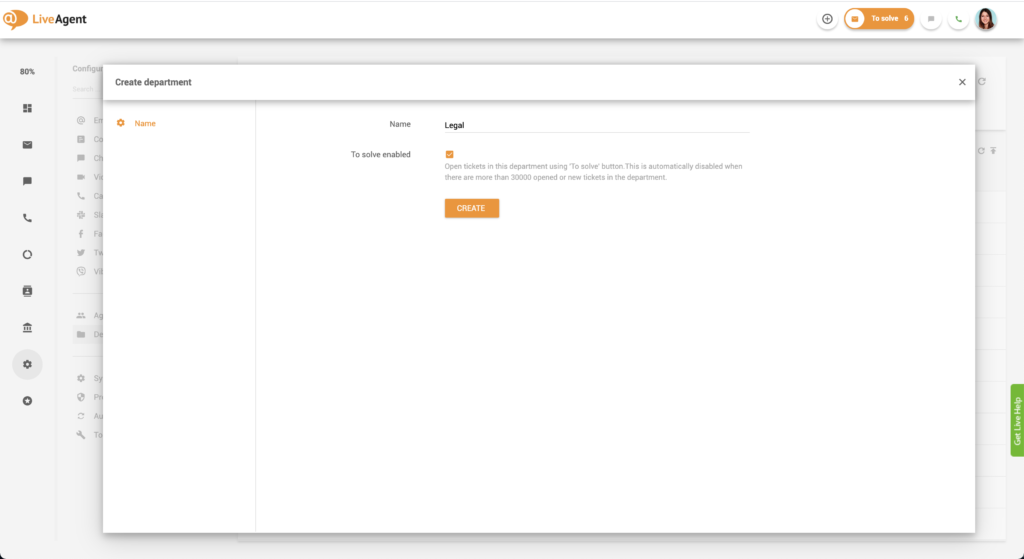
  1. Log in to LiveAgent.
  2. Click on Configuration (cogwheel icon in the left menu bar).
  3. Click on Departments.
  4. Click on Create Department.
  5. Name your department.
  6. Optional: Check the ’to solve enabled" checkbox.
  7. Click Save.
Creating department in LiveAgent

How to add agents to departments

  1. Log in to LiveAgent.
  2. Click on Configuration (cogwheel icon in the left menu bar).
  3. Click on Departments.
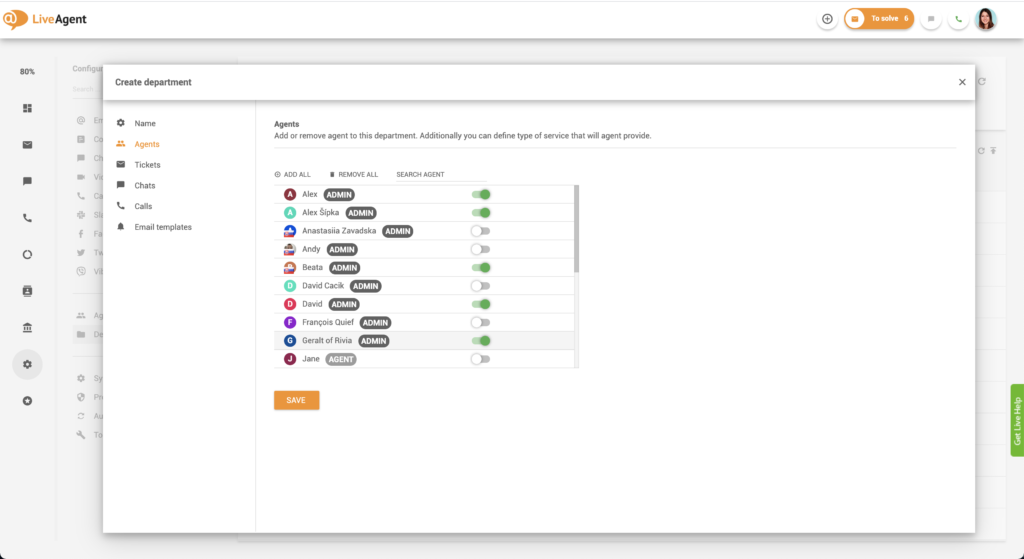
  4. Select the Department you want to add agents to and click on Edit.
  5. Click on Agents.
  6. Select the agents you want to add by clicking on the switch. When it turns green, your agent was added. Repeat this step until you’ve added all the agents you want. If you want to select all agents, simply click on ADD ALL.
  7. Click Save.
Adding agents to departments

How to route tickets to specific departments

  1. Log in to LiveAgent.
  2. Click on Configuration (cogwheel icon in the left-hand menu bar).
  3. Click on Automation.
  4. Click on Rules.
  5. Click Create.
  6. Check the Status Active checkbox.
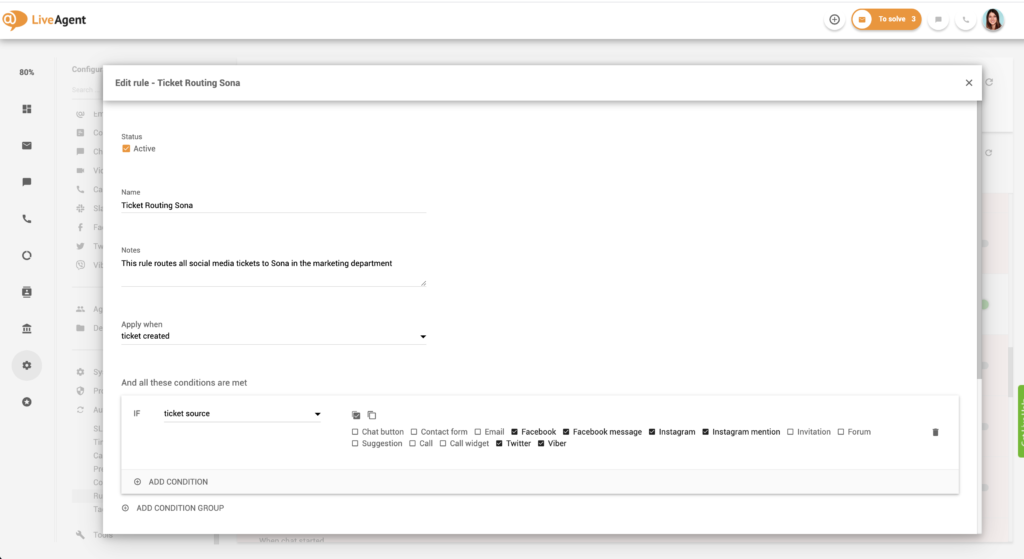
  7. Create a name for your rule, such as “Ticket routing Marketing”.
  8. You can leave the Notes section blank, or you can describe the rule in more detail. This field is simply for your convenience. An example of a note could be “This rule routes all social media tickets to the marketing department.”
  9. Select a variable, such as Apply when Ticket is created.
  10. Click Add condition group.
  11. Select the conditions according to your liking, such as IF ticket source (and select the sources you want. They could be Facebook, Twitter, Instagram, Viber, for example).
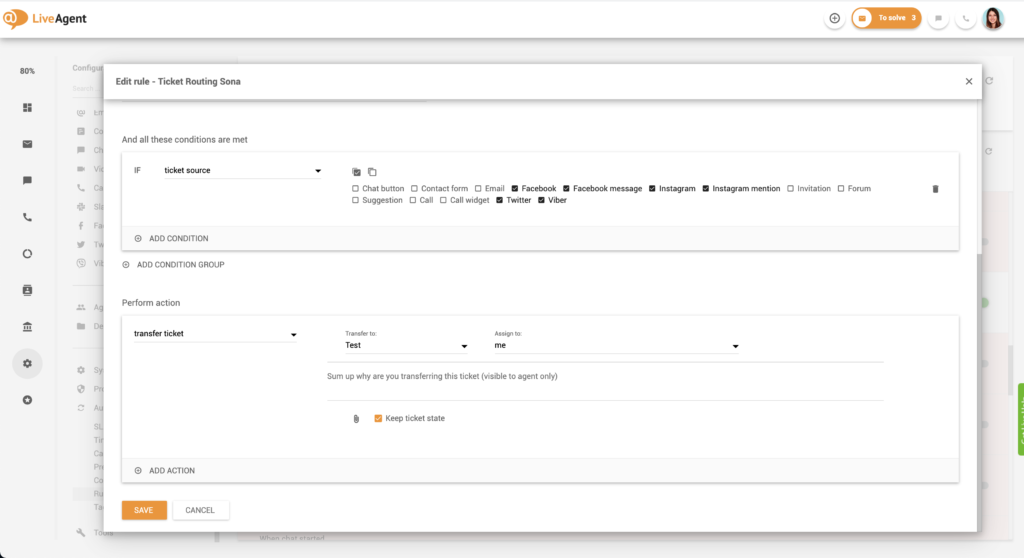
  12. Select the perform action fields according to your liking, such as Transfer ticket to the marketing department and assign to not assigned.
  13. Click Save.
Setting up ticket routing rules - Part 1
Setting up ticket routing rules - Part 2

Monitoring your department’s performance with department reports

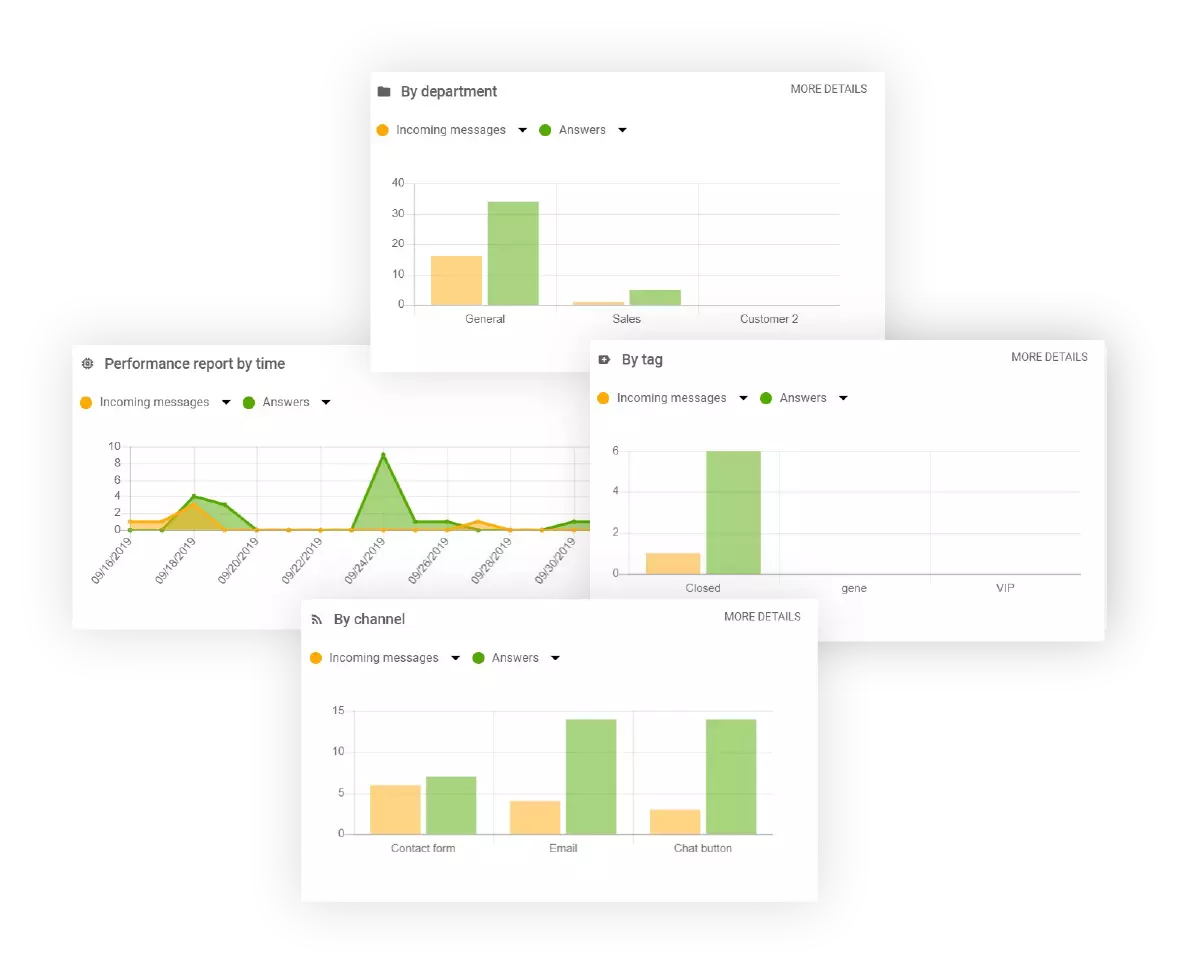
LiveAgent offers robust reporting and analytics features. LiveAgent users can view and create department reports that showcase each department’s performance based on the number of answered tickets, chats, calls, agent rankings, and more. Each report can be segmented by day, week, month, year, or a specific time range. Individual entries can be sorted by time range, department, channel, and agent. Last but not least, all department reports can be exported into CSV files.

Department report display options (columns):

  • Tag
  • Answer
  • New answer avg. time
  • Open answer avg. time
  • Calls
  • Missed calls
  • Call minutes
  • Chat messages
  • Chats
  • Missed chats
  • Chat pickup avg. time
  • Chat avg. time
  • Not ranked
  • Not ranked %
  • Positive ratings
  • Positive rating %
  • Negative ratings
  • Negative rating %
  • Incoming messages
  • Incoming calls
  • Finished calls
  • Incoming chats
  • Finished chats
  • Created tickets
  • Resolved tickets

Choosing how you want to display data

LiveAgent department reports can be viewed as:

  • Area charts
  • Line graphs
  • Bar graphs
  • Pie charts
Department reports in LiveAgent

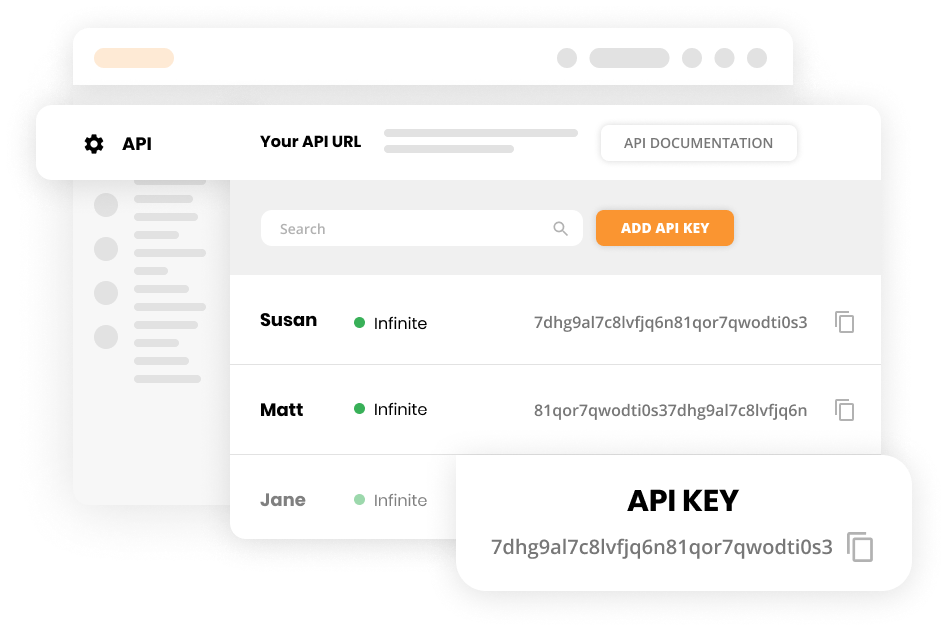
Using department reports with API

Use LiveAgent REST API to call values from department reports.

LiveAgent API for department reports

Benefits of help desk departments

More knowledgeable answers and happier customers

When tickets are routed to the right agent in the right department, it makes all the difference. Agents that are knowledgeable and able to provide high-quality service can improve your customer’s support experience and satisfaction. In turn, this leads to more sales, more loyal customers, and positive word of mouth.

Faster response times

When the right agent in the right department receives a help desk ticket, they won’t waste any time answering it. Instead of looking up answers or consulting colleagues, they’ll immediately know what to say and resolve the issue. This improves resolution and response times, which in turn, improves customer satisfaction.

Clear responsibilities and more efficient workflows

When tickets are assigned to specific departments, each ticket is accounted for. No ticket goes unanswered or is forgotten. Moreover, when each ticket is assigned to a department, no agent needs to search through an inbox of tickets to find one that they can answer. Departments create clear ticket responsibilities and improve agent workflows and efficiency. Also, using a knowledge base creator allows businesses to organize and present helpful information, making it easily accessible for both customers and support agents.

Knowledge base resources

Thumbnail for LiveAgent Product Tour

Ready to benefit from departments?

Organize all incoming tickets by assigning them to specific departments today. Making your own departments with our 30-day free trial is easy. Try it today. No credit card required.

Frequently asked questions

What are help desk departments?

A help desk department is a part of an organization that's made up of specific people who are dedicated to solving specific problems. Usually, the agents in each department have different levels of product/service knowledge and different responsibilities.

What are help desk departments for?

Generally, help desk departments are created to keep help desks organized. They can be compared to inbox labels that you can find in Gmail. Just like these Gmail labels, help desk departments ensure you can find customer queries with ease.

What are some examples of help desk departments?

Business/organizational departments that are responsible for resolving different queries within different fields such as human resources, IT, accounting, sales, marketing, or legal. Departments that are responsible for answering queries about different products/services. Departments that are responsible for handling different types of customers such as resellers, affiliates, VIPs, or partners.

Do I need help desk departments if I'm running a one-man show?

If you're a solopreneur or a very small organization, you don't need to set up departments if you don't want to. If you don't, all tickets will be up for grabs by all of your agents/members of your organization.

Transform your customer support experience

Discover LiveAgent's powerful features that streamline communication, increase efficiency, and boost customer satisfaction.

Learn more

Agents features
Agents features

Agents features

Help desk agents provide customer support via email, chat, phone, and more, resolving issues like billing and troubleshooting. LiveAgent helps manage agents wit...

5 min read
Agents Help desk +2
Department Report Features

Department Report Features

Department reports in LiveAgent allow organizations to allocate tickets and assign agents to various departments by product, location, or responsibility, offeri...

2 min read
Department Report Reporting +1

Help desk checklist
Help desk checklist

Help desk checklist

Enhance your customer support with a thorough help desk checklist, covering goals, agent organization, communication channels, workflow automation, and more. Es...

24 min read

You will be in Good Hands!

Join our community of happy clients and provide excellent customer support with LiveAgent.

Post Affiliate Pro Dashboard - Campaign Manager Interface