



FlowHunt
FlowHunt is a no-code platform for creating AI-driven applications and chatbots. Integrate with LiveAgent to automate customer queries, generate leads, and prov...
3 min read


LiveAgent’s AI-powered chatbot automates customer interactions, improves response times, and reduces agent workload. Integrated with FlowHunt, it handles FAQs, escalates complex queries, generates leads, and offers multilingual support. Setup is simple and flexible.
Customer expectations are higher than ever. They want quick answers, helpful responses, and a smooth experience. That’s where the LiveAgent Chatbot feature comes in. It’s your new AI Agent integrated directly into the LiveAgent chat button, allowing both AI-powered conversations and live human support within the same interface.
In this article, we’ll cover everything you need to know about the LiveAgent Chatbot, including its key features, why it requires FlowHunt as an AI provider, and the practical use case examples. Let’s dive in and explore how this new feature can transform your customer support experience.
The LiveAgent Chatbot is an AI-powered assistant built directly into your LiveAgent chat button. It instantly answers simple customer questions using your knowledge sources, transfers complex queries to your team, and helps you generate leads.
Not all chatbots are created equal. While basic chatbots handle just simple FAQs, the LiveAgent AI Chatbot uses autonomous AI agents that can reason, make independent decisions, and perform tasks. AI Agents can understand human intent and correctly decide when to escalate queries to human agents. On top of it, they can proactively gather leads and send notifications to your email. Last but not least, AI agents boast a deeper understanding of human language, easily interpreting complicated multi-step queries and matching them to correct knowledge sources.
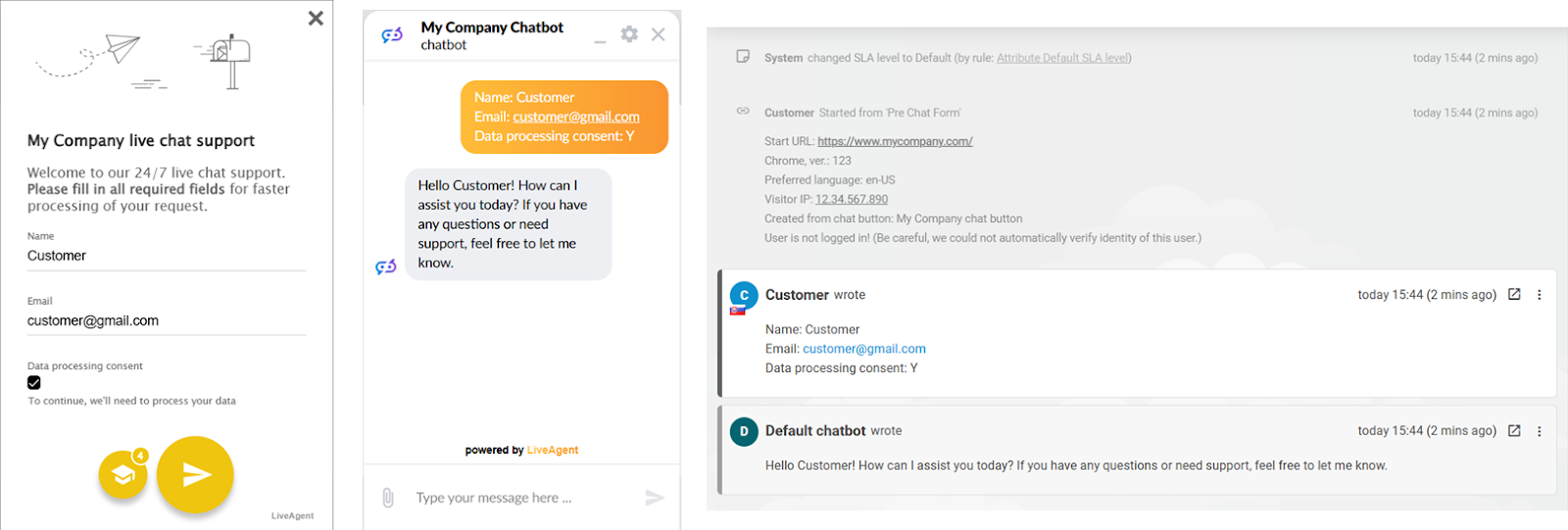
AI Agents can understand human intent and correctly decide when to escalate queries to human agents. On top of it, they can proactively gather leads and send notifications to your email. Last but not least, AI agents boast a deeper understanding of human language, easily interpreting complicated multi-step queries and matching them to correct knowledge sources.
With the Chatbot functionality, you can drastically lower response times, handle more queries at once, and reduce agent workload, all while maintaining a personal touch. Whether guiding a new customer through your product or filtering out simple questions before reaching your agents, this chatbot adapts to the user’s preferred language and works alongside your team right in the same chat button.
To get the chatbot up and running, you need to integrate LiveAgent with an AI chatbot provider. The chatbot functionality is currently provided exclusively by FlowHunt . Quality Unit develops both LiveAgent and FlowHunt. This allows us to keep your data safe, as well as provide priority support to LiveAgent users.
By handling the chatbot functionality as an integration, we give you more flexibility and control. You can create multiple chatbots for different needs , whether for customer support, sales, lead generation, or even for internal assistance.
What makes FlowHunt as an AI provider special is that it doesn’t lock you in with a single proprietary AI model. While the latest ChatGPT model is the default, FlowHunt supports 15+ other leading AI models, is multimodal, and even lets you bring your own LLM. Moreover, with advanced prompting options and automatic recognition of over 100 languages, it ensures smooth, localized interactions tailored to your business.
LiveAgent doesn’t charge any additional fees for this integration. Your chatbot usage is billed separately through FlowHunt’s credit-based pricing model .
Your monthly chatbot expenses are determined by several factors, from the number of knowledge sources and the chosen AI model all the way to the average complexity of user queries. This comprehensive guide will give you a clear formula to calculate your AI chatbot expenses .
Setting up a LiveAgent chatbot is a straightforward process requiring just three actions on the part of FlowHunt and three steps within LiveAgent itself. If you haven’t already created an account with FlowHunt, you can quickly sign up by visiting the FlowHunt Sign-Up page .
Check out our step-by-step guide to easily set up the AI Chatbot feature!
With FlowHunt’s chatbot builder , you can easily create and explore ways to improve your customer support and internal processes. Either choose a pre-made LiveAgent chatbot from the library or create your own using the builder. Our team is happy to assist along the way. Here’s a quick overview of the major customer service features.
Thanks to AI Agents, the LiveAgent chatbot can be set up to recognize when it’s time to transfer complex queries to your team. You can set up the minimum number of AI responses required before the transfer button becomes available or let the chatbot’s AI agent decide when to transfer the chat automatically.
If the agent decides that human assistance is needed, it will trigger a transfer without the user needing to ask.
To trigger a transfer manually, the customer must click the transfer button in the top bar of the chat window. The button becomes available once the number of minimum responses is reached or if the user specifically requests to be transferred.
When it’s time to transfer, the chatbot will prompt the users to use the button:
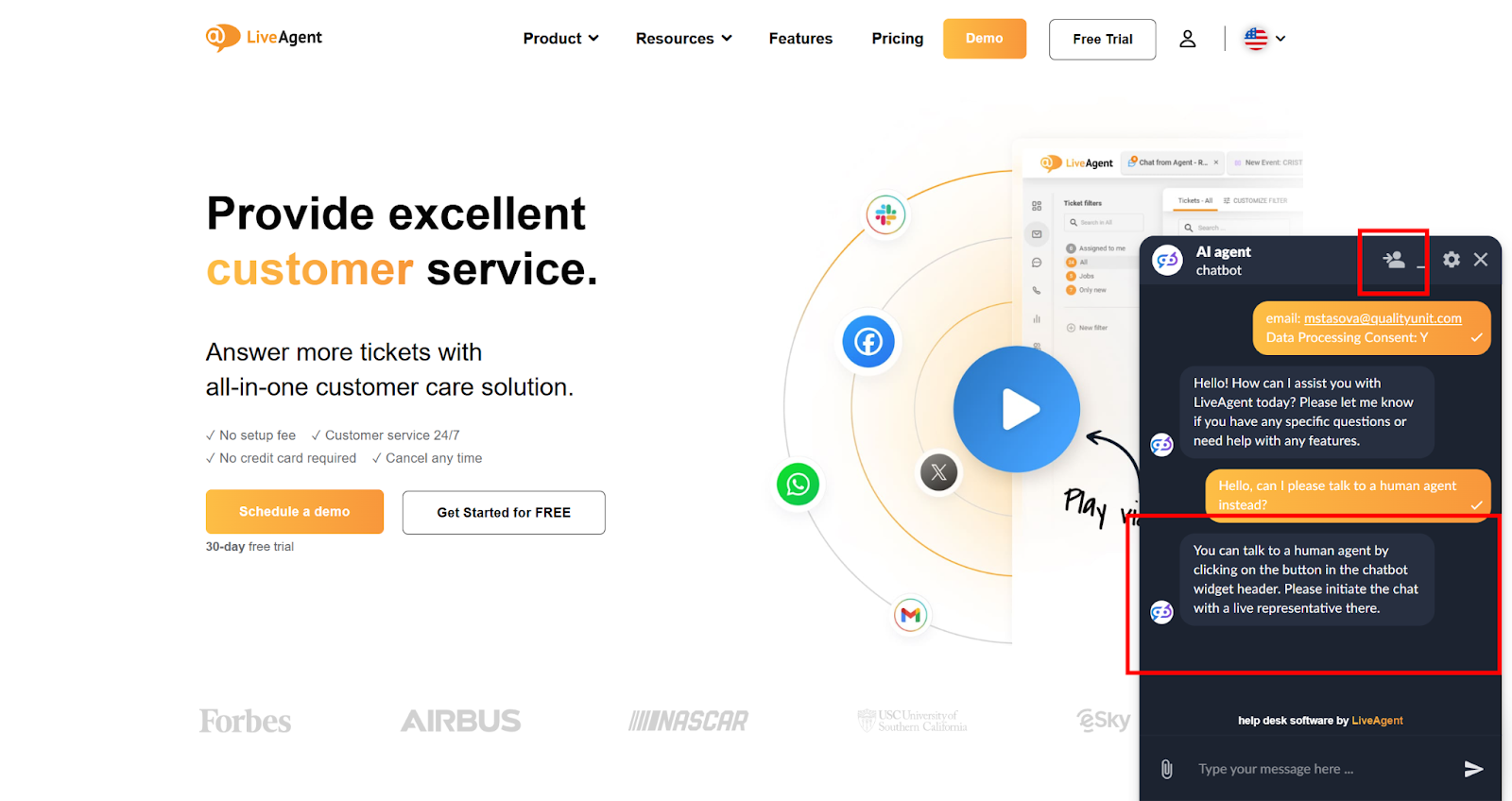
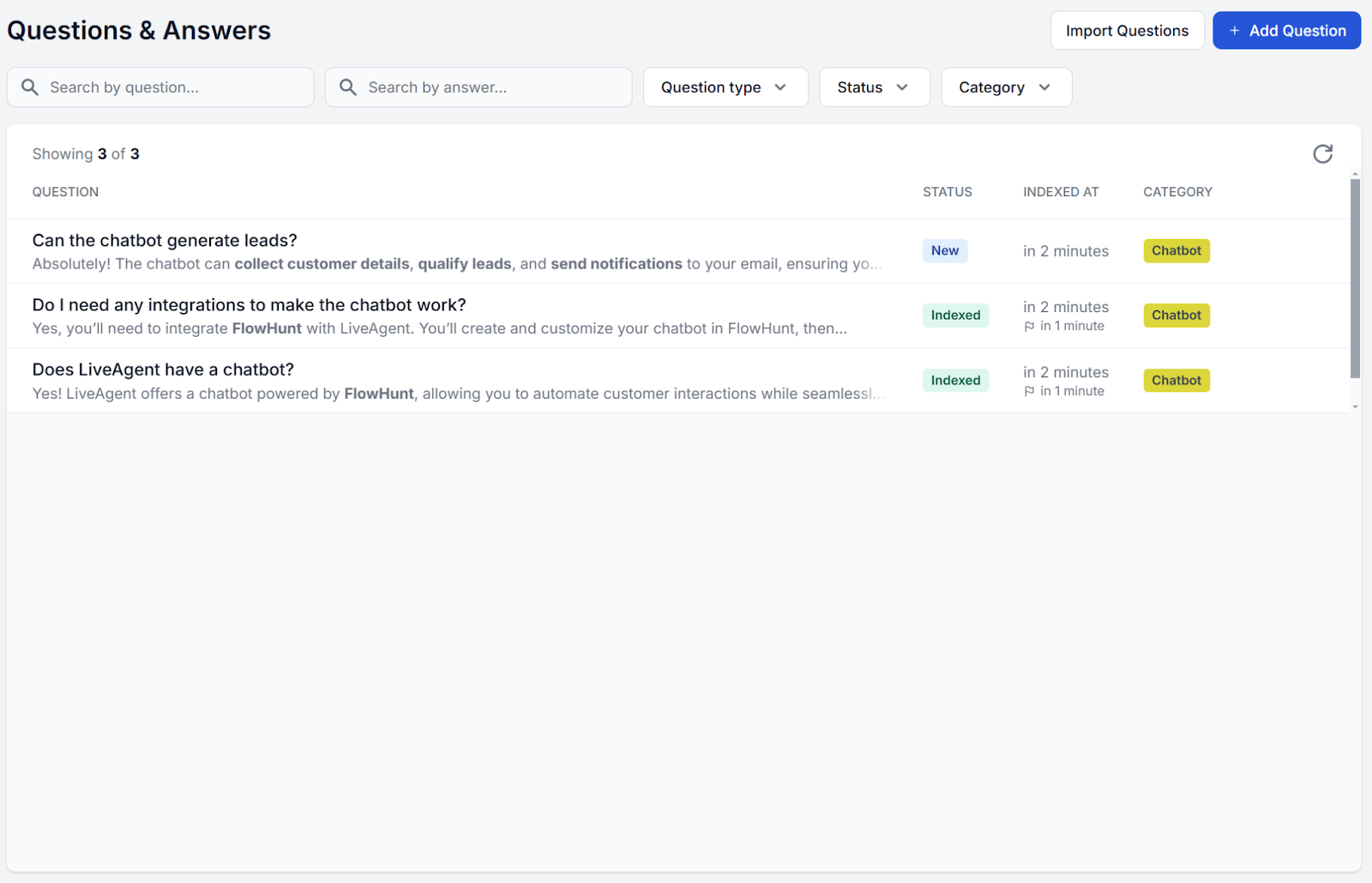
Are there any questions that are just too important for AI to miss? You can ensure consistency in answers by simply setting up FAQs in FlowHunt. The Questions & Answers feature lets you define fixed answers for questions, ensuring that whenever a similar query is asked, the chatbot responds with the exactly defined answer.
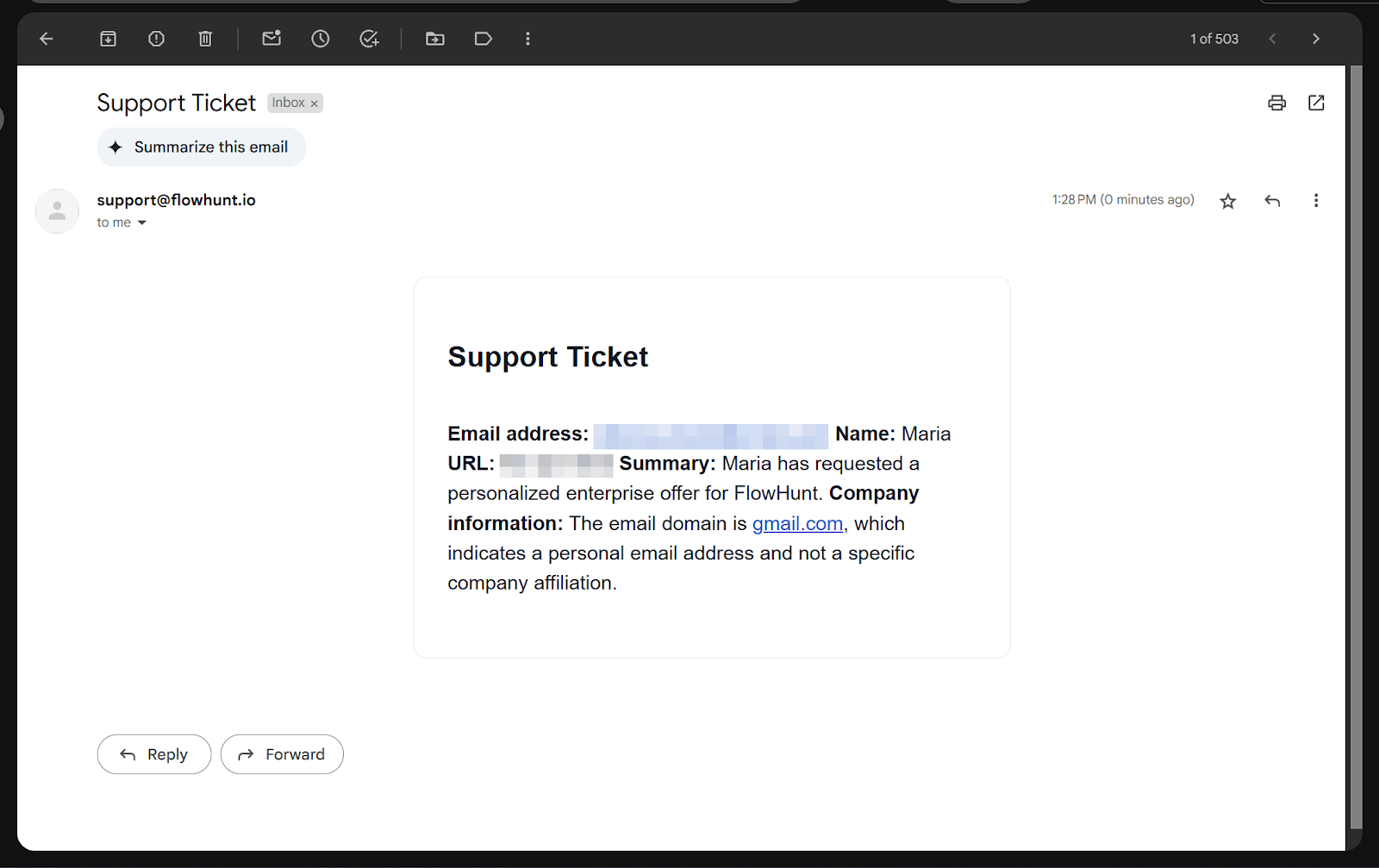
Another handy FlowHunt component is the Email notification tool. Once added to your Flow, the chatbot will start asking visitors to leave their contact details whenever appropriate. It will then immediately send the conversation summary to your email, ensuring you never miss a lead.
All of the chatbot answers are rooted in the knowledge sources and FAQs you set up. By giving the chatbot enough relevant knowledge, you can minimize AI hallucinations and boost the chatbot’s resolution rate.
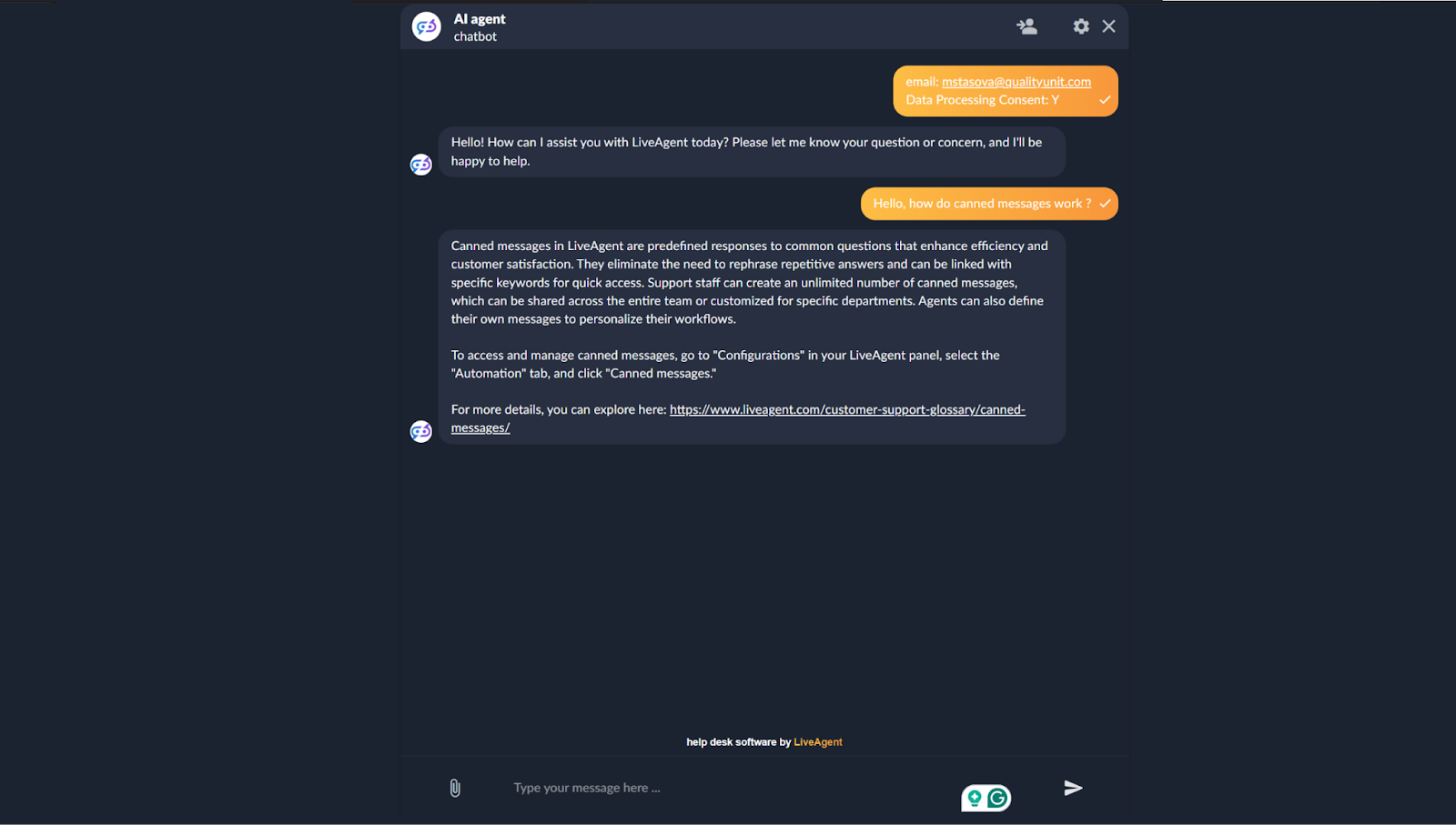
We asked our chatbot a general query about one of LiveAgent’s features. Thanks to its knowledge of our website, the chatbot can easily answer the query, give setup tips, and point us to additional self-help material:
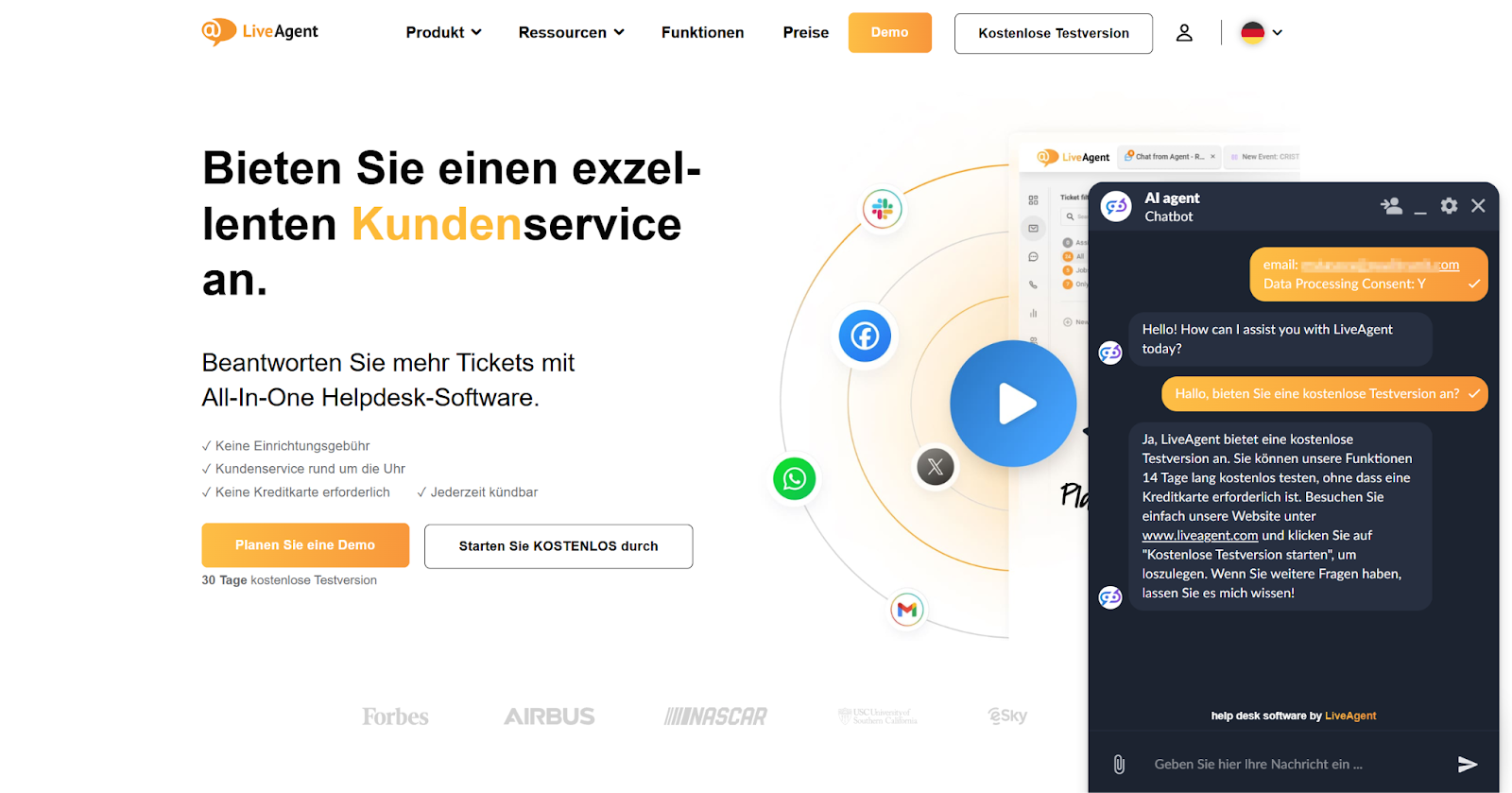
The LiveAgent chatbot can automatically recognize and effortlessly respond in the user-preferred language. Based on your AI model of choice, some limitations may apply to less widely spoken languages.
With LiveAgent’s Chatbot, you get the best of AI automation and human support in one seamless experience. Whether you need to fix resolution times, reduce agent workload, or capture leads, LiveAgent’s AI-powered chatbot gives you full control over how your chatbot interacts with customers. Get started today and see the difference firsthand—sign up for our 30-day free trial!
Discover LiveAgent's AI-powered chatbot that automates support, reduces workload, and improves customer satisfaction.
FlowHunt is a no-code platform for creating AI-driven applications and chatbots. Integrate with LiveAgent to automate customer queries, generate leads, and prov...
Learn how LiveAgent's AI chatbot for Shopify automates customer support, reduces workload, and accelerates sales with 24/7 instant answers to product and order ...
Empower your team with LiveAgent AI Chatbot for faster and smarter support. Automate customer service, boost efficiency, and delight customers. Try free for 30 ...
Join our community of happy clients and provide excellent customer support with LiveAgent.
