



Automated Ticket Distribution
Automated ticket distribution in LiveAgent assigns help desk tickets to agents based on predefined rules, enhancing efficiency and reducing errors. It offers me...
7 min read
Ticket Management
Automation
+1

Enhance agent efficiency with LiveAgent’s automatic chat distribution. Choose from various routing options, manage chat load, and improve customer satisfaction. Experience the benefits with a 14-day free trial.
Look no further. Automatic Chat distribution is one of many LiveAgent’s features that helps your agents handle new chats effectively.
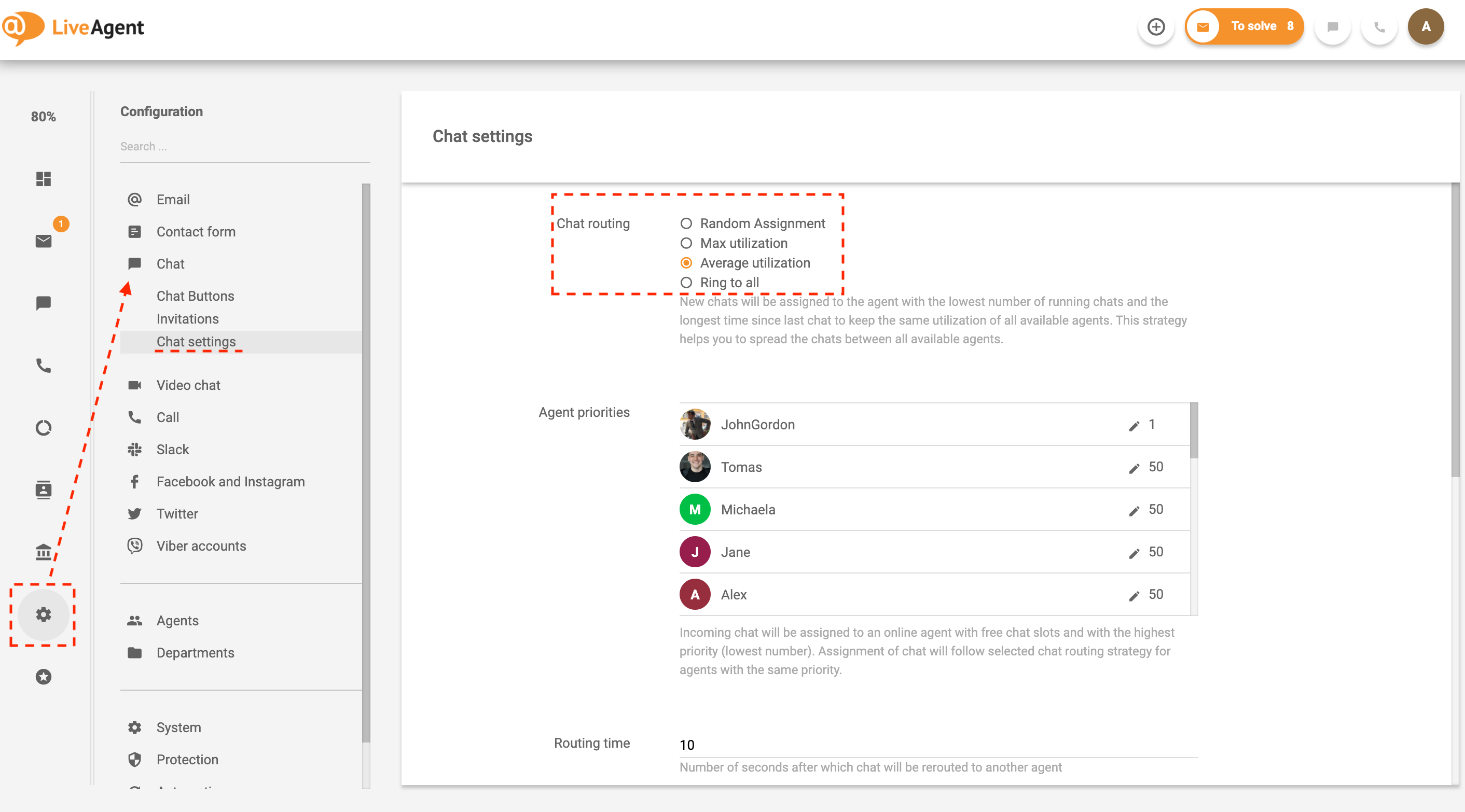
LiveAgent provides multiple ways of Live Chat routing and distribution. You can choose from predefined route options such as:
To ensure fast and accurate communication, LiveAgent assigns Chats to Agents who’ve had previous communication with chatting customers. Besides random assignment, there are also 3 other options for advanced chat routing.
New Chats will be assigned randomly to one of the Agents available for Chat. This strategy helps you to, on average over time, assign the same amount of chats to each of your Agents.
New Chats will be assigned to the Agent with the lowest number of running chats to keep the same utilization of all available Agents. This strategy helps you to load a balanced number of concurrent Chats between all available Agents.
New Chats will be assigned to an Agent with the highest number of running Chats to keep utilization at maximum. Once the Agent has no free chat slots, a new chat request will be routed to the next available Agent. This strategy helps you to maximize the load for chatting Agents and let other Agents work on offline Tickets.
New Chat will notify all Agents available for chat until one of them answers.
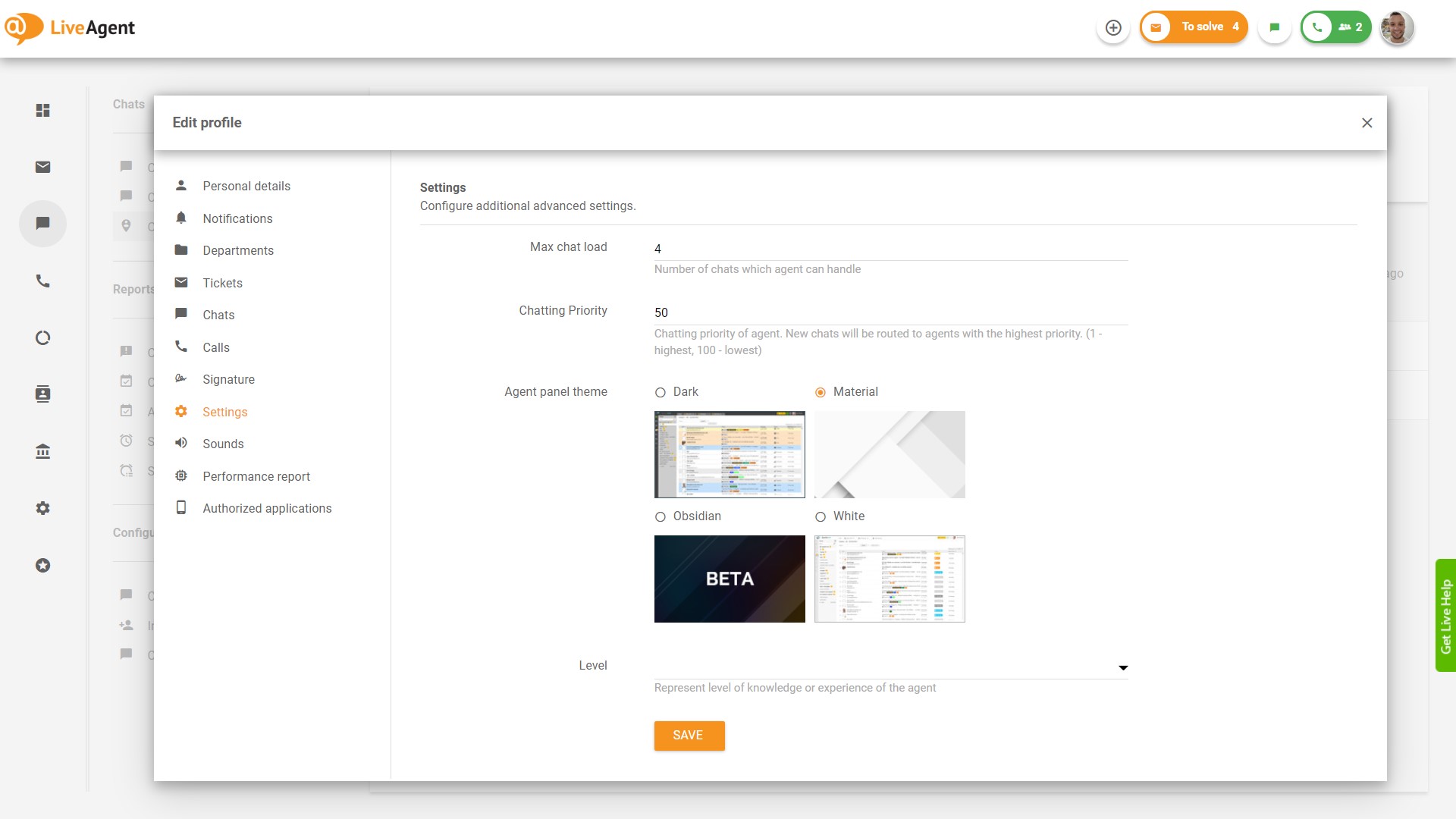
Define the number of Chats an agent can handle.
Setup a lower or higher chatting priority for a specific agent. New Chats will be routed to Agents with the highest priority. (1 – highest, 100 – lowest.)

The latest tips and deals delivered straight to your inbox.
Chat priority routing is an essential feature that ensures that customer inquiries are handled efficiently by routing chats to the most suitable agent based on priority levels. In LiveAgent, this allows administrators to assign different priority levels to agents, ensuring that high-priority chats are directed to agents with the necessary expertise or availability first. This method of prioritization ensures quick response times and enhanced customer satisfaction, as critical chats receive immediate attention. Agents can be assigned priorities ranging from highest to lowest, with the system automatically routing new chats to the highest-priority available agent.
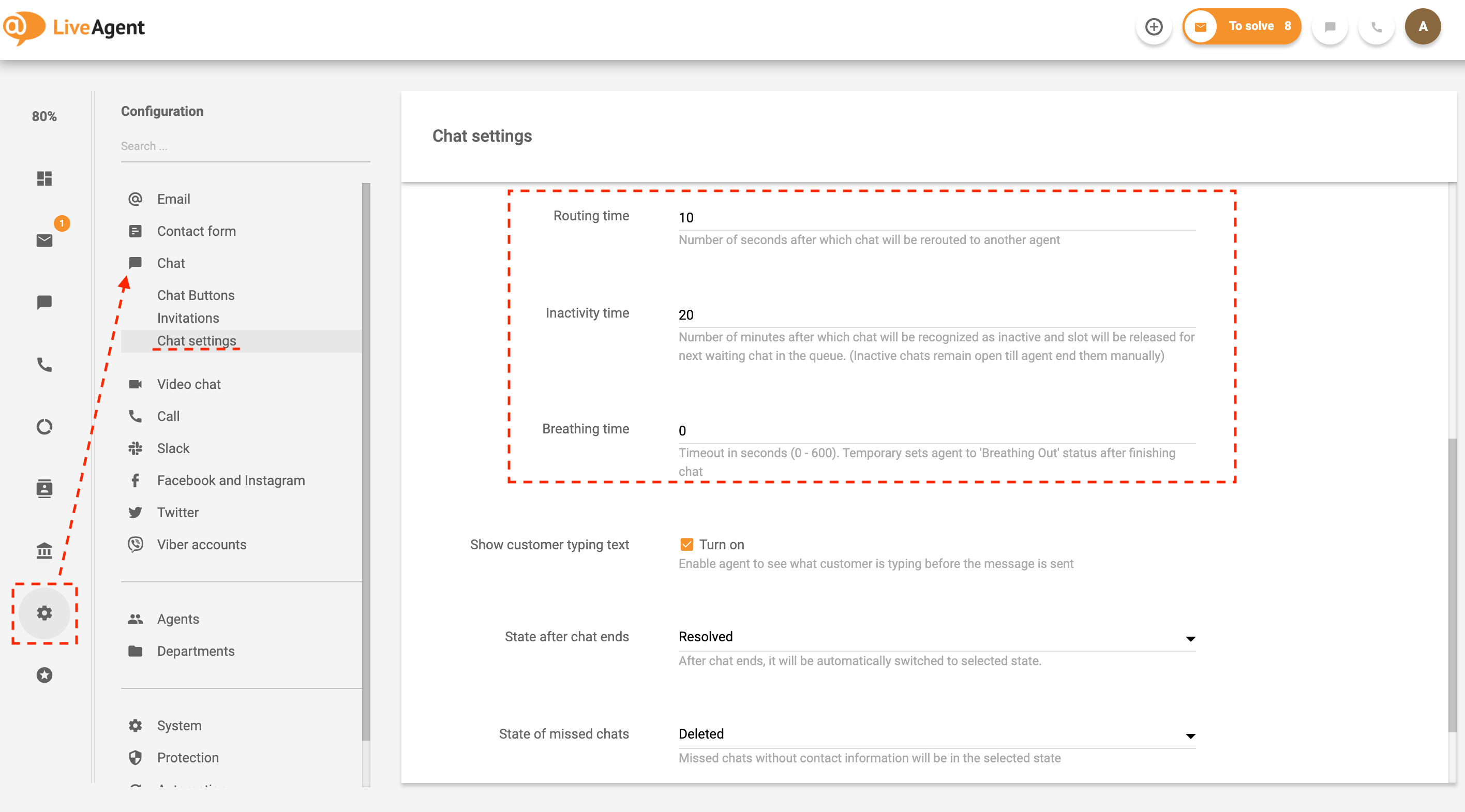
Prevent unnecessary waiting time with the Routing time feature. The routing time setting allows you to choose a preferred time (in seconds) after which the chat reroute if the initial agent isn’t responsive/available.
Set an inactivity time to automate your chat inquiries to the max.
Set up a ‘Breathing time" and give your agents space to get ready for the next visitor/customer.
LiveAgent Live Chat has many features to improve the overall customer experience and efficiency, besides Live Chat routing and distribution.
Easily find out the customers’ previous inquires with the Chat history feature and provide fast and effective support. Explaining a problem/situation again can be frustrating for the customer. This feature can prevent unnecessary frustration and confusion.
Learn more about Chat history feature.
Be ready to assist your customers throughout the whole customer journey with proactive invitations. This useful feature can be helpful for websites that might be experiencing a high bounce rate. By proactively inviting customers to chat, they can prevent this by offering assistance. Regardless, this feature is simply a great addition, giving your company a competitive advantage.
Learn more about the Proactive chat invitations feature.
LiveAgent has a separate section for online visitors. These are the visitors that are currently browsing your website. You can find out information such as the visitor country, the current URL, referrer, and more. The more information you have, the better customer service you can provide.
Learn more about the Online visitors’ feature.
Check out our step-by-step guide on How to create a chat button for your website .
If you would like to learn more, read about all Live Chat features – LiveAgent .
Automated ticket distribution in LiveAgent assigns help desk tickets to agents based on predefined rules, enhancing efficiency and reducing errors. It offers me...

LiveAgent's real-time chat tool enhances customer interaction with instant responses, boosting satisfaction and conversions. Features include mobile chat, file ...

Boost customer support with LiveAgent's advanced chat tool! Enjoy real-time communication, screen sharing, and a free 30-day trial today.