



Professional call recording software
Discover LiveAgent's top-rated call recording software for 2024, offering crystal-clear sound, unlimited recordings, and no setup fees. Perfect for quality assu...
30 min read

Call detail records (CDRs) capture metadata about phone interactions in contact centers. They provide insights for billing, reporting, and productivity. LiveAgent offers call recording software, aiding in efficient CDR analysis for enhanced business operations.
Call detail records, or CDR for short, are types of metadata that capture the information about phone interactions in your contact center. These can be inbound and outbound calls as well as text messages on your telephone system. Call detail records allow businesses to analyze and better understand the ins and outs of the phone interactions their contact centers have. CDRs are available for analysis on all your connected devices – including mobile phones and other devices.
Data on all incoming and outgoing calls are collected regularly to be processed for various diagnostic, usage, and capacity reporting purposes.
Call detail records are also an important resource for billing purposes as they specifically pinpoint the usage of telephone systems in companies that rely either on VoIP or traditional telephony to conduct their business.
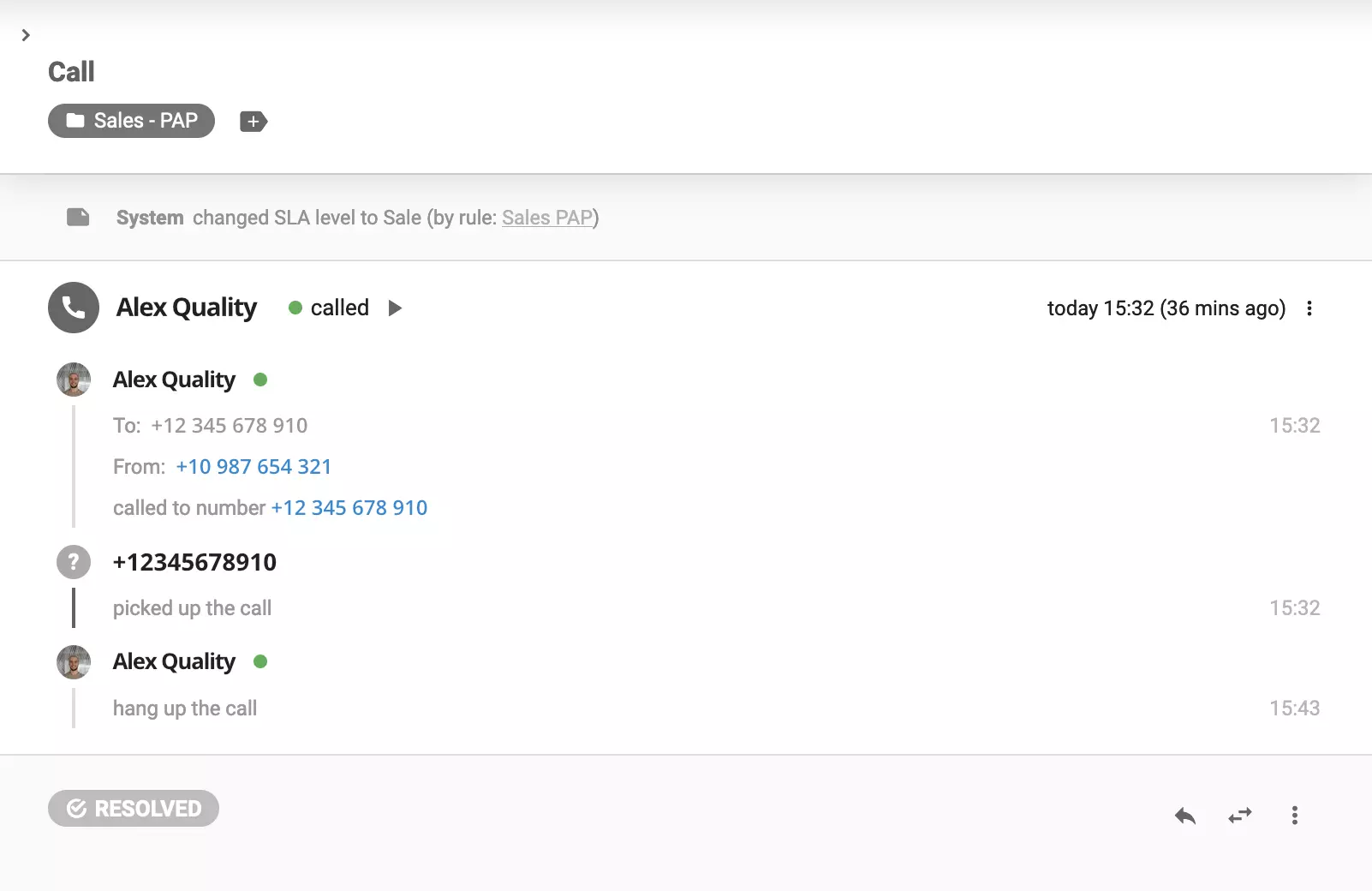
There are two ways through which you can log calls:
Call detail records are generated by dedicated software. Once CDR files are created, they are stored in a database where you can later access and analyze them. Some companies with a greater volume of phone interactions may use software to generate, store, analyze and create reports on contact center metrics including CDRs.
Call detail records were initially developed by telecommunications companies solely for billing purposes. However, as the needs of modern businesses progressed, call detail records started becoming an integral part of many contact center operations.
CDRs are considered one of the most significant VoIP call metrics. If you want to stay on top of your goals and KPIs and keep consistent results, you should analyze them regularly.
Here are some of the key benefits call detail records can bring to your business:
Billing purposes – Your telephone service provider can estimate how much they are going to bill you for a time period. Furthermore, if any issues or discrepancies arise, CDRs provide easy and accessible digital evidence that helps resolve them quickly and efficiently.
Reporting – There are many reports that can be generated in a contact center environment. This includes communication activity, actual call performance metrics, the activity of users, and VoIP call metrics are all crucial for running an efficient contact center.

Planning – Analyzing call center metrics as well as call detail records themselves allows you to better estimate future activities. Using this information, you can make more informed decisions about campaigns, allocating budgets, etc.
Staying organized – CDRs are a convenient way to keep all the telephone call records of your activities organized and accessible whenever you need to have a look at them.
Productivity tracking – Staying focused and productive is one of the most crucial parts of running a successful call center. CDRs allow you to track and measure the productivity of your employees, phone systems, as well as the whole business.
Insights – CDRs can uncover issues with your VoIP service that you might have otherwise missed. Moreover, they allow you to better understand other KPIs of your contact center for improvement.
Spotting trends – You can use this data to not only uncover trends that you can use to improve your business (e.g. most active time of day to make calls) but can also detect any anomalous activities or abnormal behavior that may occur. Some abnormal activities can be a natural part of the contact center environments, but you might want to look into them further if you find that they are repeating themselves.
Budgeting – CDRs provide great insights into how much your company spends on the phone systems. When you have a detailed understanding of your call center’s day-to-day activities and operations you are able to better allocate your resources. This way you can ensure that you are running an efficient business without wasting money.
Discovering security threats – These records allow administrators to flag and investigate any fraudulent activities that might otherwise remain unnoticed.
Even though call detail records can often be included in various contact center reports, they provide a great deal of data on their own.
Let’s have a look at what information you can discover when studying call detail records in your contact center.
While CDRs store metadata – the data about data – on phone calls or even SMS messaging, they do not reveal the contents of those interactions. However, if you’d like to analyze your call recordings, LiveAgent call recording software is the one for you.
LiveAgent allows users to efficiently conduct call detail record analysis by providing access to CDR records for both inbound and outbound calls. This feature helps contact centers analyze key call details like call duration, source, destination, and costs. With these insights, businesses can enhance performance tracking, billing accuracy, and overall operational efficiency.

The latest tips and deals delivered straight to your inbox.
This intuitive process makes call detail record analysis simple and accessible, providing businesses with all the essential data for performance improvement.
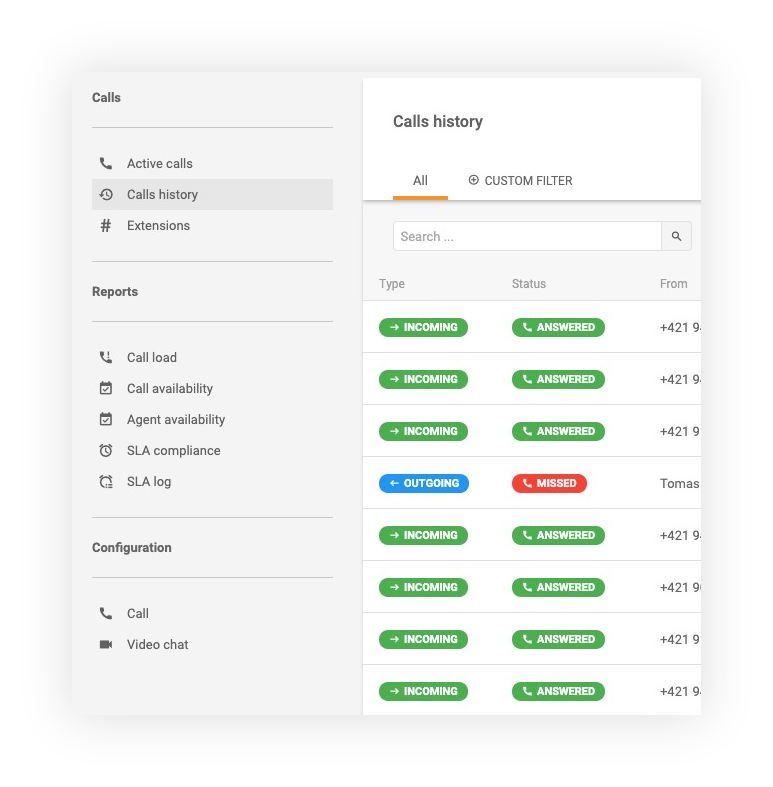
There are two very easy ways to check call detail recordings using LiveAgent:
The first option:
From here you can see the CDRs with all the included data.
The second option:
This way you can not only see the CDRs but also other ticket details regarding given customer interaction.

If you want to take your contact center’s operations to the next level, sign up for a 30-day free trial right now. No need to provide your credit card information.
Discover LiveAgent's top-rated call recording software for 2024, offering crystal-clear sound, unlimited recordings, and no setup fees. Perfect for quality assu...

Call center software manages customer support, sales, and telemarketing, streamlining processes and boosting productivity. LiveAgent offers a top-rated solution...

LiveAgent's Unlimited Call Recordings store every call securely for training, compliance, and support—no storage limits. Try it free for 30 days!