



Customer Interaction
Effectively managing customer interactions is key to building strong relationships and enhancing satisfaction. Learn how to streamline communications with real-...
3 min read
Customer support
Customer service
+2


Ticket priority is the level of urgency assigned to a customer support ticket, helping teams allocate resources efficiently and ensure urgent issues are addressed promptly.

Ticket priority is the level of urgency assigned to a customer support ticket. Each ticket is automatically assigned a level of priority based on preset SLAs. The higher the help desk priority level, the faster the resolution times are required according to SLAs. This helps support teams prioritize their workloads and allocate resources accordingly.
When it comes to managing customer inquiries, ensuring that urgent issues are promptly addressed is key. That’s where help desk ticket priorities come into play.
We will first delve into what ticket prioritization is all about, covering the concept, setup, and benefits of help desk priorities, as well as the role of Service Level Agreements (SLAs). Then, we’ll share best practices for effectively utilizing ticket priorities in a help desk environment. To bring it all to life, we will look at some real-life examples of how implementing ticket priorities can enhance customer support workflows.
When a new customer inquiry comes in, determining the level of urgency and prioritizing it accordingly is key. By establishing a clear process, you’ll be able to ensure that urgent issues receive the attention they need, and you will be able to provide timely assistance to your customers.
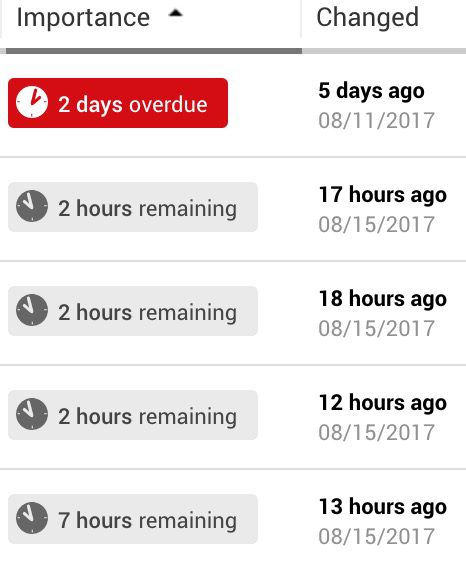
Although different systems let you choose from slightly different priority levels, let’s look at what are the different types of priorities in a service desk and which are some of the most common support ticket priority levels:
So, what is a high-priority ticket? This type of priority is used for time-sensitive issues that require immediate attention and faster resolution times. These may include circumstances such as website outage, security breach, or any situation where customers are unable to use the product or service. However, this option is not always available for free trial users or in cheaper subscription tiers. In LiveAgent, you can set up SLAs and configure ticket priority when using a free trial account.
Issues with this ticket priority level are important but not necessarily critical, such as a bug in the software that is affecting some users. These tickets generally require timely response and resolution, but the impact of the issue on the customer/business is not as severe.
This is used for common issues or feature requests that can wait, such as a typo on a webpage, a customer request for a feature improvement or non-essential issues that do not have any significant impact on the customer/business.
Some customer support ticket systems allow clients to set custom ticket priority levels, which can be useful for specific types of issues. For example, a customer may want to set a ‘refund request" priority status for issues related to returns and refunds.
In LiveAgent, you can add tags to tickets to indicate their priority. For example, tags like “Urgent” need to be handled promptly, as they might threaten a business’ smooth operation. Depending on your particular use case, you can create new tags that you can assign to tickets. This is a useful feature because it can perfectly align with your business requirements.
Using ticket priorities in your help desk brings numerous advantages that can enhance your customer support process. Let’s explore some of these advantages:
Assigning ticket priorities can help you allocate your support resources more effectively. Tickets that are marked as ‘high priority" can be promptly addressed by your more experienced agents, ensuring that these issues receive immediate attention. Meanwhile, tickets with medium or low priority can be handled by junior team members.
For example, a customer whose website is down due to a technical issue should be marked as a high priority issue. By doing so, you can ensure that a skilled technician is assigned to resolve the problem, avoiding any further impact on the customer’s business.
Customers expect quick responses to their queries. These expectations vary from customer to customer and from industry to industry. For example, according to SuperOffices, 46% of customers expect companies to respond in 4 hours or less, and 12% expect a response within 15 minutes or less.
When companies prioritize incoming tickets by their severity, they can first address critical issues and resolve them as quickly as possible. Resolving first priority tickets leads to faster ticket response times and more efficient support for the entire user base. This can also lead to increased customer satisfaction and loyalty.
Ticket priorities help organize and streamline your support workflows. Categorizing tickets based on their urgency allows your support team to efficiently prioritize their workload. It prevents urgent issues from getting lost and ensures that resources are allocated appropriately.
For example, let’s say your customer support team receives a sudden influx of tickets after a new product release. By focusing on high priority tickets related to critical bugs, you can ensure that they are addressed first, minimizing any further disruptions.
American Express research shows that one-third of consumers would consider switching companies after just one bad customer service experience. Therefore, prioritizing tickets can prevent customers from leaving, as it contributes to delivering an exceptional customer experience. When you continuously resolve high-priority issues on time, customer satisfaction and overall loyalty will rise. On top of that, customers who receive prompt and efficient support will likely continue doing business with you and even become brand ambassadors.
By focusing efforts on high and medium priority tickets, agents can efficiently address important issues without losing valuable time on lower priority inquiries. This targeted approach results in faster ticket resolution.
When a customer submits their ticket, either your agents or predefined automation rules route the ticket based on various factors, including its priority level. In some cases, the software may also use the priority level to determine the order in which tickets are addressed.
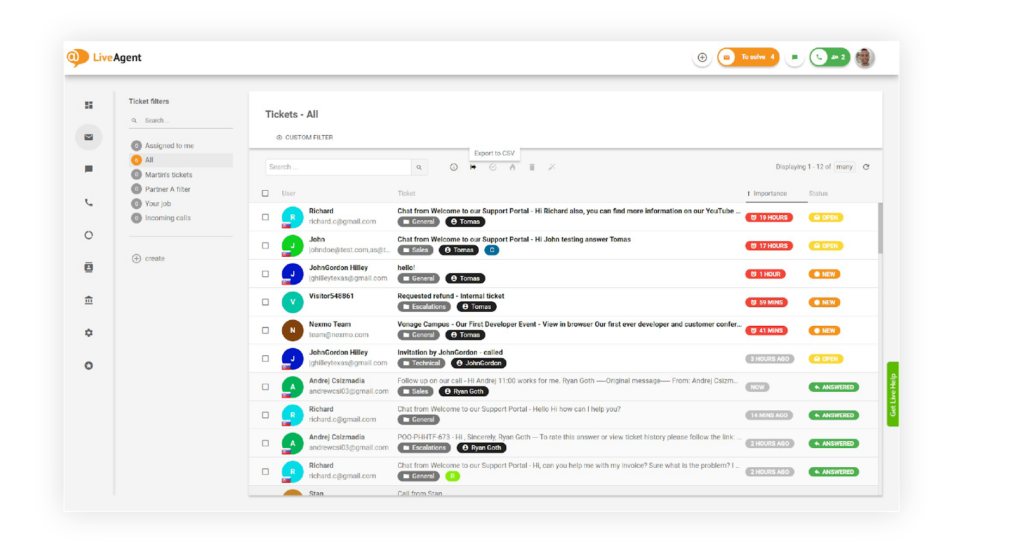
In LiveAgent, you can prioritize tickets by creating customized rules and tags that can be assigned to each ticket. Tags are labels that are used to organize and categorize tickets, and differentiate important customer queries to filter them easily.
Creating tags in LiveAgent is easy if you follow this step-by-step process:
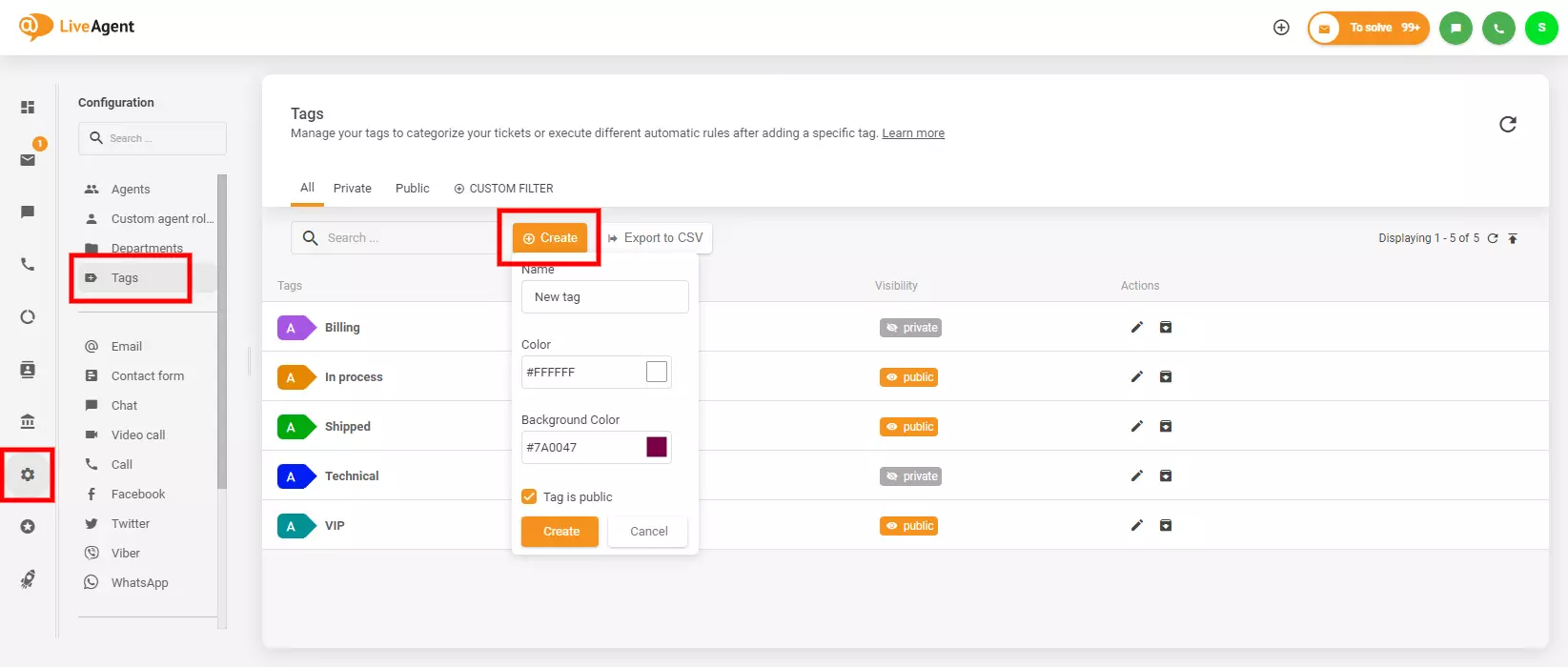
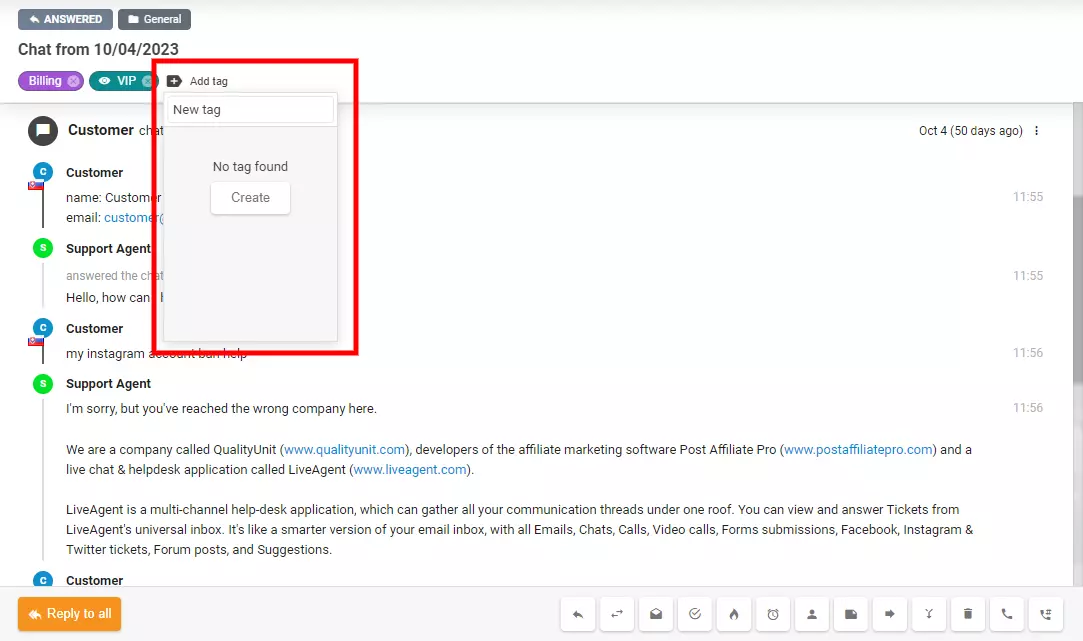
Note: If you want to add tags to your tickets automatically, you can create a rule with the action “add tag” in Configuration → Automation → Rules. To learn more about filtering and archiving tags, you can check our article about ticket tags.
If you want to learn more about how to increase priority of a ticket, you can read more on our customer portal.
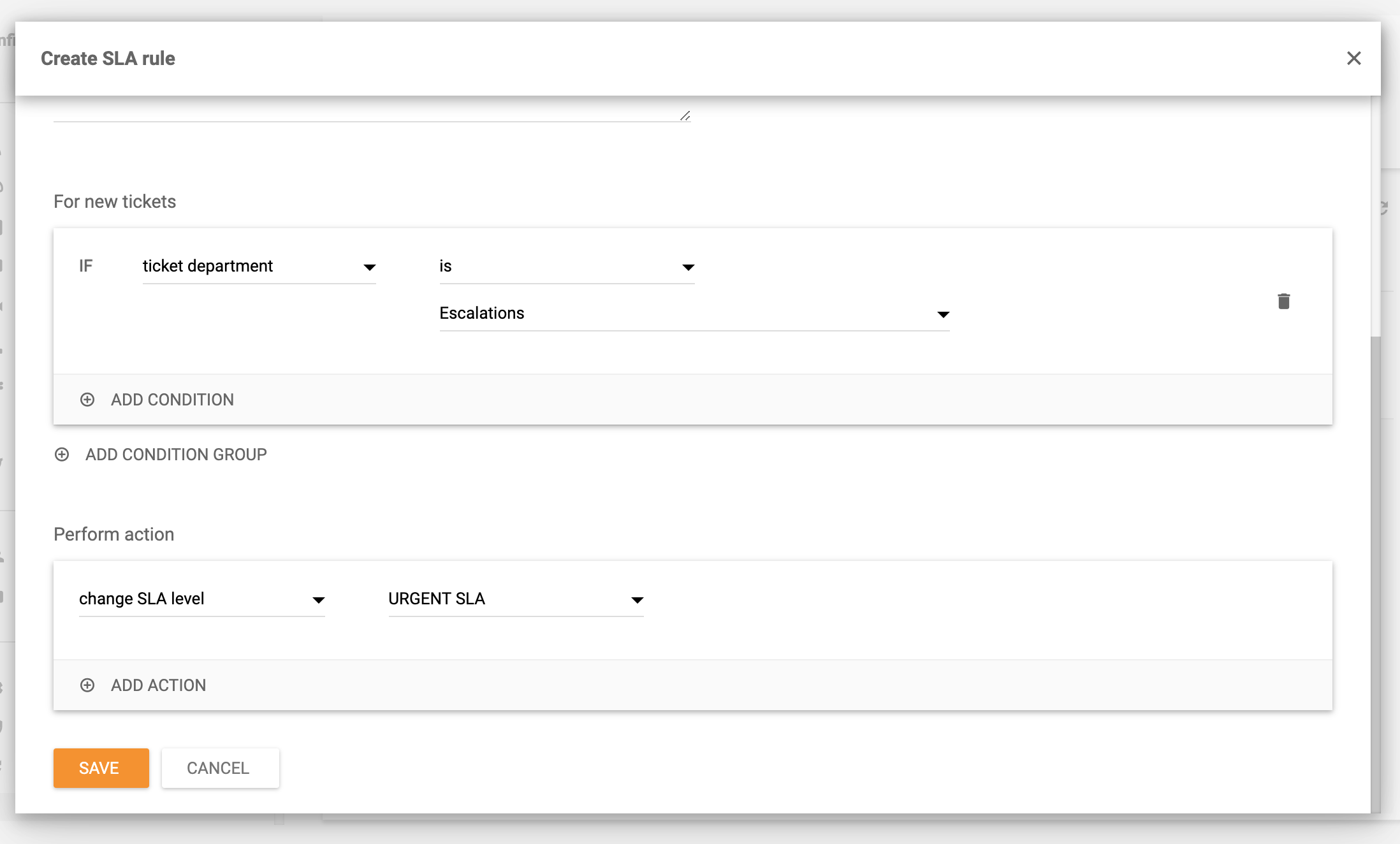
LiveAgent also lets you set up SLA rules. These rules define how fast agents have to answer a customer’s service request. To apply these SLA Levels, you have to assign them to tickets through rules. You can create SLA rules which are applied when a ticket is created, or if you need to apply SLA level.
Here is a step-by-step guide that shows you how to set up SLAs:
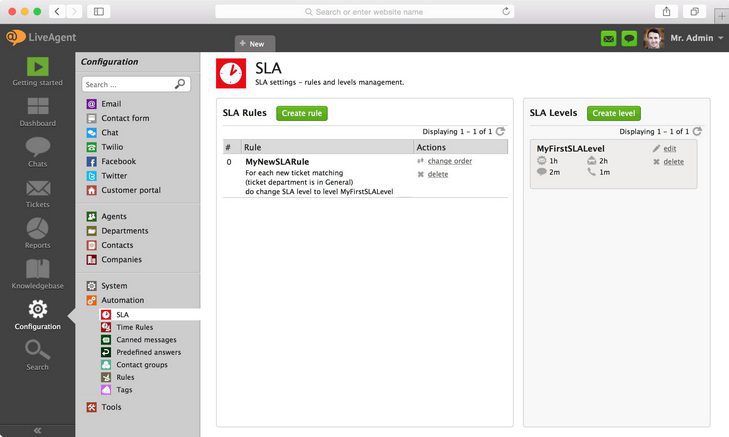
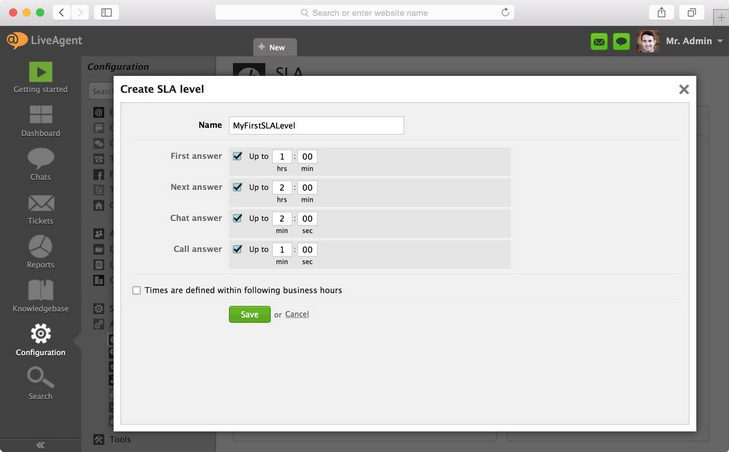
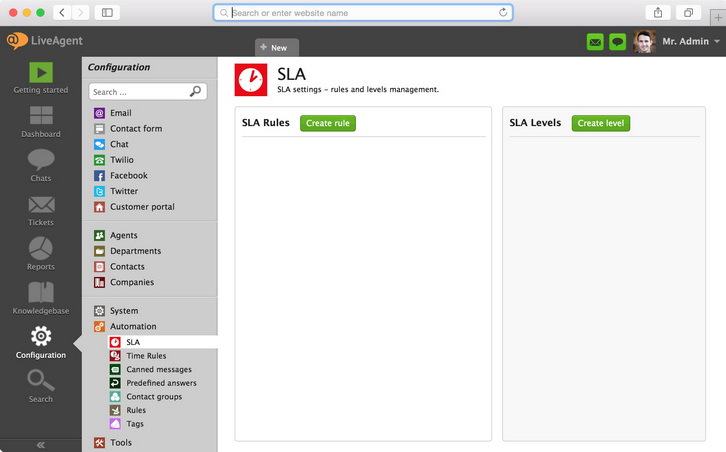
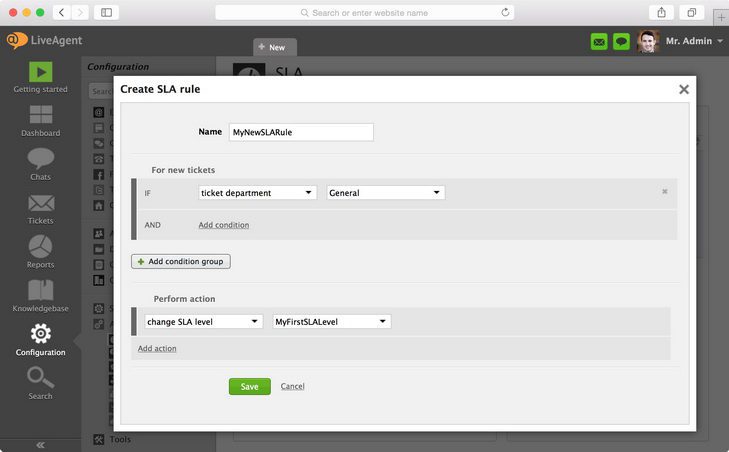
Service-Level Agreements (SLAs) are agreements between a company and its customers that outline the level of service that will be provided. They specify response times, resolution times, and other key performance metrics that reflect the company’s commitment to addressing customer inquiries within a certain time period.

Establishing clear expectations for your customer service team as well as your customers is crucial to provide excellent customer service. That’s why it is crucial to define Service-Level Agreements that allow you to categorize and handle tickets based on their priority levels, as well as set realistic response times.
When you are setting up your SLAs, take into consideration the urgency and impact of the inquiry on the customer’s business. This can prevent high-priority tickets from getting overlooked, and you can make sure that they receive the attention they need and deserve.
It’s also important to regularly monitor and evaluate the effectiveness of your SLAs. By analyzing metrics such as response times, average resolution times, or customer satisfaction ratings, you can identify areas that need improvement. Don’t forget to make adjustments that will better align with the needs and expectations of your customers.
When it comes to managing SLAs, utilizing a help desk software like LiveAgent can greatly streamline the process. LiveAgent offers SLA management features that allow you to define and implement SLAs effortlessly. It also enables automated ticket prioritization based on SLAs, ensuring that tickets are appropriately categorized and addressed.
Another essential thing is to optimize your help desk ticket priority system to be able to quickly identify urgent support issues. Urgent issues are those that require immediate attention, as they have a significant impact on the customer’s experience or business operations.
Examples of urgent issues may include critical system failures, service disruptions, security breaches, major bugs affecting a large number of customers, or instances where a customer is unable to use your product/service. These types of issues should have a high priority level because they have a severe impact on the customer’s ability to function or conduct business.
To facilitate quick identification of urgent issues, you can implement advanced help desk software such as LiveAgent. By creating well-defined criteria for identifying urgent issues and leveraging automation features, you can flag and escalate high priority tickets for immediate attention.
Automation can significantly help with ticket prioritization by eliminating the need for manual processes and ensuring consistent and efficient ticket handling. For example, setting up rules in your help desk software will automatically assign help desk ticket priority levels based on your predefined criteria. This can include keywords in the ticket description, the customer’s subscription level, or the urgency indicated by the customer.
Using artificial intelligence for analyzing the content and context of tickets to determine their urgency and impact on the customer can also be very beneficial. It can assess the importance of the issue based on language used in the ticket, keywords, or historical data.
AI can also help you optimize ticket prioritization by providing intelligent recommendations to support agents. It can suggest appropriate responses or actions based on the ticket content and priority level. This can improve response times and help agents provide more accurate solutions.
Promoting self-service through a comprehensive knowledge base can reduce the number of lower-priority tickets that your customer service department needs to handle. By empowering your customers to find answers or resolve common issues on their own without submitting a support ticket, you free up your support team and give them time to focus on more complex issues.
A knowledge base is a centralized repository of information such as FAQs, troubleshooting guides, video tutorials, step-by-step instructions, and more. By offering a well-organized and easily searchable knowledge base, you provide customers with a self-service option that enables them to find solutions to their problems quickly and independently.
You can create a user-friendly and customizable customer knowledge base using LiveAgent’s knowledge base software that will help you maintain a well-structured repository of information. With features like article categorization, search functionality, and easy content editing, LiveAgent simplifies the process of creating a self-service resource for your customers.

Understanding the context of issues is crucial for smarter prioritization. It involves gathering and analyzing relevant information about the customer, their history, and the specific issue they are facing. It helps you better assess the urgency and impact of the problem on the customer. This allows you to prioritize tickets accurately based on the overall situation, rather than solely relying on predefined criteria or general guidelines.
These are the things to pay attention to in order to gain a good understanding of the issues:
Effective internal communication ensures that all members of your support team are aware of how tickets should be prioritized and handled. It promotes consistency and efficiency within your support team. When everyone understands the prioritization processes, they know exactly how urgent issues should be addressed, resulting in a streamlined workflow.
Here are some key aspects that should be communicated:
To enhance priority management in your help desk ticket system, employing technological solutions can be highly effective. Advanced software, such as LiveAgent, offers features designed to improve ticket prioritization and priority management.
Ticket tags and labels: LiveAgent lets you assign tags or labels to tickets based on their priority level, urgency, or other specific categories — allowing you to easily identify and sort tickets.
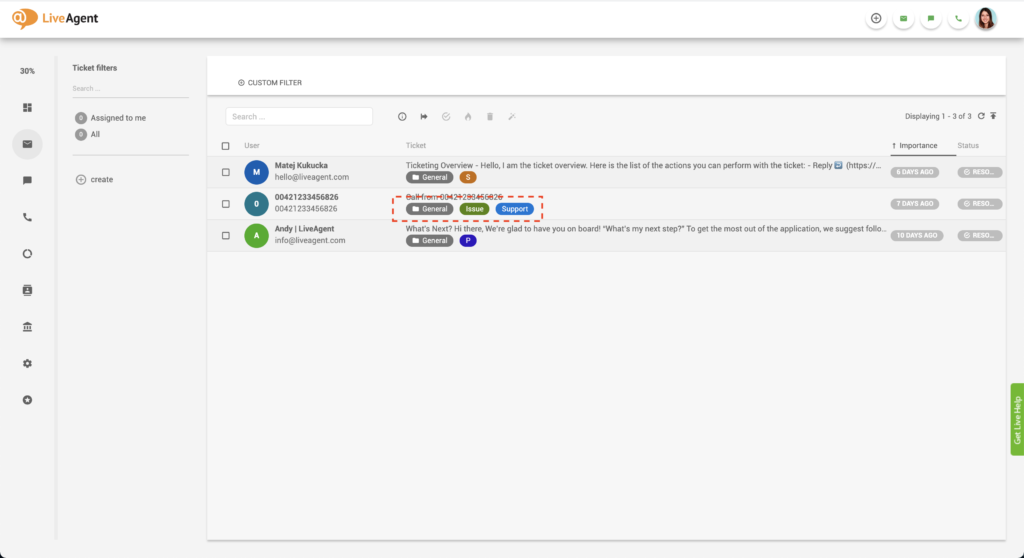
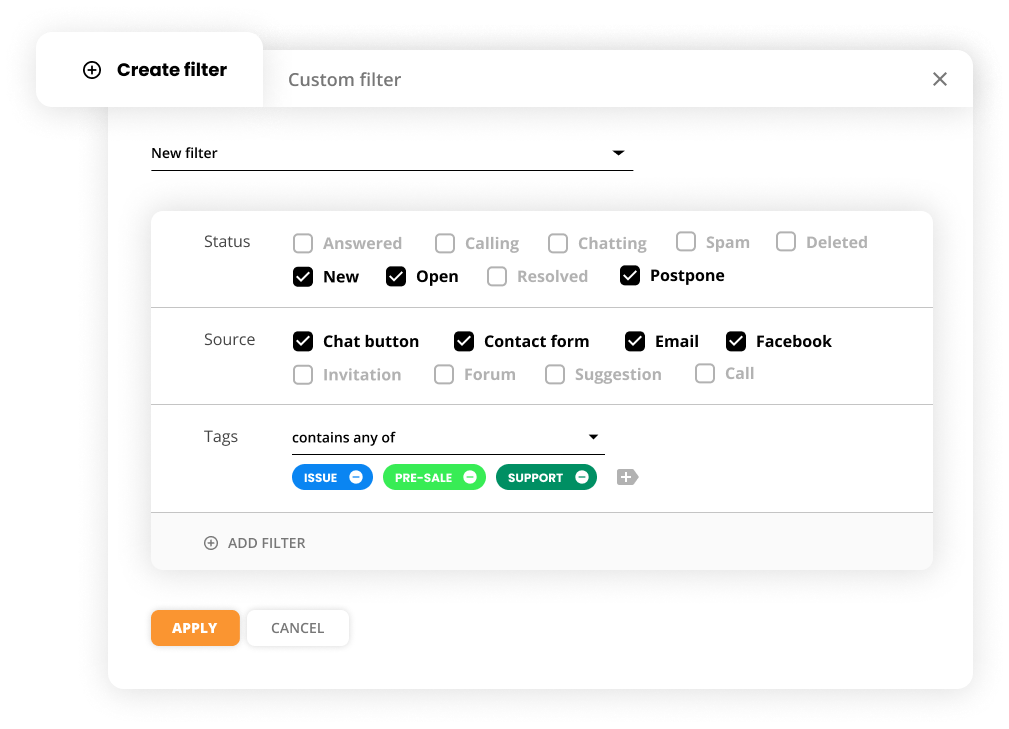
Ticket filters: LiveAgent enables you to create and apply custom ticket filters to prioritize tickets based on different criteria such as priority level, status, or specific customer segments.
SLA management: Comprehensive SLA management features are there to help you easily define, track, and enforce SLAs. You can set specific response and resolution times for different priority levels.
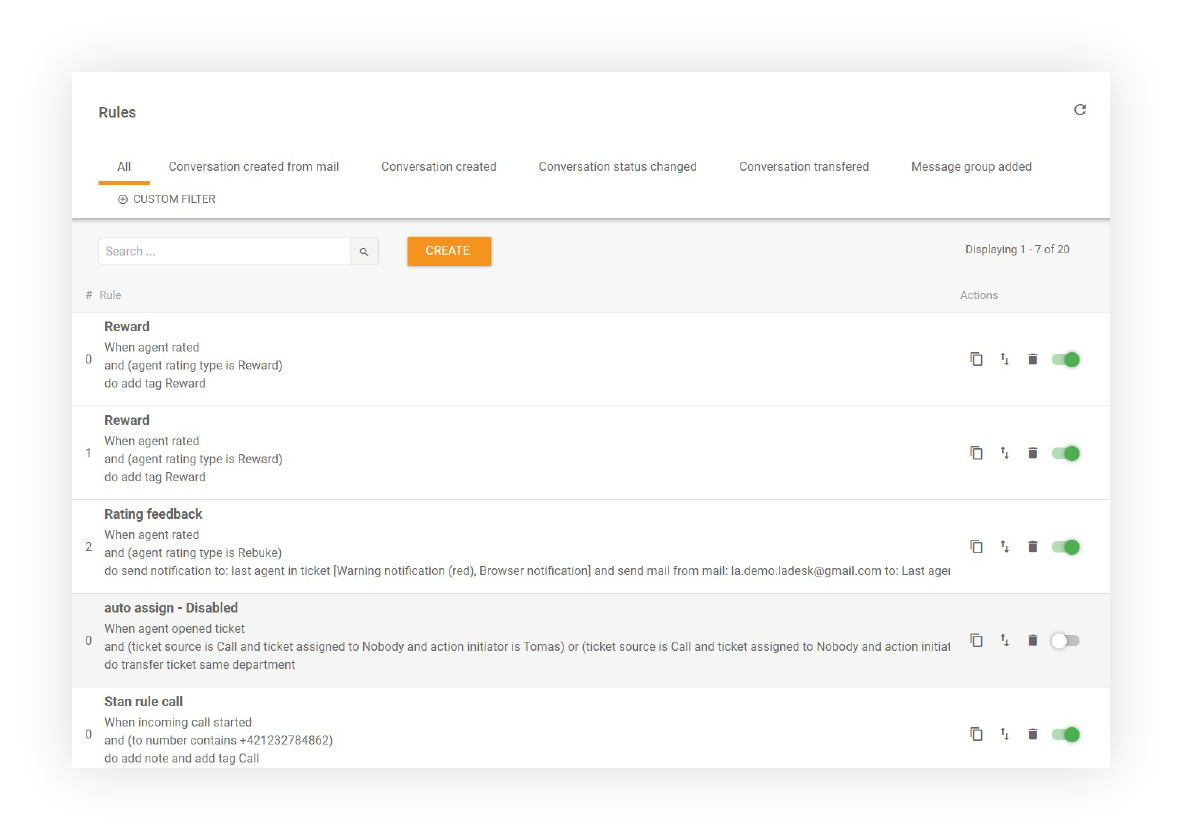
Automation rules: Incorporating automation can help you streamline priority management by automatically assigning helpdesk ticket priority levels based on predefined rules. This saves time and ensures consistent and accurate ticket prioritization.
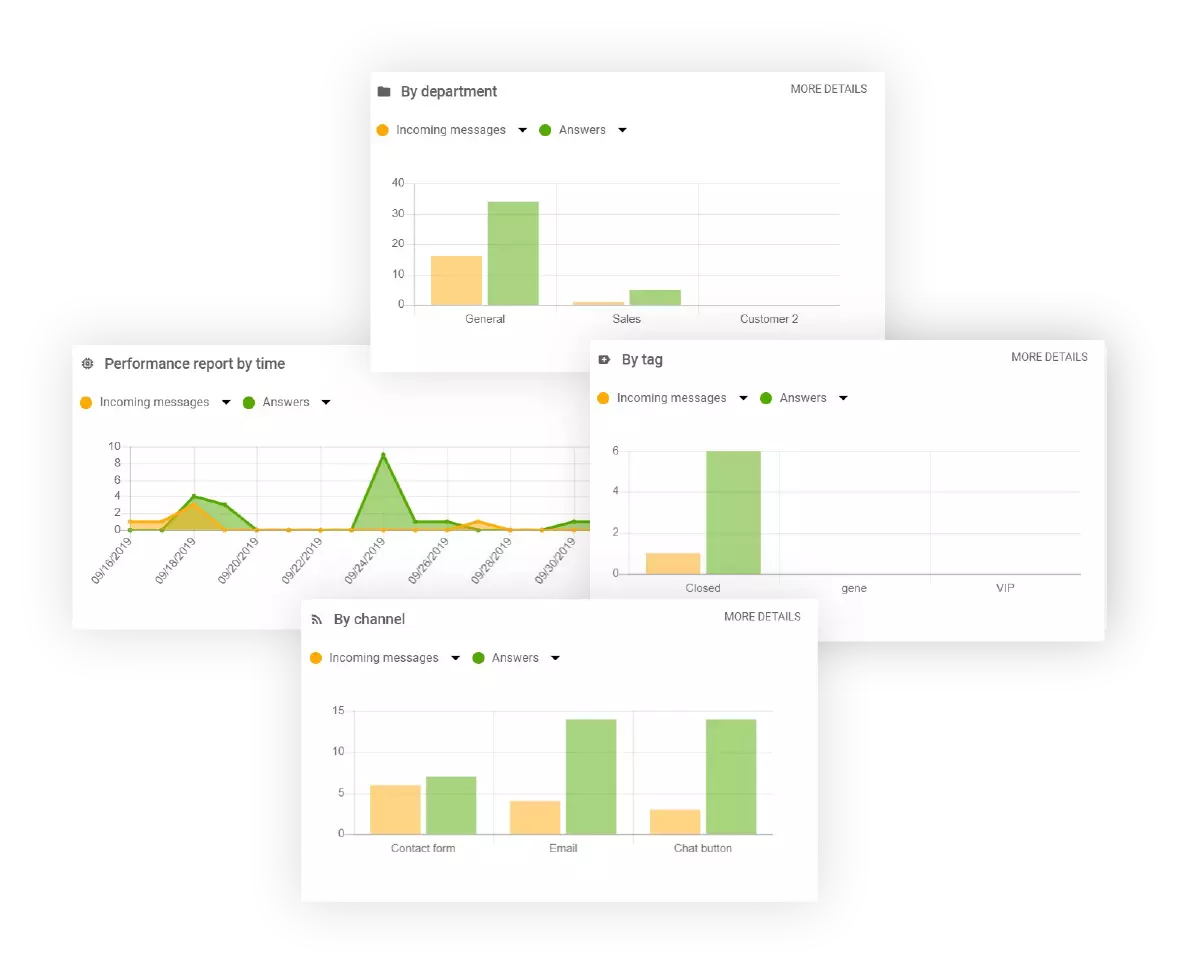
Analytics and reporting: LiveAgent provides detailed analytics and reporting functionalities that allow you to gain insights into response times, resolution times, and customer satisfaction, helping you identify areas for improvement and optimize your priority management strategy.
To show you how ticket prioritization works in practice, we include examples of how we use different ticket levels in LiveAgent.
Ticket prioritization is a crucial aspect of efficient customer support in LiveAgent. By marking tickets as “high priority” or “urgent”, agents can identify and address critical issues promptly. Here are some examples of issues that can be tagged as “high priority” or “urgent” in LiveAgent:
When a ticket is marked as ‘high priority", it lets agents know that they need to prioritize it over less important tickets. We use this tag for VIP clients, or any other clients that encounter a serious problem. However, it is worth noting that some high priority issues may require additional time for analysis in order to find the best solution.
Additionally, tickets tagged as “urgent” indicate issues that have a significant impact on a customer’s business and operations, making them even more critical than high priority cases.
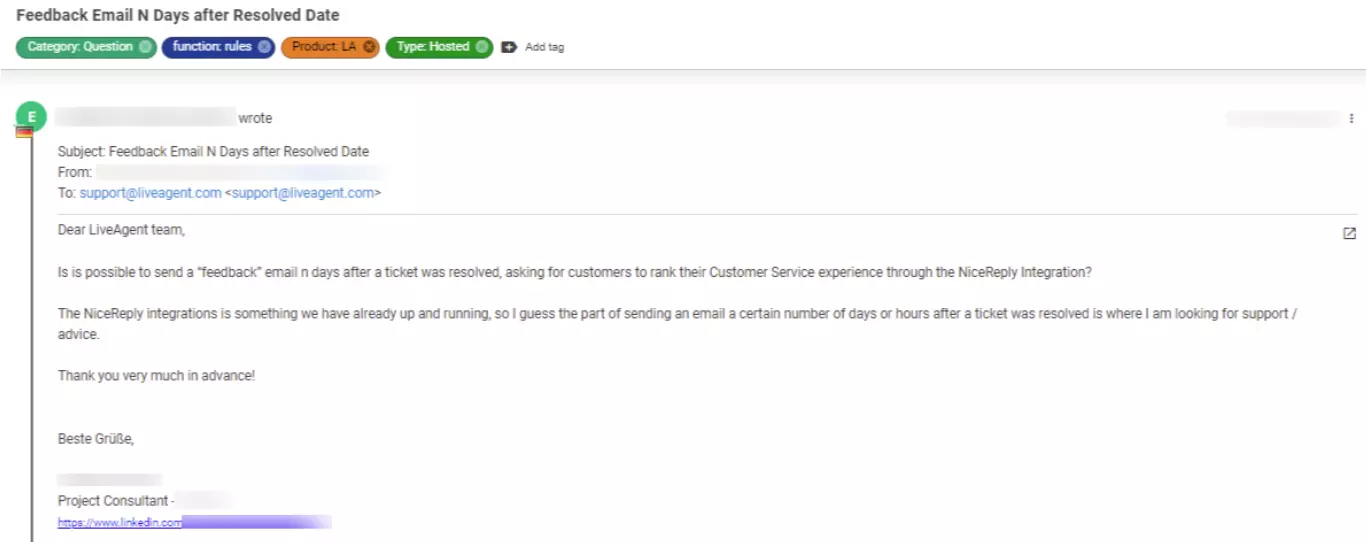
In LiveAgent, we don’t mark tickets as ’low priority". Any ticket that is not marked as “high priority” or “urgent” is considered a low priority ticket. These tickets still require attention and resolution but do not need immediate action, as they do not have a significant negative impact on the customer. Here are some examples of low priority issues:
In summary, in this article we started by understanding what ticket priority is and discussed how to set priorities for new tickets, categorizing them as high, medium, or low based on their urgency and impact. We also explored multiple advantages of using ticket priorities, including efficient resource allocation, improved response times, enhanced customer experience, increased productivity, and streamlined workflows. These benefits contribute to higher customer satisfaction and loyalty.
Furthermore, we provided you with a step-by-step guide on how to set up ticket priority in LiveAgent, and touched upon the role of Service-Level Agreements (SLAs) in ticket prioritization. We explained how SLAs help shape customer expectations, guide response times, and ensure the timely handling of tickets. Aligning ticket priorities with SLAs is essential for meeting customer commitments and maintaining transparent communication.
To optimize your help desk ticket priority system, we discussed best practices that enable efficient resource management, improve customer satisfaction, and enhance support team performance. And at the end, we provided real-life examples to illustrate the effectiveness of ticket prioritization in various scenarios, showcasing its impact on customer experience and business outcomes.
Are you ready to optimize your help desk ticket priority system? Then take advantage of LiveAgent’s 30-day free trial and discover how it can transform your customer support processes.
Streamline your support workflow with LiveAgent's advanced priority management, SLA automation, and smart ticket routing capabilities.
Effectively managing customer interactions is key to building strong relationships and enhancing satisfaction. Learn how to streamline communications with real-...

Learn 12 best practices for optimizing ticketing systems, including agent training, ticket prioritization, and automation. Enhance support efficiency with examp...
Learn about ticketing systems, their features, benefits, and real-life examples. Streamline customer support and boost efficiency today!
Join our community of happy clients and provide excellent customer support with LiveAgent.
