


VoIP Software
Discover cost-effective VoIP software with features like video calls, screen sharing & call recording. Enhance communication & save more today!
4 min read
VoIP
Communication
+2


QoS VoIP is a technology that enhances voice call quality by reducing jitter, optimizing bandwidth, and prioritizing voice traffic over other network uses.

QoS VoIP means Quality of Service for Voice over IP. It is a technology that was created to solve common problems with VoIP calls by reducing jitter, optimizing bandwidth, and ensuring reliable voice transmission even when network resources are limited.
The term QoS VoIP means “Quality of Service for Voice over IP.” Quality of Service technology was created to solve common problems with VoIP. Sometimes, you may have limited Internet bandwidth if other people in your business or home use the Internet. When your VoIP call competes with other users, your call might stall, suffer from a jitter effect, and overall degradation of voice quality. Using Quality of Service technology can reduce jitter and optimize your bandwidth.
QoS VoIP is one of the most powerful ways to improve the quality of VoIP calls. By implementing QoS policies, you ensure that voice traffic receives priority treatment on your network, resulting in clearer, more reliable conversations regardless of other network activity.
Strictly speaking, QoS is not required to make VoIP calls. QoS for VoIP is a way to enhance the voice quality to an acceptable level. Without this technology, your call might suffer problems due to packet loss, especially if other users are using video conferencing or other bandwidth-intensive applications.
As you speak on a VoIP call, your conversation is converted to digital information and rapidly transmitted as a series of “VoIP packets.” If some of those VoIP packets are lost during communication between devices, your call may suffer.
If you want to make a good impression on customers who call your branch offices and head office, VoIP QoS technology is a great choice. It demonstrates professionalism and commitment to quality customer communication.
To make high-quality phone calls through a VoIP network, using QoS Policy is an intelligent choice. There are a few requirements to use QoS for VoIP effectively:
Ask your VoIP provider if they offer QoS for phone calls. If your service provider does not offer QoS, you may have to use a different service provider. Many modern VoIP providers include QoS support as a standard feature.
QoS optimizes VoIP traffic across your Internet connection. If your Internet connection has minimal bandwidth, QoS might not help much. As a guideline, the Federal Communication Commission (FCC) in the USA gives a minimum bandwidth recommendation: 25 megabits per second download and 3 megabits per second upload. If there are multiple people in your household or business, it may be best to buy the maximum bandwidth you can afford.
Check the settings on your router to see if it is ready for QoS VoIP. For example, your router might have bandwidth management limits in place. These settings may need to be changed to support QoS.
Once you’re done with using a VoIP test tool to test the service, use the following steps to start your QoS setup for your VoIP phone. Please keep in mind that solving problems like network jitter and poor voice quality can take some experimentation. If you need advanced help, consider contacting the network engineers at your VoIP service provider.
Your router or Internet service provider might have bandwidth limitations or bandwidth limits in place. Network engineers use these limits to ensure that all users can use the Internet effectively, whether they are using mobile devices or computers.
Ask other users in your business or home to moderate their use of streaming services and gaming during business hours. This change alone will boost the quality of your voice calls to an acceptable level in many cases.
To achieve or exceed an acceptable level of quality for voice calls, check and turn on the ‘priority queue" setting. This capability means that voice calls will get priority so that you can make the most of your bandwidth limitations.
Some people are concerned about using quality-of-service technology because of its effect on other people. To understand this concern, let’s consider an example.
The FCC defines the effective minimum bandwidth standard as 25 megabits for download and 3 megabits for upload as the adequate minimum bandwidth.
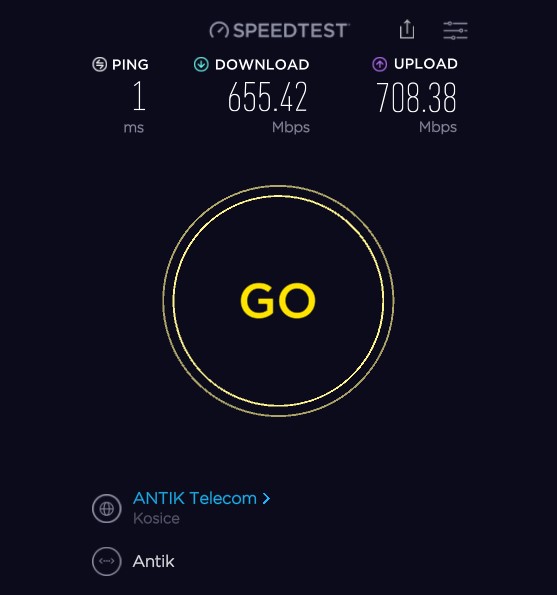
Your situation might be different. For example, take branch offices where you might have multiple mobile devices, video conferencing, and voice calls all happening simultaneously. In this case, bandwidth limitations are more likely to happen. However, in a business setting, poor voice quality on calls with customers is unacceptable. Therefore, it is worth using quality of service (QoS) settings, so that voice traffic has dedicated bandwidth.
Before turning on QoS, announce the change. Informing in advance helps avoid complaints when other network devices suffer. Most business users understand that voice traffic needs to be prioritized over other types of traffic. For instance watching videos on YouTube may need to be slowed down to maintain VoIP call quality.
Since Quality of Service technology requires direction, you have to decide which services get priority treatment. Traffic classes organize your Internet usage into similar groups. For example, you might have one traffic class for voice calls and video conferencing. Email might have its traffic class, and web browsing may have its traffic class.
Take some time to discuss your traffic priorities with other people in your home or business. For example, make a list of all of your network devices: laptops, mobile devices, and a list of every VoIP phone. In a larger company, ask for insight from your network engineers. Once you have compiled the list you can prioritize it.
To minimize the impact of network congestion on voice calls, your QoS profiles should include bandwidth guarantees for voice traffic. If bandwidth guarantees are not available, class VoIP traffic as your number one priority.
Tip: Keep in mind that there are periods of congestion during the day. American wireless network operator, Verizon, has found that weeknights 7-11 pm are typical “Internet peak hours.” During this time, VoIP traffic and video conferencing may not work so well. Without VoIP QoS in place, problems like network jitter may slow down your VoIP packets and disrupt your voice calls.
QoS ensures that voice packets receive priority treatment, resulting in clearer audio and fewer dropped calls. This is especially important for businesses that rely on VoIP for customer communication.
By prioritizing voice traffic, QoS minimizes the delay and variation in packet delivery times, which are primary causes of voice distortion and poor call quality.
QoS allows you to allocate bandwidth efficiently, ensuring that voice calls get the resources they need while still allowing other network activities to function.
Clear, reliable voice calls improve customer satisfaction and build trust in your business communications.
QoS VoIP and help desk software provide organizations with high-quality voice-over IP (VoIP) services while also improving customer service with powerful help desk tools. QoS VoIP makes use of Quality of Service (QoS) capabilities to guarantee specifications such as latency, jitter, packet loss, and bandwidth. LiveAgent help desk software provides organizations with ticketing, chat, knowledge base, and other powerful customer service features. Combined, these technologies provide customers with great voice quality as well as the efficient and fast customer service they expect.

Quality of Service (QoS) for VoIP is an essential technology for businesses that depend on reliable voice communication. By implementing QoS policies, you can ensure that your VoIP calls maintain high quality even when your network is congested with other traffic. Whether you’re running a small business or a large enterprise, QoS VoIP helps you deliver professional, clear communication to your customers and team members.
The key to successful QoS implementation is understanding your network requirements, working with your service provider, and continuously monitoring and adjusting your settings to maintain optimal voice quality. With proper QoS configuration, you can transform your VoIP experience and ensure that voice communication remains a reliable and professional channel for your business.
Eliminate jitter, reduce latency, and ensure professional call quality with optimized VoIP infrastructure and QoS support.
Discover cost-effective VoIP software with features like video calls, screen sharing & call recording. Enhance communication & save more today!
Learn about MOS VoIP, the key metric for VoIP call quality. Discover tips to improve audio clarity and compare providers effectively.
Discover the essential components of VoIP infrastructure, including bandwidth, providers, and phones. Learn how LiveAgent can optimize VoIP for call centers and...
Join our community of happy clients and provide excellent customer support with LiveAgent.
