


Custom Status
Enhance customer service with LiveAgent's custom statuses! Tailor ticket workflows, boost efficiency, and start your free trial today!
2 min read
Customer support
Ticketing
+2


An open ticket is a customer support tool used to track unresolved issues, maintaining communication between customers and agents until resolution. It involves prioritization, assignment, and status updates to enhance customer satisfaction and support efficiency.

A support ticket describes interactions between customers and customer support staff. An open ticket suggests that a customer issue has not been solved yet. The open ticket contains information about the customer's issue and is used to track the progress of the resolution. Agents interact with the customers by responding to these tickets. Once the issue is resolved, the ticket is closed and can be marked as solved.
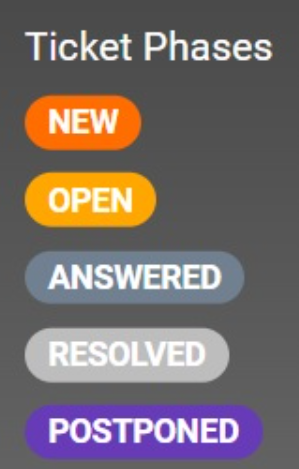
In LiveAgent, the default ticket statuses go as follows: when a ticket comes into ticket workflows for the first time it’s marked as ‘New". After a support agent replies to the ticket it is marked as “Answered” and when the customer replies again it is marked as “Open”. The ticket marked “Resolved” means that the customer issue has been successfully resolved and when it is marked “Postponed” it means that the agent will look into it a bit later and is still waiting for a resolution.
A ticket includes the customer’s full name, contact information, email, and any other relevant details.
A ticket also includes a clear and concise description of the issue that the client is facing. This helps the customer support agent understand what is the exact problem and take appropriate action based on this information.
The priority level determines the urgency of the request. It is mostly used in the helpdesk IT environment. This helps the customer support representatives to prioritize and manage open tickets effectively based on different criteria.
Assigning the tickets to the right customer support representative or department ensures that the issue is handled by a person with the necessary expertise.
It shows the current status of each ticket such as ‘Open, “Answered, and “Resolved”. This helps to keep track of the stage of each ticket to see what further steps need to be taken to resolve the issue.
It contains records of the entire conversations with customers including all updates and any additional information provided by the customer during the resolution process.
By having all information in one place, the customer support team can manage tickets more effectively. It also helps to keep everything more organized for both the customer and the agent.
No matter which approach to customer service you have, overall customer experience and satisfaction should always be at the top of your priorities. If a customer or visitor encounters an issue with a product or service, they can contact the customer support team for assistance. When customer support receives the customer request, it is transformed into a ticket to be able to track and resolve the issue. This is also known as an “open ticket”.
The open ticket serves as a communication channel between the customer and the customer support team. It allows agents to track the entire process until it’s completely resolved and it ensures that the customer’s request is not forgotten or lost. Using these digital ticketing solutions help customer service representatives and it can improve the overall customer experience.
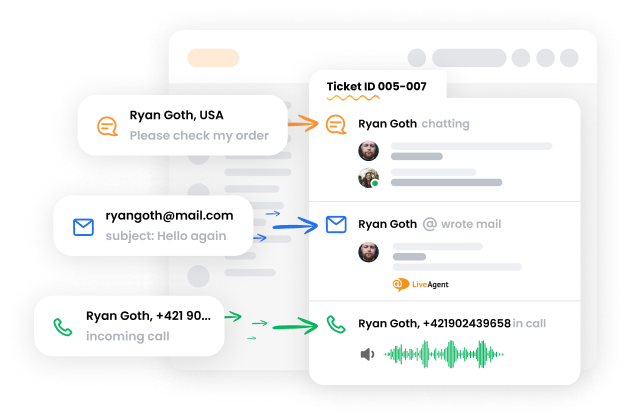
Implementing effective management of open tickets should help your customer support team provide excellent customer service and ensure a high level of customer satisfaction. Customer support ticketing systems should also improve the performance of your team and prevent the accumulation of unresolved tickets. Here are some steps that can help manage open tickets:
Prioritizing open tickets based on their urgency ensures the tickets with the highest priority are addressed first.
The question is how to prioritize tickets and still treat your customers equally as all of them are important for your business.
LiveAgent uses SLA (Service Level Agreement). This agreement sets a certain amount of time that the support agents have to answer or completely resolve a ticket. This resolution time can be different between departments depending on the complexity of the tickets that the department has to deal with.
All incoming tickets should be automatically assigned to the appropriate department or customer service expert to ensure that each ticket is being handled by the right person.
LiveAgent does not provide the option to automatically assign an agent or department to the ticket. However, there is a To Solve button that automatically routes the tickets based on how long they have been unanswered or based on the SLA levels that apply to the tickets. This way, the tickets that have been waiting for an answer the longest, or the customers with urgent issues will be prioritized and routed to agents first.
Tracking tickets and the resolution process should ensure that all open tickets are resolved on time to avoid long waiting times. Therefore all tickets should have assigned status with tags such as “New”, “Open”, “Answered, etc. This makes it more clear and keeps them from getting lost or unanswered.
The open ticket allows clear communication between the customer and customer service agents to ensure clear and organized tracking of the issue until the point of resolution.
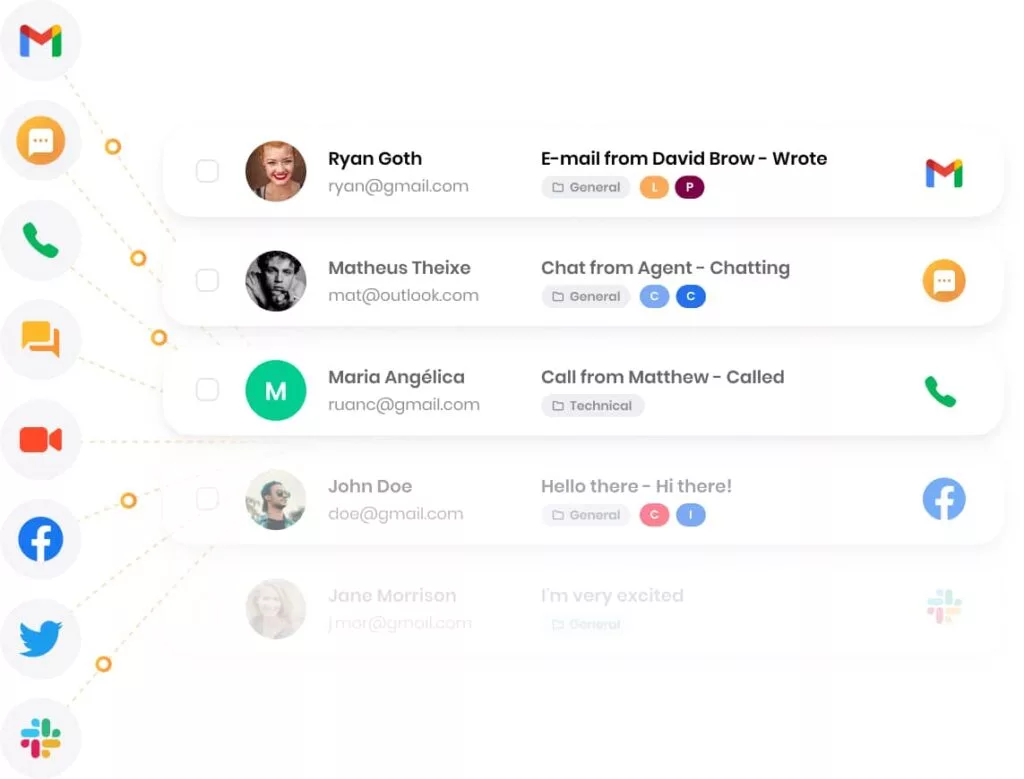
Help desk software is the best ticketing tool to manage open tickets, monitor their status, and track their resolution time. Thanks to many available integrations, it helps to store all tickets from different types of channels in one centralized inbox. Making use of these tools can help streamline the whole process and ensure effective open ticket management.
To change the status of an “Open ticket” into a “Resolved ticket” requires several steps and collaboration between the customer service team and the customer.
The customer support agent that is assigned to the ticket needs to find a solution to the customer’s inquiry. This may involve further communication with the customer or additional research to find out exactly what the problem is about and what needs to be done to resolve it.
Once the agent has found a solution, they should confirm with the customer that it resolves the issue.
The customer support representative needs to update the ticket status to ‘Resolved”. This indicates that the issue has been resolved and the customer is satisfied with the outcome.
Closing the ticket means that the issue has been fully resolved and no further action is required regarding this issue.
After the ticket is closed, the customer support agent should monitor the customer’s feedback to make sure that the resolution was satisfactory and that no further issues arise.
Once you mark a ticket as ‘Resolved” and close it, you can reopen the ticket again if necessary.
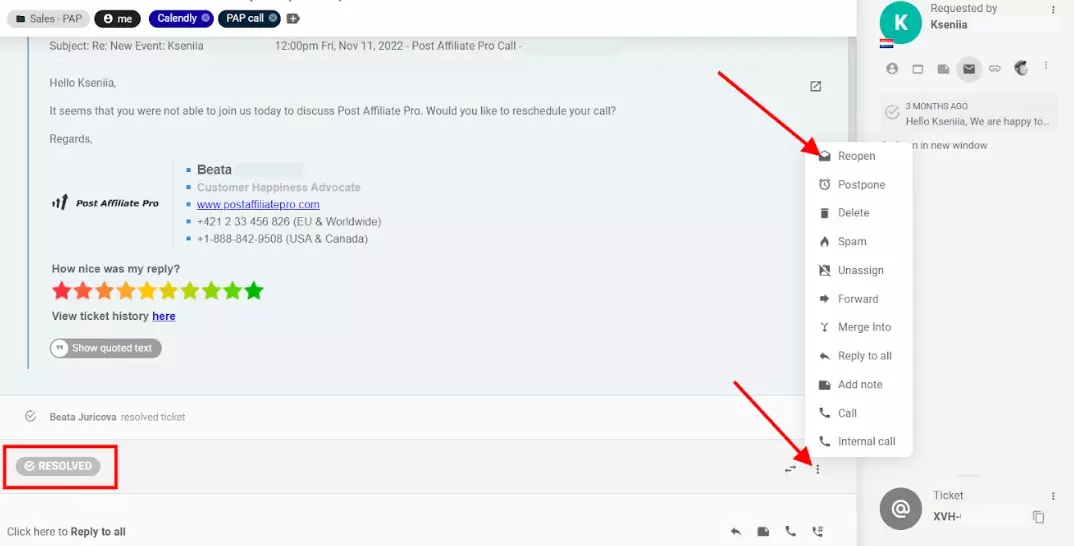
The ticket’s status is based on customer interactions and the steps taken to resolve the issue. When an agent receives a new ticket and sends a reply, the status will change to ‘Answered". The moment the customer replies to this ticket, the status will change to “Open”. This will keep changing until the ticket is solved and at this point, the status will change to “Resolved”.
Tickets are a very important component of customer support software and have a significant role in providing exceptional customer service. An open ticket status shows the customer support agents that the issue has not been resolved yet and that it still needs their attention.
Agents can interact with customers through these tickets to ask additional questions or to make sure that the solution that they offer is satisfactory for the client. Once this issue is solved, the ticket can be closed and the status can be changed to “Resolved”.
Whether you are a customer service agent or an owner of a SaaS company, it is crucial to have an understanding of the role of tickets in your customer service efforts and how they can help to improve your services and therefore customer satisfaction.
Track and resolve open tickets faster with LiveAgent's ticketing system. Prioritize, assign, and never let a ticket slip through.
Enhance customer service with LiveAgent's custom statuses! Tailor ticket workflows, boost efficiency, and start your free trial today!
Learn the stages of a ticket lifecycle from creation to closure. Enhance efficiency, customer satisfaction, and service with LiveAgent tools!
Learn what a closed ticket means in customer support, its benefits, lifecycle, and how LiveAgent automates closure for better efficiency.
Join our community of happy clients and provide excellent customer support with LiveAgent.
