


Email management software
Discover top email management software for streamlining communication and boosting productivity. Learn about key features, pricing, and benefits to enhance emai...
43 min read
Email Management
Customer Service
+5


A mail loop occurs when servers send emails back and forth indefinitely, often due to misconfiguration. Learn how to prevent and troubleshoot email loops.

An email loop is an unwanted chain reaction which can occur during email communication where two or more mail servers keep sending each other messages indefinitely. Usually it is caused by misconfigured servers, but there can also be other factors involved that will be covered below.
Every time a machine with pre-configured email answering receives an email message, it sends an automatic reply to the sender. However, if the sender also possesses this feature, an endless loop is created between these two machines that will continue to send each other automatic replies indefinitely.
Mail loops can cause a variety of problems such as:
In order to prevent these email delivery issues, it is important to make sure your server is configured correctly and is able to handle incoming email messages properly. Incorporating filters and rules, as well as setting up tools to monitor and detect any possible loops is a good idea for preventative measures. It’s also crucial to be able to identify and troubleshoot the mail loop before it becomes an obstacle or issue.
A looping message can be caused by an error in the configuration of mail servers. This error can happen if the server incorrectly interprets the recipient’s email address or has a bad mail routing configuration, causing it to send the message back to the original sender instead of delivering it to the intended recipient.
As mentioned previously, it can also happen when an email address with autoresponder sends a message to another address that also has an automatic responder, therefore creating a loop of mail.
Overall, it can be caused by a variety of factors, but is typically the result of a misconfiguration or error in one or more servers.
Let’s say a customer sends an email to a help desk and asks for help regarding a certain issue. However, the help desk software is configured to automatically respond to all incoming messages. Similarly, the customer’s email is configured to respond automatically as well, triggering a chain reaction of automatic responses between them.
Another scenario can be if someone has numerous email accounts and has configured their email servers to forward messages from one account to another. The forwarded messages can trigger the automatic response, causing a loop of messages that will be sent back and forth between these accounts.
While email loops can occur in various ways depending on the specific configuration of the sender’s and recipient’s email systems, there are few common patterns that we often see in mail loops.
Arguably the most common pattern is the use of email autoresponders that are configured to automatically respond to incoming email messages. If both the sender and recipient of an email have configured their email systems to automatically respond to incoming messages, the automatic responses end up triggering each other, ultimately creating an indefinite mail loop.
A second common pattern is the use of email forwarding rules that cause messages to be sent back and forth between 2 or more email accounts. This can happen if the forwarding rules are not set up properly, or if they are triggered by the automatic responses generated by the email autoresponder as previously mentioned.
Mailing lists configured to send automatic replies can create loops when they interact with other autoresponders or mailing lists.
In both of these cases, the key to preventing it is to carefully configure your email autoresponder and forwarding settings. If you suspect that a mail loop has occurred, it is important to take action quickly to prevent further issues and avoid a storage overload.
If you have identified a possible mail loop, the following is a list of few specific steps you can take to stop emails from looping:
One way of identifying and detecting email loops is through email headers. But what is an email header and where do you find it? The email header is a section of the message where you can find necessary information about the sender of the email, the recipient, the date and time the message was sent, and other details.
When you send an email, the header is added to the message by the sender’s email server and is included within the message as it is being transmitted to the recipient’s email server.
The email header can be used to trace the path that an email message takes as it is transmitted from the sender to the recipient, which can help identify when a loop is happening.
For example, if a message is sent from person A to person B, and person B’s email server sends an automatic reply, the header of the reply will include details about the original email from person A. If person A’s email server then automatically sends another automatic reply, the header of that reply will include information about the original email from person B, and so on. By examining the headers of these emails, it is possible to see the pattern of messages that are sent back and forth, and therefore identify that a loop is occurring.
Email headers can also be used to detect and identify an e-mail loop by looking for certain patterns or indicators in the headers that are associated with loops.
For instance, an email loop can often be identified by having multiple ‘Received" headers in the message, which indicates that the same email has been transmitted and received multiple times.
Another common indicator of an email loop is the presence of multiple “Message-ID” headers, which are specific and unique identifiers assigned to each message. If the same Message-ID happens to appear multiple times in the headers of a message, it may be a clear indication that a loop is happening.
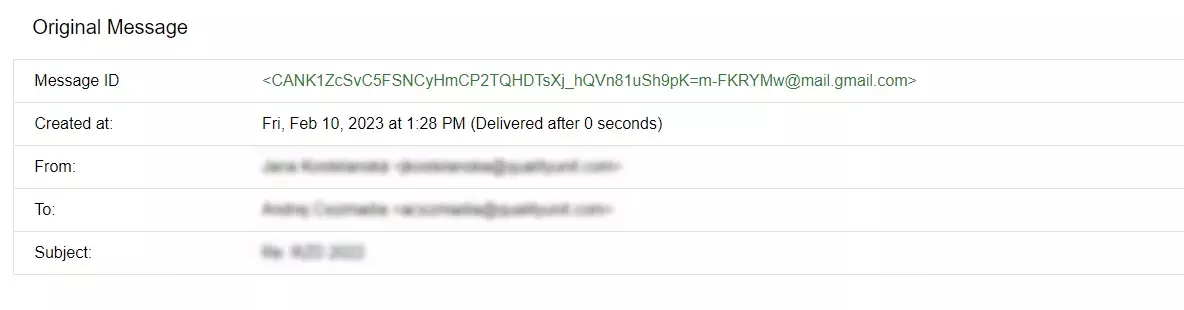
Email headers can be also used to specifically identify those email accounts that are directly involved in the loop, which can be very helpful for resolving and troubleshooting the issue.
For example, the headers marked “From” and “To” can help you to identify the sender and recipient of the message, and the “Subject” header can be used to identify the specific topic of the email.
By examining these and other headers, it is possible to get a more detailed overview of the email loop and take appropriate and necessary steps to break the loop and prevent further problems.
Yes, there are different RFC (Request for Comments) documents that provide guidance on how to prevent mail loops.
One document is RFC 3834, titled “Recommendations for Automatic Responses to Electronic Mail”, " which provides recommendations for configuring email autoresponder systems to avoid mail loops. This RFC specifically addresses:
Another relevant document is RFC 5321. This document is titled “Simple Mail Transfer Protocol”. It defines the standard protocol for sending and receiving email messages over the internet. It also includes a section on “Mailbox Loop Avoidance”, " which describes a number of techniques that can be used to prevent bad mail loops. This can, for example, include:
These RFC standards are essential for email system administrators to understand and implement to ensure reliable email delivery and prevent mail loops.
Overall, there can be a variety of factors that can cause looping of email messages. To be able to prevent it from happening, it is important to double check if your server is configured correctly, and to make sure that it is also able to handle all the incoming messages properly without causing unnecessary and unwanted problems.
Streamline inbox management, configure proper autoresponders, and ensure reliable email delivery with advanced email handling.
Discover top email management software for streamlining communication and boosting productivity. Learn about key features, pricing, and benefits to enhance emai...
Discover how partner addresses in LiveAgent prevent email loops by managing sharing agreements with organizations. Easily add them in the Configurations section...
Efficiently manage emails with LiveAgent's forwarding tool, ensuring seamless communication and preventing mailbox flooding. Learn how email forwarding works an...
Join our community of happy clients and provide excellent customer support with LiveAgent.
