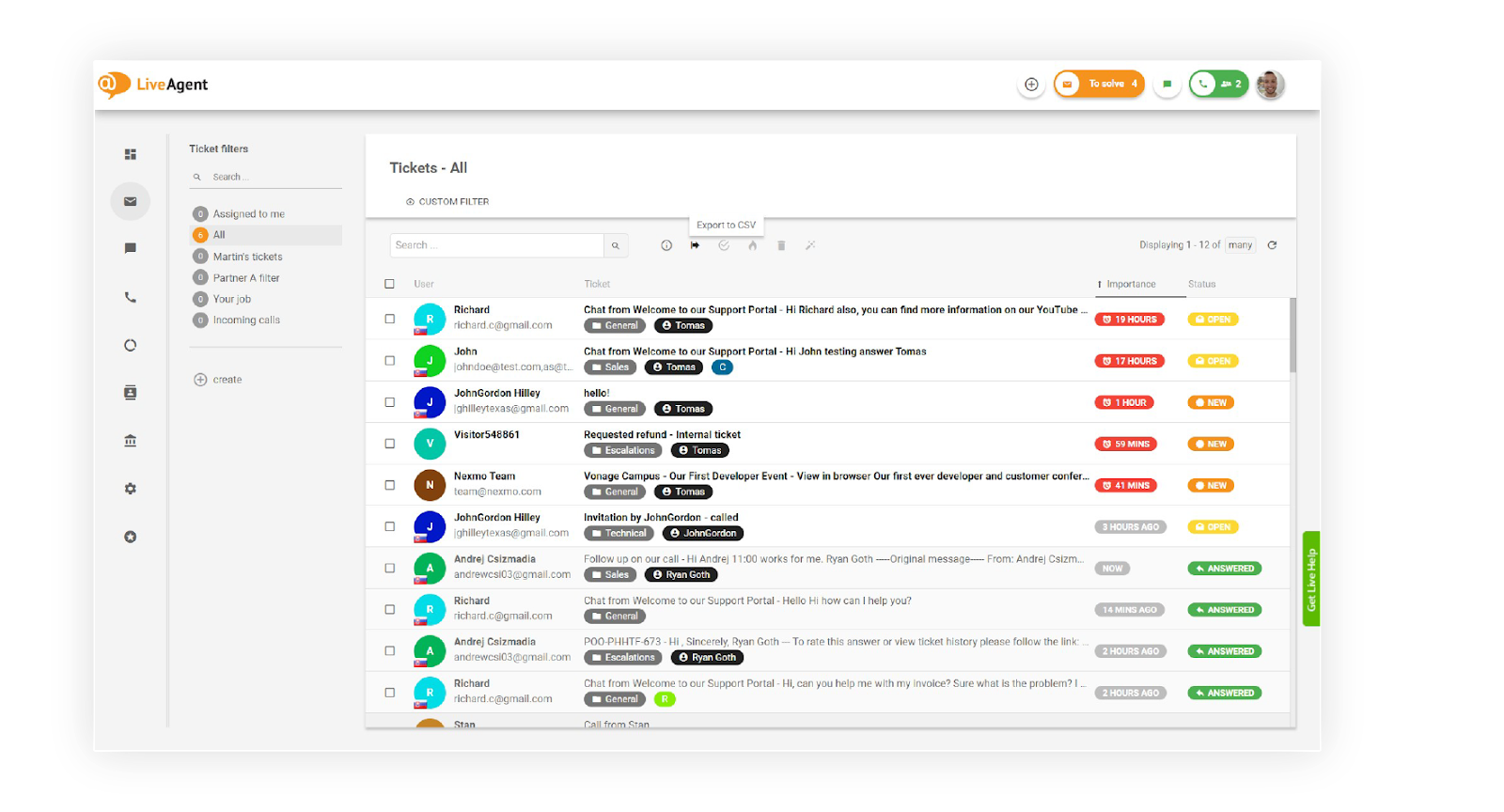
Good tools let a few people answer every customer quickly without losing track of who asked what. Most small teams start with a help desk that brings email, chat and calls into one place, then add self-service and automation as the number of questions grows.
What tools do customer service representatives use?
Customer service representatives mostly work in a help desk, where every email, chat, call and message becomes a ticket, and use live chat, a phone system and a knowledge base next to it. The main types:
| Tool | What it does | When a small team needs it |
|---|---|---|
| Help desk or ticketing system | Turns every request into a ticket with an owner and a status | As soon as more than one person answers customers |
| Shared mailbox | Lets several people answer one email address without replying twice | When customers write to an address like support@ |
| Live chat | Answers website visitors in real time | When people ask questions before they buy |
| Phone system | Routes, records and logs calls next to the other channels | When customers prefer to call |
| Knowledge base | Lets customers find answers on their own | When the same questions keep coming back |
| Social media and messaging | Brings Facebook, Instagram, WhatsApp and similar messages into the inbox | When customers write where they already are |
| Customer records (CRM) | Shows contact details, orders and past conversations next to the ticket | When agents keep asking for details you already have |
| Saved replies and automation rules | Reuse answers, route tickets and start timers without manual steps | When the same steps repeat every day |
| Internal notes | Let colleagues help on the ticket itself, without the customer seeing it | When two people work on one request |
| Customer feedback | Asks customers to rate the answer they got | To see which answers and topics need work |
| AI agents and chatbots | Answer simple questions and hand over to a person | When questions grow faster than the team |
| Reports | Show response times, workload and ratings | To decide what to improve next |
What are examples of customer service tools?
Examples by type are help desks such as Zendesk, live chat tools such as Tidio, phone systems such as Aircall and knowledge base tools such as Document360:
- Help desks: LiveAgent, Zendesk, Freshdesk, Help Scout
- Live chat: LiveChat, Tidio, Intercom
- Phone systems: Aircall, RingCentral
- Knowledge bases: Document360, Helpjuice
Many help desks, LiveAgent among them, include live chat, calls and a knowledge base in one product, so a small team may need only one of them. For a ranked comparison with prices, see customer service software compared.
What is the difference between customer service tools and customer service software?
Customer service software is one product, usually a help desk, that bundles several customer service tools; customer service tools also include the separate apps a team adds next to it, such as a phone system, a survey tool or a CRM. The fewer separate tools a team uses, the easier it is to keep each customer’s history in one place.
Which customer service tools does a small team need first?
A small team needs one place where every email, chat and call arrives first, then live chat on the pages where customers decide, then saved answers and a knowledge base so the same questions take less time.
-
One inbox for every channel
Bring the support email address, the contact form and calls into one help desk, so nothing is answered twice or missed.
-
Live chat where customers decide
Add chat to the pricing, checkout and contact pages first; that is where a quick answer matters most.
-
Saved replies and a knowledge base
Write down the answers to the questions you get every week. Agents reuse them, and customers find them on their own.
Reports and customer ratings
Look at first response time, open tickets and ratings once a week to see what to fix next.
How do you choose customer service tools?
Choose tools by the channels your customers already use, the number of people who will answer, and whether one tool can cover them all; every extra tool is another login and another place where a request can get lost.
- Channels. List where customers contact you today: email, chat, phone, social media, messaging apps.
- One tool or several. A help desk that covers all channels keeps each customer’s history in one place.
- Price per agent. Check what each plan includes, so the channels you need are not extras.
- Setup time. Connecting your email address and adding chat to the website should not need a developer.
- Integrations. Your shop, billing or CRM data next to the ticket saves agents from switching tabs.
- Where data is stored. Check the data center region and security terms before you move customer conversations. LiveAgent, for example, lets you choose a data center in the EU (Frankfurt), the US or Singapore when you sign up.
What are common mistakes with customer service tools?
A frequent mistake is adding a separate tool for every channel, which splits one customer’s history over several places.
- Too many tools. Agents switch between apps and answer the same customer twice.
- Chat without people to answer it. An unanswered chat window is worse than none; show chat only when someone is available, or leave a message form.
- A knowledge base nobody updates. Outdated articles send customers back to the inbox.
- Watching speed only. Fast first replies help only if the issue gets solved; watch first call resolution and ratings too.
Customer service tools in LiveAgent