



Agent Interface
Explore LiveAgent's agent interface for streamlined customer service management with features like ticket handling, reporting, and more!
3 min read
Customer support
Help desk
+2


An agent signature is a customizable text signature for emails and messages that includes the agent’s name, position, and company branding for professional communication.

An Agent signature is a specific signature, that can be added to emails, different templates, comments or various messages. Agents are able to edit an existing or customize and add their own personalized signature in profile settings.
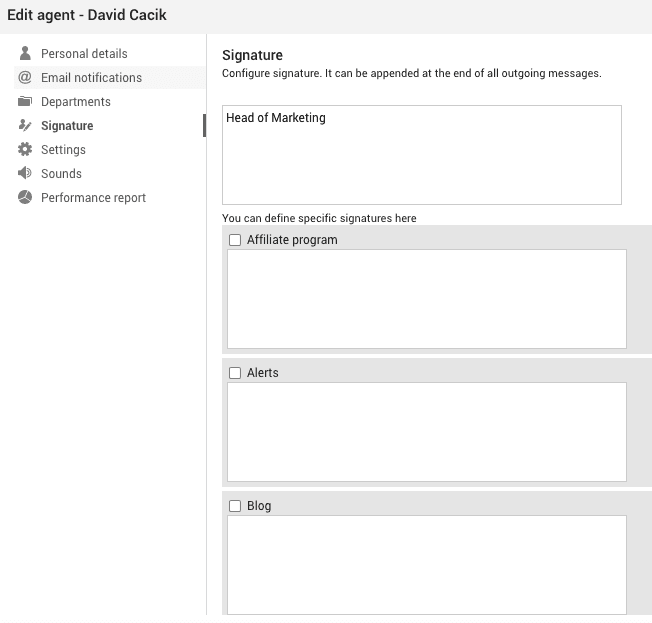
An Agent Signature is a personalized block of text or an image appended automatically at the end of an agent’s outgoing communications such as emails, ticket responses, and messages within help desk software. This signature typically includes the agent’s name, job title, contact information, and sometimes a company logo or other branding elements. It serves as a professional sign-off that adds a personal touch to otherwise formal business communications.
Name and Title: The basic elements of any agent signature include the agent’s full name and their official title or role within the company.
Contact Information: This often includes a phone number, email address, and possibly a physical address or a link to a professional social media profile.
Company Branding: This might involve the inclusion of a company logo, tagline, or a hyperlink to the company’s website.
Legal Disclaimers or Taglines: In some cases, signatures may include legal disclaimers or motivational taglines that align with the company’s values.
Dynamic Placeholders: Some advanced help desk systems allow the use of placeholders to dynamically insert information like ticket numbers or personalized messages.
Agent signatures are more than just a formality; they are essential for various reasons:
Consistency in Communication: Standardized agent signatures ensure that all communications from the company have a uniform appearance, reinforcing the brand’s image.
Personal Touch: By including personal details, agent signatures humanize interactions, which can enhance customer satisfaction and trust.
Credibility and Trust: A well-crafted signature can lend credibility to the communication, as it provides clear identification of the sender.
Saves Time: Automated insertion of signatures saves agents the time and effort of manually adding their details to every message.
Error Reduction: Automation reduces the likelihood of missing or incorrect information being sent to clients.
Legal Protection: In certain jurisdictions, including a signature may be necessary for legal compliance, especially in regulated industries.
Verification and Accountability: Signatures can serve as a means of verifying the authenticity of communications, ensuring accountability.
In LiveAgent, agent signatures can be configured to include basic text elements and are available in text format only. Agents can personalize their signatures through the profile settings, and these signatures are automatically appended to all outgoing communications. Administrator can define in mail template custom HTML signatures with dynamic variables for each agent.
Agent signatures are not merely decorative elements; they have significant legal implications:
Binding Nature: In many cases, an agent’s signature can make a document legally binding. It signifies the agent’s authority to represent the company in contractual matters.
Verification: Signatures can serve as evidence of communication in legal disputes, providing a trail of accountability.
Create customizable email signatures with LiveAgent for consistent, professional branding across all customer touchpoints and messages.
Explore LiveAgent's agent interface for streamlined customer service management with features like ticket handling, reporting, and more!

Get detailed insights into agent performance with LiveAgent's Agent report. Track work time, tickets, chats, calls, and more. Export data to CSV and use charts ...

AI-powered customer service software that drafts replies, categorizes tickets, detects spam, and routes issues automatically. Free 30-day trial — no credit card...
Join our community of happy clients and provide excellent customer support with LiveAgent.
