



Custom Agent Roles
Boost productivity and enhance customer experience with custom agent roles in LiveAgent. Easily assign specialized roles to streamline tasks and improve agent s...
5 min read
Customer support
Help desk software
+2


Agent roles in LiveAgent define privileges for customer support agents, admins, and owners to enhance productivity and service quality. Assigning roles ensures clarity in responsibilities.

Agent roles in LiveAgent define privileges for customer support agents, admins, and owners to enhance productivity and service quality. Assigning roles ensures clarity in responsibilities, boosting efficiency in managing customer interactions.
Support agents are a vital part of delivering excellent customer service. They interact with clients daily to answer their questions, provide technical support, resolve customer issues, and much more.
To avoid confusion as to which agent has particular privileges and responsibilities within the help desk system, every agent is given an agent role. All user roles come with their set of privileges like configuring the system, overseeing customer interactions, monitoring the workflow, etc.
When you add a new customer support agent to LiveAgent, it is necessary to assign them a role within the system. In LiveAgent, and as well as in most help desk systems, there are three main agent roles to choose from, based on an agent’s skills for chat support.
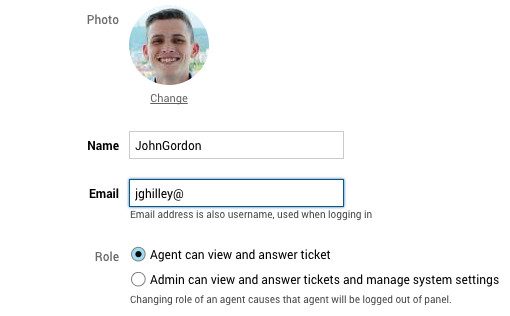
The Agent role is the standard support role with the following capabilities:
This is the most basic role, ideal for frontline customer service representatives who focus on resolving customer issues and providing support.
The Admin role grants elevated privileges including:
Admins have broader system access than regular agents, allowing them to manage the help desk infrastructure while still being able to handle tickets.
The Owner role comes with the widest range of privileges:
The Owner role is typically assigned to business owners or senior management who need complete control over the help desk system.
There is also an option to create custom roles, however, this is not a guarantee for every help desk software. Custom roles allow you to define specific permissions tailored to your organization’s needs, providing more granular control over agent capabilities.
When you assign roles to agents, you avoid confusion and potential frustration for agents. Clear role definitions help everyone understand their responsibilities and authority levels within the system.
Having clearly defined responsibilities as well as privileges allows agents to focus on their tasks and provide exceptional customer service to your client base. Agents know exactly what they can and cannot do, reducing time spent on unauthorized actions or seeking approval.
Role-based access control ensures that sensitive information and critical system settings are only accessible to authorized personnel. This protects your customer data and prevents accidental or intentional misuse of system features.
Different roles enable better workflow management. Admins can set up automation and routing rules, while agents focus on customer interactions. This division of labor improves overall efficiency.
As your team grows, role-based access makes it easier to onboard new agents and manage permissions at scale. You can quickly assign appropriate roles to new team members without having to configure individual permissions.
Agent roles are a fundamental component of any help desk system. By properly assigning roles in LiveAgent, you create a clear organizational structure that enhances productivity, improves security, and ensures excellent customer service. Whether you’re managing a small support team or a large enterprise operation, understanding and implementing appropriate agent roles is crucial for success.
Start improving your help desk customer service today by properly defining and assigning agent roles in LiveAgent. With clear role definitions, your team can work more efficiently and provide better support to your customers.
Enhance team productivity with LiveAgent's role-based access control featuring agent, admin, and owner permissions for optimized workflow management.
Boost productivity and enhance customer experience with custom agent roles in LiveAgent. Easily assign specialized roles to streamline tasks and improve agent s...

Custom roles in LiveAgent enable the creation of tailored agent roles with specific permissions, enhancing productivity and workload management. This feature is...
LiveAgent's Agent Ranking feature enables customer feedback on support interactions, helping identify negative trends and reward top agents. Try it free to enha...
Join our community of happy clients and provide excellent customer support with LiveAgent.
