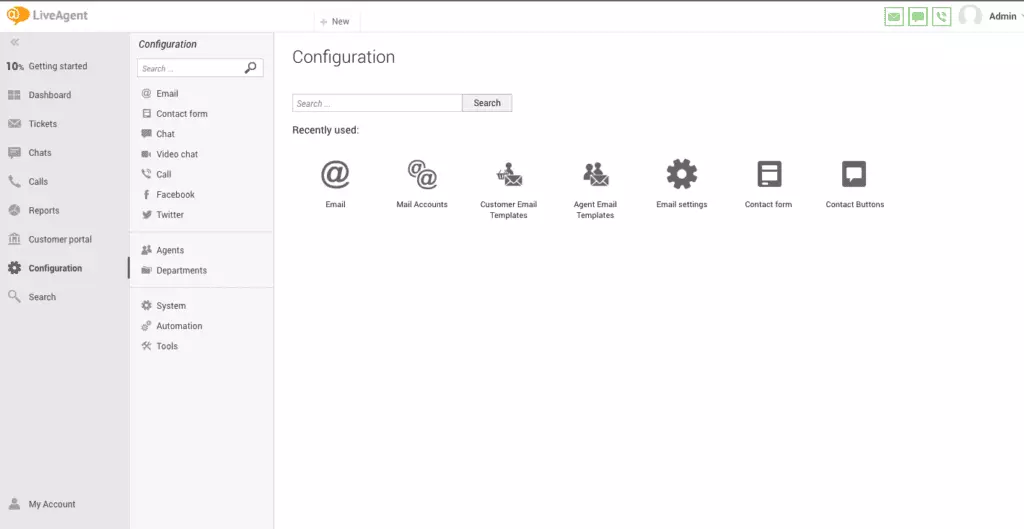
The LiveAgent agent panel streamlines customer communication and tasks for agents, offering omnichannel support, access to a knowledge base, and account configuration. It enhances productivity and customer satisfaction by managing interactions from one place.
What is an agent panel?
It is a tool that allows agents to effectively interact with LiveAgent help desk software, but it can be found among many other similar help desk software solutions. It is a convenient way for them to access all the functionalities and features so they can stay on top of their tasks.
When agents log in to their LiveAgent accounts, they can find the agent panel on the left side of the agent interface. From there, they can configure and adjust account settings, add or remove users, create an agent group, manage privileges (in case of an admin role), activate the plugin, and much more. However, in their daily tasks, the panel mainly allows them to work with customer profiles, access support tickets they receive, interact with a dashboard, communicate with customers using live chat, or use the call center features.
The convenience of the agent panel lies in the fact that all the customer interactions can be initiated, accessed, and managed from one place. This not only helps boost agent productivity, and minimize their idle time, but what’s even more important, it shortens customer waiting times, boosts their satisfaction, and improves the overall customer experience.
You can access it after you log into your LiveAgent account. You can navigate your way to the left side of the window from where you'll be able to initiate, continue, and manage customer interactions, configure your account, set up automation rules, and many more.
Agent panel is a convenient tool that allows agents to perform all their daily tasks from one place. Among its most important capabilities you can use is the ability to manage all customer communication. You can initiate, continue and manage all the customer interactions on multiple channels allowing for a truly omnichannel coherent experience. You can also access the company knowledge base where the knowledge articles are accessible. Another capability of an agent panel is to configure your and other agents' accounts if you have the admin role. These can be language preferences, notification preferences, and more.
Track website visitors in real-time with LiveAgent's Online Visitors feature. View visitor activities, locations, and referrers to enhance customer support and ...
LiveAgent's customer portal offers features like a knowledge base, feedback forum, and ticket submission to enhance customer satisfaction and reduce support cos...
10 min read
You will be in Good Hands!
Join our community of happy clients and provide excellent customer support with LiveAgent.