Valentine's Day promotion background
14.Feb - 13.Mar 2026

Valentine deal

AI UNLOCKED
For new and existing customers for 3 months
Agent Group

Agent Group

What is an Agent Group?

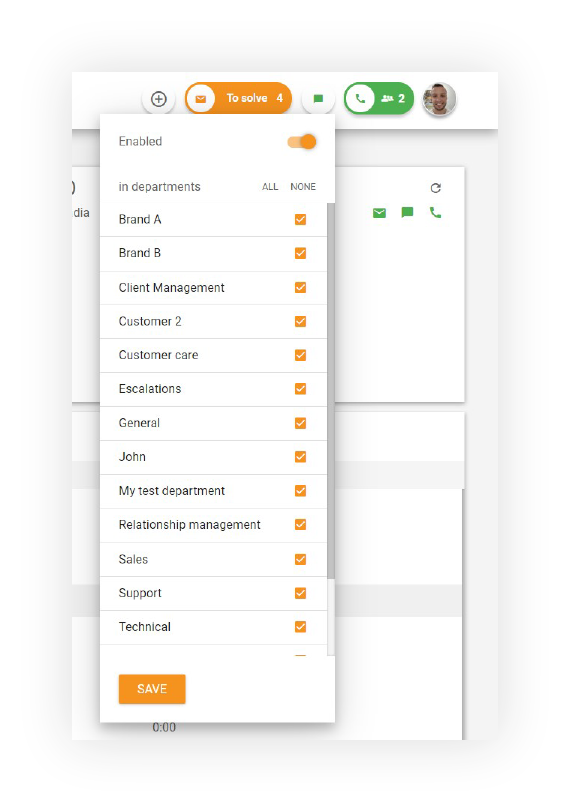
An agent group, also called a department, is a group of agents that share analogous skills and abilities. It is also a kind of streamlined process and organizing people. Agent groups are based on something, e.g. location of clients or type of issue. It helps agents to concentrate on a specific field, stay focused and effective.

Learn more about Departments in LiveAgent.

An agent group, also called a department, is a group of agents that share analogous skills and abilities. Groups are usually based on something, e.g. location of clients or type of issue. It helps agents to concentrate on a specific field, stay focused and effective.

All incoming messages and calls entering through different channels are in a moment redirected to various agent groups without manual processing. This automatic routing ensures that customer inquiries reach the most appropriate team members, improving response times and customer satisfaction.

LiveAgent's agent group and department function

Key Benefits of Agent Groups

Improved Organization

Agent groups provide a structured way to organize your support team. By grouping agents with similar skills and responsibilities, you create a clear organizational hierarchy that makes management easier and more efficient.

Focused Expertise

When agents are grouped by their areas of expertise, they can focus on specific types of issues or customer segments. This specialization leads to:

  • Faster resolution times - Agents handle issues within their area of expertise
  • Higher quality support - Specialized knowledge improves solution quality
  • Better customer experience - Customers get help from the most qualified agent
  • Increased agent satisfaction - Agents work on tasks they’re skilled at

Automatic Routing

One of the most powerful features of agent groups is automatic message and call routing. Instead of manual assignment:

  • Incoming tickets are automatically directed to the appropriate group
  • Calls are routed based on department or skill
  • Live chat conversations go to the right team
  • Emails are distributed efficiently

This automation reduces manual work and ensures faster response times.

Scalability

As your business grows, agent groups make it easier to scale your support operations:

  • Add new agents to existing groups
  • Create new groups for new service areas
  • Manage multiple teams across different locations
  • Maintain consistency in service quality

How Agent Groups Work

Agent groups function as the backbone of efficient ticket routing and customer service delivery:

  1. Group Creation - Administrators create groups based on business needs (e.g., Sales, Support, Billing)
  2. Agent Assignment - Agents are assigned to appropriate groups based on their skills
  3. Routing Rules - Tickets and calls are automatically routed to the correct group
  4. Load Balancing - Work is distributed among available agents in the group
  5. Monitoring - Managers can track group performance and individual agent metrics

Types of Agent Groups

By Department

Organize groups based on business functions:

  • Sales - Handles pre-sales inquiries and quotes
  • Support - Manages technical support and troubleshooting
  • Billing - Handles payment and account issues
  • Onboarding - Assists new customers with setup

By Skill Level

Group agents by their expertise:

  • Tier 1 - Basic support and common issues
  • Tier 2 - Advanced technical support
  • Tier 3 - Expert-level troubleshooting
  • Specialists - Highly specialized support areas

By Location

Organize by geographic regions:

  • North America - US and Canada support
  • Europe - European customer support
  • Asia Pacific - APAC region support
  • Local Teams - Regional or city-based groups

By Customer Type

Group based on customer segments:

  • Enterprise - Large account support
  • SMB - Small and medium business support
  • Startup - New customer support
  • VIP - Premium customer support

Best Practices for Agent Groups

Clear Naming Conventions

Use descriptive names that clearly indicate the group’s purpose:

  • ✅ Good: ‘Technical Support - Enterprise, “Billing Department”
  • ❌ Avoid: “Group 1”, “Team A”

Balanced Workload

Ensure groups have:

  • Appropriate number of agents for expected volume
  • Similar skill levels within the group
  • Clear escalation paths to higher-tier groups

Regular Review

Periodically review your group structure:

  • Monitor group performance metrics
  • Identify bottlenecks or inefficiencies
  • Adjust group composition as needed
  • Update routing rules based on trends

Clear Responsibilities

Define what each group handles:

  • Document the types of issues each group manages
  • Create clear escalation procedures
  • Establish service level agreements (SLAs)
  • Communicate expectations to all team members

Training and Development

Invest in your agent groups:

  • Provide ongoing training for group members
  • Share best practices within groups
  • Encourage knowledge sharing
  • Support career development and advancement

Monitoring Agent Group Performance

Key Metrics to Track

  • Average Response Time - How quickly groups respond to inquiries
  • Resolution Time - Average time to resolve issues
  • First Contact Resolution - Percentage of issues resolved on first contact
  • Customer Satisfaction - Ratings and feedback from customers
  • Ticket Volume - Number of tickets handled by each group
  • Agent Utilization - How efficiently agents are working

Conclusion

Agent groups are essential for organizing an efficient customer support operation. By grouping agents with similar skills and responsibilities, you create a structure that enables automatic routing, improves response times, and enhances overall customer satisfaction. Whether you’re managing a small support team or a large enterprise operation, implementing well-designed agent groups is crucial for success.

Start improving your customer support today by creating agent groups in LiveAgent. With proper organization and automatic routing, your team can work more efficiently and provide better service to your customers.

Organize teams with agent groups

Structure your support team effectively with LiveAgent's department management and automatic routing. Improve efficiency through smart organization.

Frequently asked questions

What does agent for group mean?

A group agent is a group of agents who have similar abilities and skills. Besides, it is an improvement in organizing people. Thanks to this grouping, agents can focus on a specific area. This favors the effectiveness and efficiency of agents.

How to create agent groups in LiveAgent?

In LiveAgent you can create so-called departments. For example, you can create a 'sale' group and assign appropriate tickets to it. You can create them in the 'configuration' section and then clicking 'departments'. Here you can create and manage your groups.

What is a virtual agent group?

A virtual agent group is a group of virtual agents that work together to provide customer service. In LiveAgent are agent groups managed by Departments.

Learn more

Department Report Features

Department Report Features

Department reports in LiveAgent allow organizations to allocate tickets and assign agents to various departments by product, location, or responsibility, offeri...

2 min read
Department Report Reporting +1

Departments features

Departments features

Help desk departments organize help desks by grouping specialized agents to handle specific queries, improving ticket handling, response times, and workflow eff...

6 min read
Departments Ticket Management +1
Agent Role
Agent Role

Agent Role

Define roles for agents in LiveAgent to boost productivity and optimize service. Explore agent, admin, and owner roles. Try free now!

3 min read
Customer support Help desk +2

You will be in Good Hands!

Join our community of happy clients and provide excellent customer support with LiveAgent.

Post Affiliate Pro Dashboard - Campaign Manager Interface