





iOS App for Customer Support
Discover the power of customer service on the go with LiveAgent's native iOS app. Resolve, transfer, and respond to tickets from anywhere, integrate with hundre...
2 min read
iOS
Mobile
+1


LiveAgent now offers an iOS app optimized for iPhone 5, enabling users to chat, resolve tickets, and receive push notifications on-the-go. Compatible with iPhone, iPad, and iPod touch, it enhances customer support accessibility.
LiveAgent now offers a powerful iOS app optimized for iPhone 5 and later, enabling you to manage your entire customer support operation from your iPhone, iPad, or iPod touch. Whether you’re in the office, at home, or on the move, stay connected with your customers and never miss an important ticket or chat.
Get instant notifications about new tickets or ringing chats directly to your iPhone or iPad. Never miss an important customer interaction, even when you’re away from your desk.
Chat with your customers directly from the app. Respond to inquiries, provide support, and build relationships—all from your mobile device.
Resolve, transfer, and respond to tickets with ease. Manage your entire ticket workflow from the palm of your hand.
Use your preset filters to organize and prioritize your tickets. Quickly access the tickets that matter most to you.
View tags, notes, and departments for every ticket. Get all the context you need to provide excellent customer support.
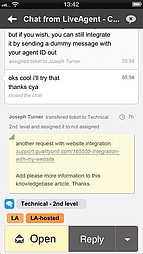
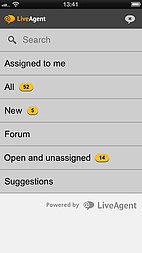
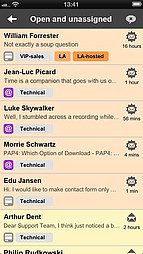

The LiveAgent iOS app brings the full power of our help desk software to your mobile device. Whether you’re managing a small team or a large support department, you can stay in control of your customer support operations from anywhere.
Benefits include:
Download the LiveAgent iOS app from the App Store and start managing your customer support from your iPhone or iPad. Log in with your LiveAgent credentials and you’re ready to go. No additional setup required.
Stay connected with your customers, resolve tickets faster, and provide exceptional support—all from your mobile device.
Share this article
Daniel oversees marketing and communications at LiveAgent as a member of the inner product circle and company top management. He previously held various managerial positions in marketing and client communication. He is recognized as one of the experts on AI and its integration into the customer service environment.

Discover the power of customer service on the go with LiveAgent's native iOS app. Resolve, transfer, and respond to tickets from anywhere, integrate with hundre...

LiveAgent offers a native Android app for customer support, featuring chat, ticket resolution, and push notifications. Free trials are available for Android and...

Live support, via live chat on websites, enhances customer service with real-time communication, traffic analysis, and ticketing tools. It boosts customer exper...
Join our community of happy clients and provide excellent customer support with LiveAgent.
