


LiveAgent Monthly Updates: March Edition 2025
Discover LiveAgent's March updates: AI Chatbot launch, ticket filter improvements, bug fixes & more! Enhance your customer support today!
4 min read
Updates
News
+3


Discover LiveAgent’s 2025 highlights: new AI chatbot, smarter ticketing, enhanced security & UX. See how support just got better!
2025 was a year of meaningful progress for LiveAgent. From product improvements and AI-driven enhancements to behind-the-scenes teamwork that kept everything running smoothly, this year was about refining what already works and pushing it further. In this wrap-up, we’re looking back at the key milestones, updates, and moments that shaped LiveAgent in 2025, and how they’re setting the direction for what comes next.
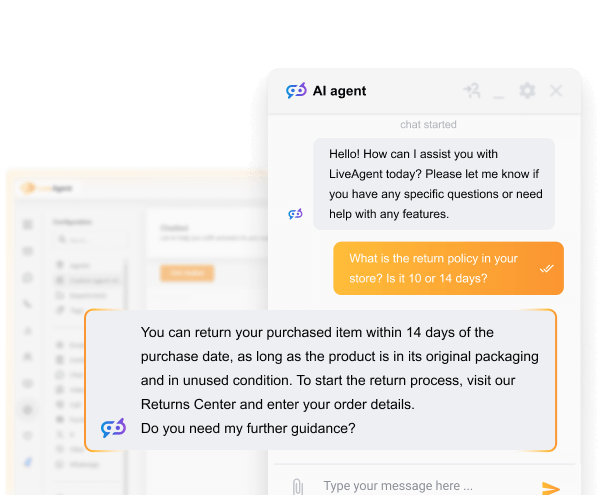
Delivered as promised! We’re excited to announce the successful roll-out of the promised new AI chatbot feature, in line with our timeline to release it in the first quarter of this year. Our innovative AI chatbot is now available to all customers on our current pricing plans (legacy plans excluded).
Our AI-powered chatbot, utilizing LLM technology, can be trained on your data to handle frequently asked and advanced questions. It can also escalate complex queries and provide multilingual support. It automates customer interactions, improves response times, reduces agent workload, and enhances your customers’ chat experience by initially connecting them to your AI bot. This not only provides immediate responses but also assists in filtering queries before reaching a human agent.
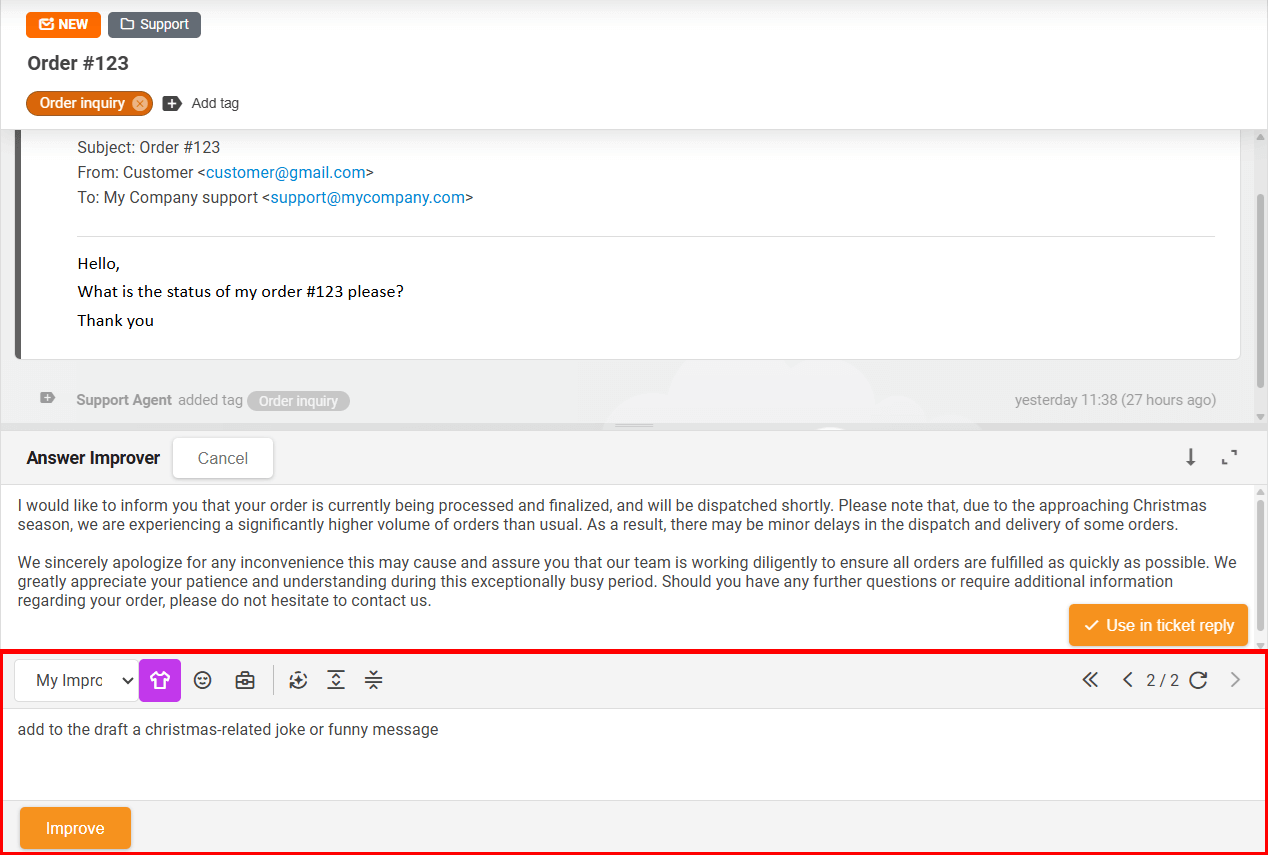
We introduced the AI Answer Improver, followed by AI Answer Composer, an evolution of our Answer assistant that generates contextual ticket responses based on customer messages. This powerful tool helps your team respond faster and more accurately than ever before. AI Answer Improver is a powerful enhancement tool built directly into LiveAgent that helps agents refine, improve, extend, or generate their replies.
LiveAgent AI Answer Composer is an intelligent response generator that helps support teams craft professional, context-aware replies to customer inquiries. By automatically analyzing the ticket conversation history, it understands the nuances of each interaction and generates accurate, relevant responses that address the customer’s specific needs.
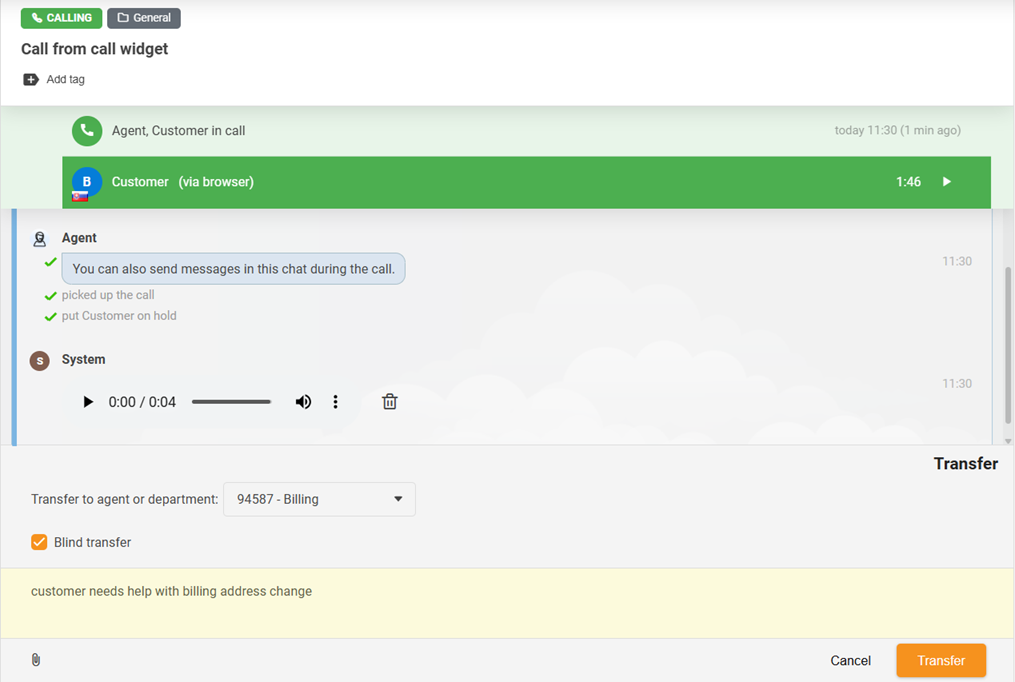
This innovative function enables agents to make an informed decision – they can select to either internally call a colleague before transferring the call or directly transfer the call to another colleague or department without calling them upfront.
In line with the changes from Microsoft and to maintain the highest security standards, from version 5.56 onwards, Microsoft/Office 365 shared mailboxes can be connected via OAuth connector as outgoing email accounts. This eliminates the need for entering SMTP details, usernames, and passwords into our application, requiring only enabled SMTP AUTH in your Microsoft account/tenant.
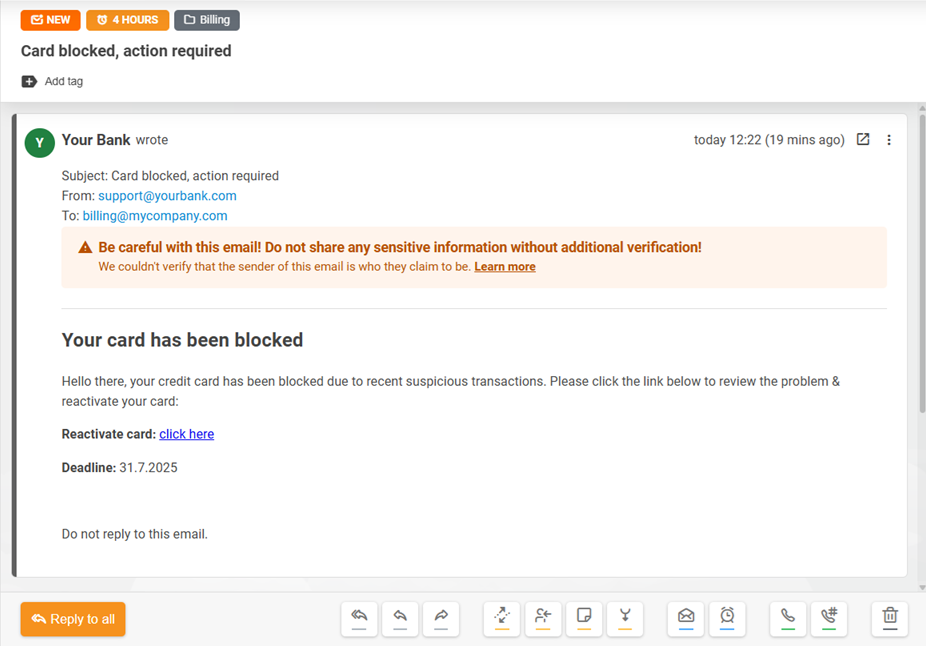
To maintain our security standards, we’ve developed a spoofing protection mechanism that flags suspicious emails. This improvement helps raise awareness about potentially fraudulent emails and encourages caution before clicking on suspicious links, informing agents that the sender of the email cannot be verified by the SPF record.
This update is designed to make the ticket field system more consistent and easier to understand. It creates clear links between the fields in forms and their settings in the configuration, helping to fix related issues.
Starting with version 5.59, when you create a new field from a form, its matching ticket field definition in the configuration is automatically created—and the same works the other way around. The enhancement also eliminates the possibility of changing the type of a form field that differs from the associated definition.
In an effort to enhance our ticket field refactoring, we’ve revised the way ticket fields are saved within tickets. Moving forward from version 5.61, every ticket field is saved individually. This clarity-focused improvement eliminates the risk of losing unsaved changes due to an overlooked ‘Save’ button click, making field management straightforward and more user-friendly.
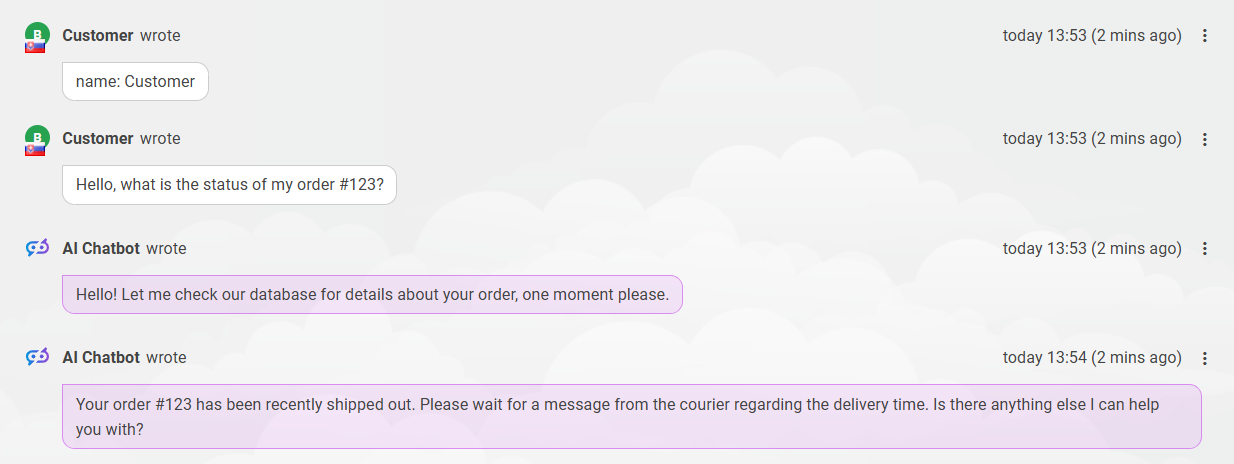
Our designers have resolved the inconsistency in the design of messages within social media tickets and chats with the AI chatbot. Previously, these messages appeared similar to regular email ticket messages. Starting from version 5.57, the mentioned messages will now share the same design as standard chat messages, enhancing clarity and improving the overall user experience of our software.
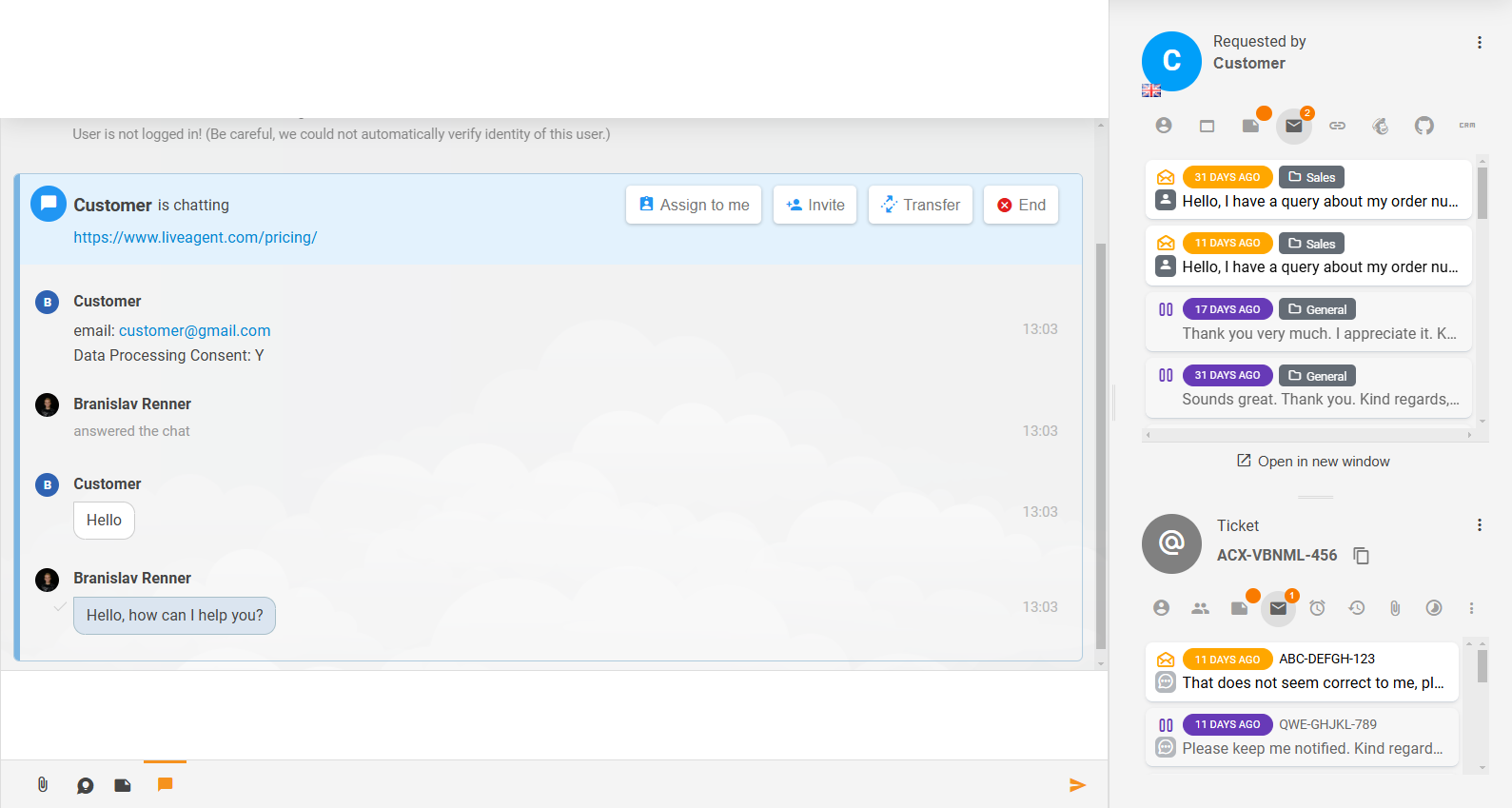
In line with our commitment to enhancing user interface & experience, we have made some refinements to the design of our Recent and Related Tickets sections, and ticket content itself. We hope you appreciate these changes aimed at improving clarity and making LiveAgent more user-friendly.
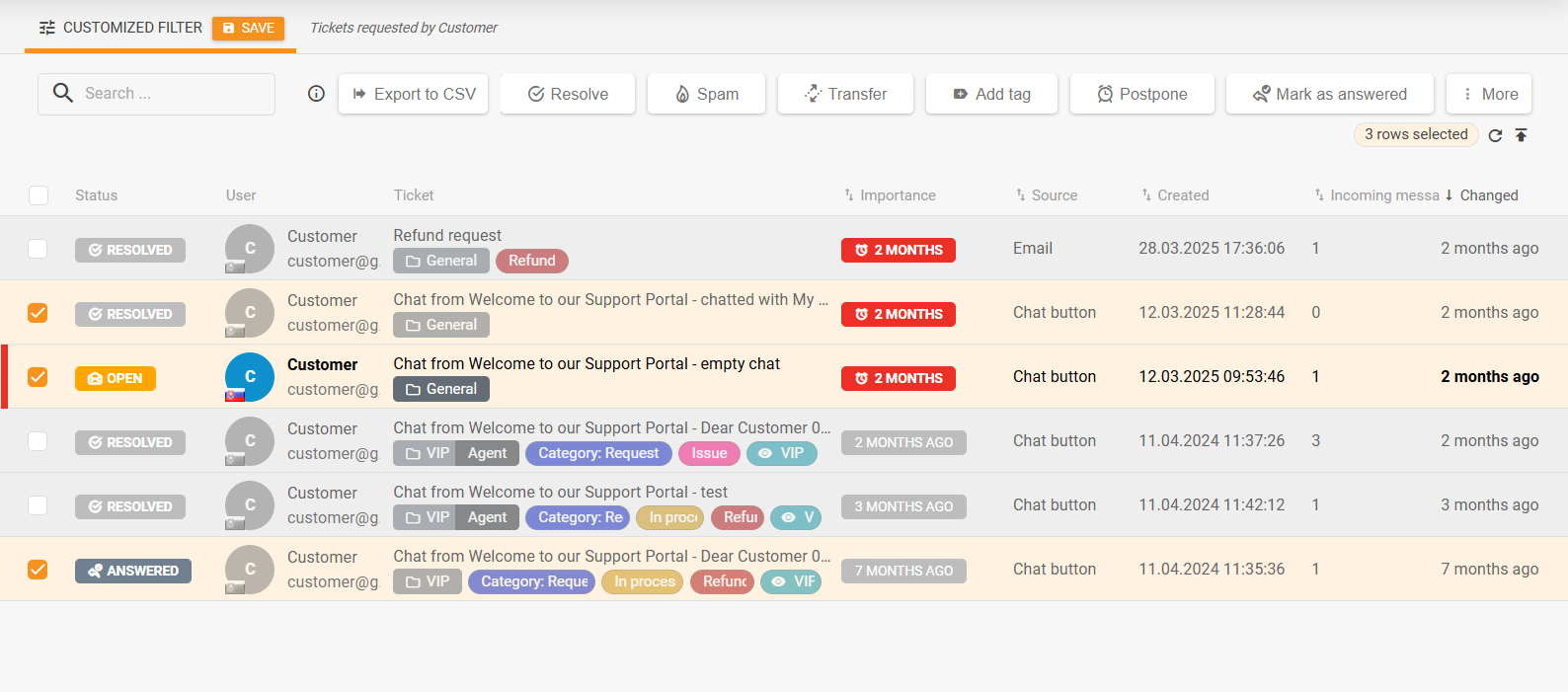
With your suggestions in mind, we’ve reworked the mass actions panel in the tickets list and integrated the most frequently utilized ticket actions. This augmentation not only enhances the user experience for our agents but also simplifies managing numerous tickets at once.
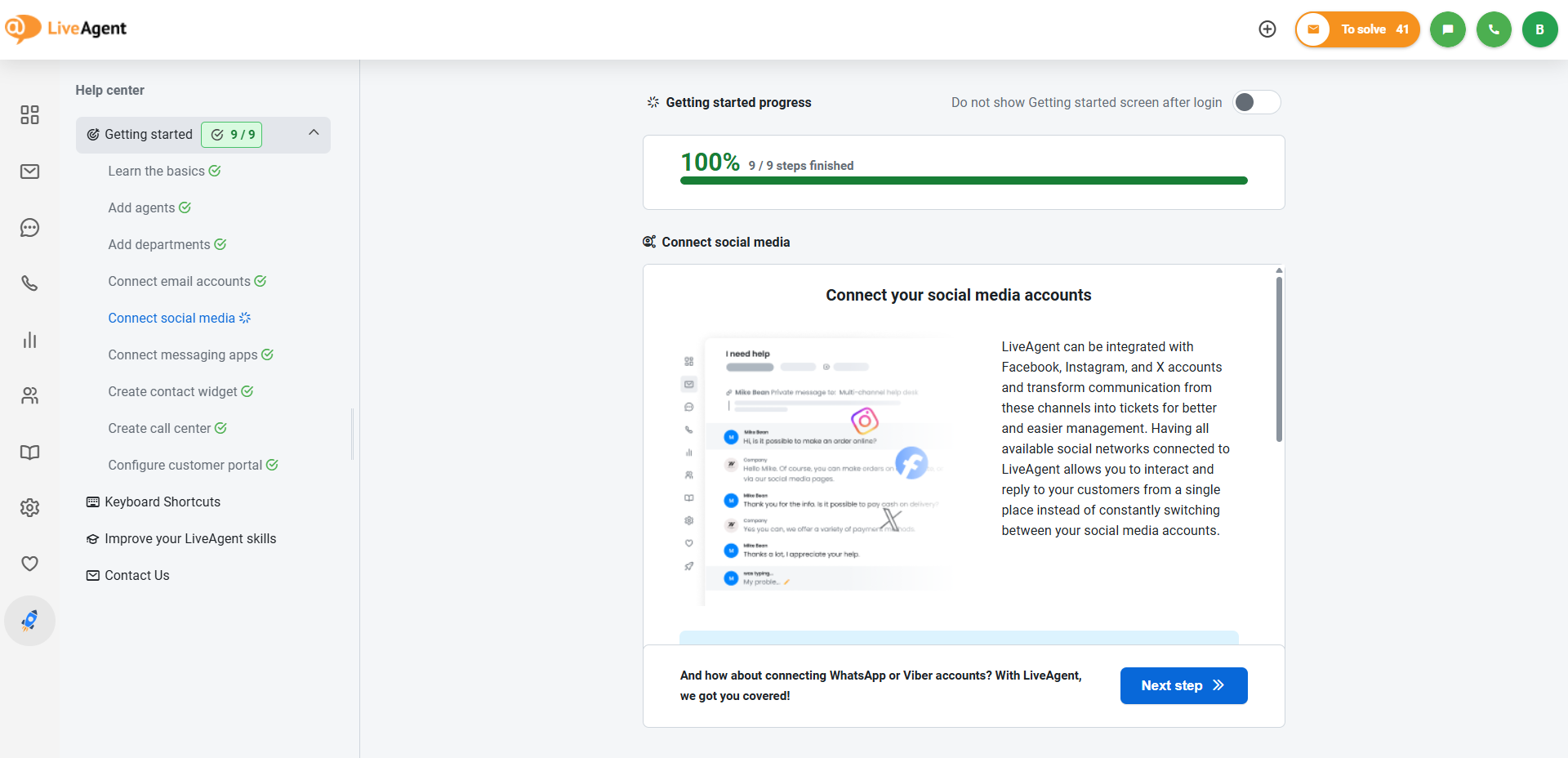
Following our continuous efforts to make LiveAgent as convenient and user-friendly as possible, our teams completely reworked and redesigned the old Getting started section and replaced it with a brand-new Help center. Introduced in version 5.57, this section provides clear and logical initial steps to help users begin using LiveAgent. It also includes additional useful information, links, and various contact details.
In response to customer feedback, we brought back the previously popular function to download multiple ticket attachments in bulk. The new reworked version of this function, available from version 5.57, allows downloading all attachments of a single ticket message in a ZIP file.

Bolstering our recent updates regarding the increase in the number of attachments an email can hold and the introduction of bulk download for all attachments, we have introduced a new feature. This new addition automatically compiles a large number of attachments into a single ZIP file, ensuring the hassle-free management and download of multiple attachments.
To elevate your LiveAgent experience, we’ve introduced a hassle-free editing feature in version 5.59. Now, you can directly edit the subject of a ticket simply by clicking on it in the ticket header. Additionally, the assigned agent label in the ticket’s header is clickable, enabling users to instantly reach out to the agent using internal chat or a direct call.
As we look back on the year, one thing stands out clearly: progress happens when we build it together. Your insights and collaboration help shape every improvement we make.
This holiday season, we hope you take a moment to appreciate how far you’ve come—and how much impact thoughtful, well-supported customer service can have.
Wishing you peaceful holidays and a bright, successful 2026 from all of us at LiveAgent.
Share this article
Lilia is a copywriter at LiveAgent. Passionate about customer support, she crafts engaging content that highlights the power of seamless communication and exceptional AI-powered service.

Discover LiveAgent's March updates: AI Chatbot launch, ticket filter improvements, bug fixes & more! Enhance your customer support today!
Discover LiveAgent's January 2025 updates: AI Chatbot, unified reseller products, API changes & call recording fixes. Explore what's next!
Discover LiveAgent's February 2025 updates featuring AI Chatbot preview, ticket counting fixes, email security enhancements, and refined ticket design.
Join our community of happy clients and provide excellent customer support with LiveAgent.
