



Help desk software with AI agents
Help desk software powered by AI agents. Auto-draft replies, categorize tickets, detect spam, and route issues to the right team — automatically. Free 30-day tr...
10 min read
Integrate AI into your helpdesk for faster responses, automated replies, and improved customer satisfaction. See benefits & best practices!
AI helpdesk integration means adding artificial intelligence technologies—such as machine learning models, natural language processing (NLP), and automation tools—directly into customer support systems. With this integration, the helpdesk can process, analyze, and respond to support tickets with very little human involvement. Scientific research explains AI integration as improving traditional workflows by using intelligent, data-focused features that learn and get better as they process more information.
Adding AI to helpdesks leads to measurable gains in how efficiently and accurately the helpdesk works. Industry research highlights several main benefits:
AI helpdesk integrations usually use:
By using these technologies, AI helpdesk integration changes customer support from a reactive, manual task to a proactive, automated process. This shift helps deliver support that is smarter, more reliable, and able to handle growth.
Start your AI integration by reviewing your helpdesk’s technical setup and team workflows. Check whether your helpdesk platform supports AI connections through APIs or plugins, including tools like LiveAgent’s AI Answer Improver, which enhances replies by improving clarity, tone, and accuracy directly inside the ticket editor. Also review network performance—AI-powered features rely on stable, fast connections, so resolve any existing system slowdowns before introducing new functionality.
Clean, structured data helps AI tools perform more accurately. Run a data audit to remove duplicate, outdated, or inconsistent tickets and knowledge base articles. Use clear naming conventions and organize content logically so AI can access the right information at the right time. Ensure your helpdesk integrates smoothly with other systems, such as CRM platforms, to prevent data silos that limit AI effectiveness.
AI changes how data flows through your helpdesk, so review your security setup. Update access permissions, enable multi-factor authentication where possible, and make sure your processes follow privacy regulations like GDPR or CCPA. Test your backup and recovery procedures to protect data throughout the integration process.
Get your team ready for the shift to AI. Choose agents who can champion AI adoption and provide training based on different experience levels. Document existing workflows clearly—this helps identify where automation and AI features, including the LiveAgent AI Answer Improver, can streamline communication and improve response quality. Secure leadership support and define clear goals tied to your customer service objectives.
By following these steps, you reduce potential deployment issues and create a strong foundation for successful AI integration within your helpdesk.
When you choose an AI helpdesk tool, use a structured approach that matches both technical features and your business needs. Research-backed methods suggest you should weigh your choices by feature depth (25%), ease of use (20%), integration compatibility (20%), time-to-value (15%), security and compliance (10%), and return on investment, or ROI, potential (10%). Focus on platforms with advanced natural language processing, strong contextual understanding, and the ability to handle tasks on their own. Studies show these features can cut manual work and speed up responses by as much as 45% (Fullview, 2024).
You should look for AI helpdesk platforms with strong automation abilities. Key features include ticket triage (sorting and routing tickets automatically), generating replies, personalizing responses based on customer feelings, and managing conversations across multiple channels. Make sure the platform can connect easily to your existing CRM (Customer Relationship Management) or support systems. This connection often happens through APIs or built-in plugins. Platforms like LiveAgent and OpenAI support API-driven integration, so you can set up custom workflows without needing to build everything from scratch.
Security and meeting legal requirements matter a lot. The AI tool you choose should use encryption to protect data both during transfer and when stored. It should offer role-based access controls, so only the right people see sensitive information. Check that the tool has certifications such as GDPR, SOC2, or HIPAA if your industry requires them. Features like data masking and redaction add extra protection, which is especially important for businesses that handle private customer data.
Check how long it takes from setting up your tool to solving your first support ticket. The best platforms deliver results within a few days. Choose tools with clear instructions, active user support communities, and simple upgrade options so you can expand as your needs grow.
| Criteria | Description |
|---|---|
| Feature Depth | Includes NLP, autonomous actions, and sentiment analysis |
| Integration | API access, native plugins, and CRM connections |
| Security/Compliance | Encryption, standards like GDPR/SOC2, and data masking |
| Time-to-Value | Fast deployment and easy setup |
| Scalability/Support | Supports business growth and offers strong support |
| ROI Potential | Lowers costs and boosts productivity |
You can use these guidelines to match your business goals with the right AI helpdesk platform. This approach helps you automate customer support in a way that is secure, efficient, and able to grow with your company.
Begin by generating an API key from your chosen AI provider. For instance, if you’re using OpenAI, log in to your dashboard, open the API keys section, and select ‘Create new secret key." Name the key, assign it to a project, and store it securely. This key is what allows your helpdesk system to communicate with the AI engine.
Open your helpdesk platform’s configuration or integration panel. Most systems let you add an AI provider by entering your API key and assigning a recognizable name to the connection. In some tools—such as LiveAgent—you simply go to Configuration > AI > Setup AI provider, choose the provider (e.g., OpenAI), paste the key, and save. Platforms that support multiple accounts will also allow you to add more keys if needed.
Define which ticket fields, customer messages, or knowledge base articles the AI can access. Share only the data required for generating suggestions, and make sure it aligns with your organization’s privacy policy and legal standards. Proper data scoping ensures the AI performs well without exposing unnecessary information.
After connecting your provider, enable the AI-powered tools available in your helpdesk’s ticket editor. These usually include suggestion engines or reply-enhancement features. For example, some platforms—like LiveAgent—offer an AI Answer Improver that lets agents refine responses instantly inside the editor, but the overall activation process is similar across systems.
Set up automation rules for tasks such as ticket classification, response suggestions, or escalation workflows. Establish confidence thresholds so that uncertain AI suggestions are forwarded for human review. Clearly mark AI-generated content to help agents understand when to double-check or edit a response.
Follow these steps to build a secure, efficient AI layer into your helpdesk. With optional enhancements—such as LiveAgent’s AI Answer Improver—you give your team practical tools that improve clarity, speed, and consistency while keeping the overall integration flexible and scalable.
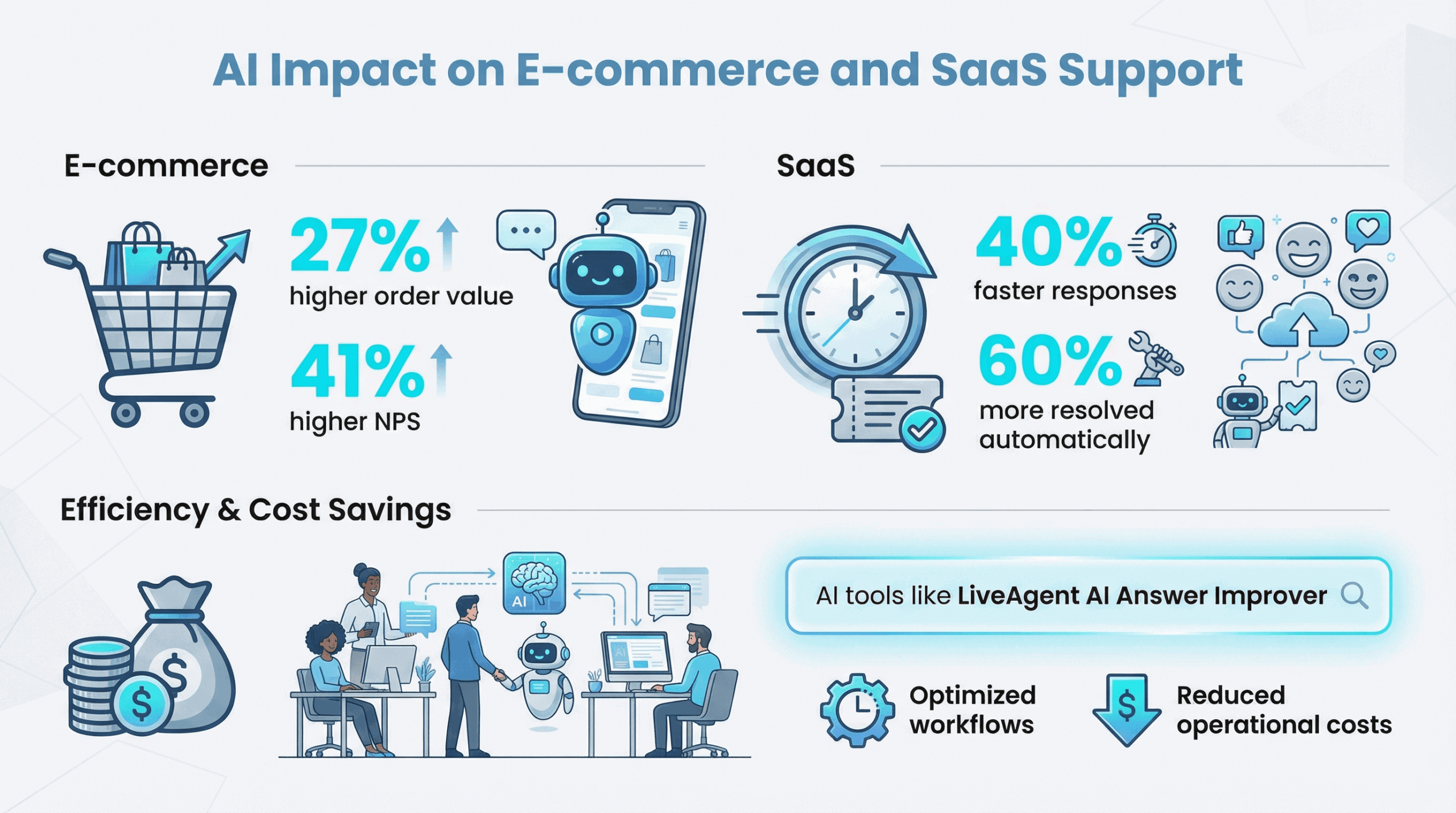
AI-generated helpdesk replies use advanced language models to review customer questions, understand context, and check past interactions. This technology creates fast, accurate, and personalized responses. Research from 2024 shows that AI-powered reply automation can cut response times by up to 80% while keeping high accuracy for common questions and basic support tasks. Using automation, support teams can handle more customer tickets without lowering the quality of their replies.
AI models personalize messages by using customer names, reviewing past conversation data, and detecting the customer’s mood or sentiment. This approach helps you receive responses that feel more tailored to your needs. Studies from 2024 show that customers report higher satisfaction and see the service as more attentive when companies use generative AI in their support systems.
Modern AI systems can follow specific brand guidelines for tone in every automated reply. Administrators set rules in helpdesk software that control whether replies sound casual, neutral, or business-like. For example, LiveAgent works with OpenAI to adjust tone based on set rules, so every message matches the company’s standards. Scientific reviews explain that tone control helps avoid messages that sound robotic or out of place, leading to more professional and trustworthy communication.
AI-generated replies work best when you combine them with smart escalation protocols. The system checks for unclear messages, strong emotions, or special customer profiles and then sends sensitive or complex tickets to a human agent. Using this hybrid method helps prevent confusion and makes sure that skilled people handle difficult issues.
To get the best results from AI-generated helpdesk replies, you need to review reply logs often and collect feedback from both agents and customers. Adjusting prompts and retraining the AI with new ticket examples helps keep responses accurate and relevant as customer needs change. Ongoing monitoring and improvements lead to better efficiency and higher customer satisfaction, as recent studies confirm.
When you use AI for automated, personalized, and context-aware helpdesk replies, you can resolve issues faster, keep brand communication consistent, and support more customers. At the same time, complex or sensitive requests still reach human experts who can give the right attention.
To train an effective AI helpdesk, you need to measure performance regularly using specific metrics. Track first-response time, how long it takes to resolve tickets, customer satisfaction scores, and how many tickets get passed to human agents. Use analytics dashboards to watch these numbers, so you can spot changes in performance, model drift, or areas where automated replies slow things down.
Create a feedback loop to improve how well the AI works. Agents should mark incorrect or unhelpful AI replies directly in the helpdesk system. Collect this feedback with customer satisfaction data to find patterns that can guide retraining. Best practices suggest retraining AI models on a set schedule, like every quarter, or when you see a lot of feedback or new types of tickets. In busy environments, you might retrain when the number of flagged cases reaches a certain point.
Improve your AI by fine-tuning it in steps. Add labeled examples of both good and bad replies to your training set. Update automation rules, prompts, and tone settings based on feedback from agents and customers. Use A/B testing to compare new AI models with older ones. Watch for clear improvements in accuracy and satisfaction.
Keep strong teamwork between AI and human agents. Let agents review AI-suggested replies for tricky or unclear cases. Ask agents to share feedback, so the AI can learn industry terms and keep up with new customer questions. Human input helps the AI provide better answers and adjust to changing support needs.
When you monitor results, gather feedback, and retrain with real examples, you help your AI helpdesk get better over time. This process leads to more accurate, efficient, and helpful responses for your customers.
Klarna, a global financial technology company, uses OpenAI’s conversational AI to manage its customer support requests. Company data shows that the AI agent now handles about two-thirds of these inquiries. After putting this system in place, Klarna tracked a sharp drop in average response time. For questions managed by AI, the response time now stays under two minutes per ticket. Human agents can now spend more time on complex or sensitive issues, rather than routine requests. This shift allowed Klarna to increase customer satisfaction scores by 25%. The company also cut its support costs by a large amount.
Research on AI-powered helpdesks shows several clear improvements:
Companies using LiveAgent together with AI providers like OpenAI report faster ticket handling and better reply quality. For example, a mid-sized software company reduced its first-response time from six hours to less than one hour. The time agents spent drafting replies to password resets and common questions fell by over 70%. Agents also said AI-driven templates and suggestions helped keep replies consistent in tone and information.
These examples show how AI helpdesk tools can automate replies, improve customer experience, and make support teams more efficient.
By following these best practices and watching out for these common pitfalls, you can use AI helpdesk tools to improve response quality, work more efficiently, and keep customer trust high.
Share this article
Lilia is a copywriter at LiveAgent. Passionate about customer support, she crafts engaging content that highlights the power of seamless communication and exceptional AI-powered service.

Help desk software powered by AI agents. Auto-draft replies, categorize tickets, detect spam, and route issues to the right team — automatically. Free 30-day tr...

Help desk software powered by AI agents. Auto-draft replies, categorize tickets, detect spam, and route issues to the right team — automatically. Free 30-day tr...

Integrately connects over 600 apps to automate workflows, enhancing efficiency and saving time. Integrate LiveAgent with email marketing, billing, CRM, etc., to...
Join our community of happy clients and provide excellent customer support with LiveAgent.
