






Best 10 Free Help Desk and Ticketing Software in 2026
Discover the top 10 free help desk software of 2026! Compare features, benefits, and pricing to enhance your customer support efficiently.
24 min read
Help Desk
Software Review
+3

Discover 17 essential help desk best practices for 2025, including selecting the right software, automating processes, providing 24/7 support, ensuring data security, and enhancing customer service for improved satisfaction.
In an age where customer expectations are higher than ever, the need for efficient and effective help desk support is undeniable. The implementation of help desk best practices can significantly impact an organization’s ability to handle customer service operations, address common customer queries promptly, and deliver a seamless support experience. Beyond these, the strategy behind a help desk influences the overall efficiency of support processes.
Drawing from extensive exposure to user experience (UX) with help desk support, we’ve identified practices that are crucial for businesses aiming to excel in customer service operations. Let’s get right into the help desk tips of selecting software, automating processes, and ultimately, their practical application.
Choosing the appropriate help desk software is pivotal for any business looking to enhance its customer service operations. This tool should meet your current needs while also being scalable for future demands. Some critical factors to consider are:
To truly capitalize on your investment, consider a robust feature set, which was specially designed to streamline your customer service workflows. As a head’s up, it’s always a good idea to verify the latest help desk software options and updates to ensure your selection fits your organization best.
Establishing your help desk as a single point of contact (SPOC) simplifies the customer support process, making it easier for customers to get the help they need without navigating through multiple channels. This approach reduces confusion and ensures consistency in support, which consequently leads to significantly enhancing customer satisfaction and loyalty. Furthermore, focusing on key customer journey touchpoints streamlines communication and provides a more cohesive customer experience.
Consumers often become frustrated when they have to repeat the same issue to different agents. A SPOC strategy can alleviate this frustration by improving response times and maintaining consistency across interactions. Additionally, it simplifies the training processes for support staff, as they only need to familiarize themselves with a single, unified method of communication and problem resolution. A SPOC strategy can also help foster a deeper understanding of customer issues as representatives can track interactions more comprehensively.

Start your free trial today and see results within days.
Ensuring a user-friendly interface is not just about making a system easy to use; it’s about creating an environment where both customers and agents can interact with your help desk support software effortlessly. A well-designed interface minimizes the learning curve, enabling new users to adapt quickly and existing users to work more efficiently.
Streamlined navigation plays a critical role in this, as it allows agents to swiftly find the information they need, significantly cutting down on response times and elevating the overall quality of support provided, particularly in handling service requests.
A well-designed interface is built with the user’s experience at its core. Its dashboard is logically organized, ensuring that agents have immediate access to the tools and information that matter most. For instance, features like a unified inbox allow agents to manage conversations across multiple channels from a single point, reducing the need to switch between different applications and interfaces.

Another aspect that highlights the importance of a user-friendly interface is the integration of search functionalities. Agents can quickly locate past interactions, customer information, or solutions to common issues without having to sift through databases or ask colleagues for assistance manually. This capability not only speeds up the resolution process but also ensures that customers receive accurate and consistent support.
Leveraging the full spectrum of automation options provided by your chosen customer service software is key to optimizing help desk operations. These automation tools are designed to enhance workflow efficiency while simultaneously ensuring a seamless service experience for both customers and agents.
Following IT help desk best practices, one of the most impactful uses of automation is automatic ticket routing. This function ensures that incoming tickets are swiftly allocated to the appropriate team or agent based on predefined criteria such as issue type, customer priority, or agent expertise. This automation eliminates the bottleneck and inefficiencies associated with manual sorting and distribution, allowing your team to focus on resolution rather than administration.
Additionally, automated responses can significantly enhance customer interaction by providing immediate acknowledgments, estimated resolution times, or even direct solutions for common queries. This instant communication can greatly improve customer satisfaction by setting accurate expectations and reducing perceived wait times.
The latest tips and deals delivered straight to your inbox.
Implementing Service Level Agreements (SLAs) within your help desk empowers you to establish clear, measurable performance benchmarks for your support team.
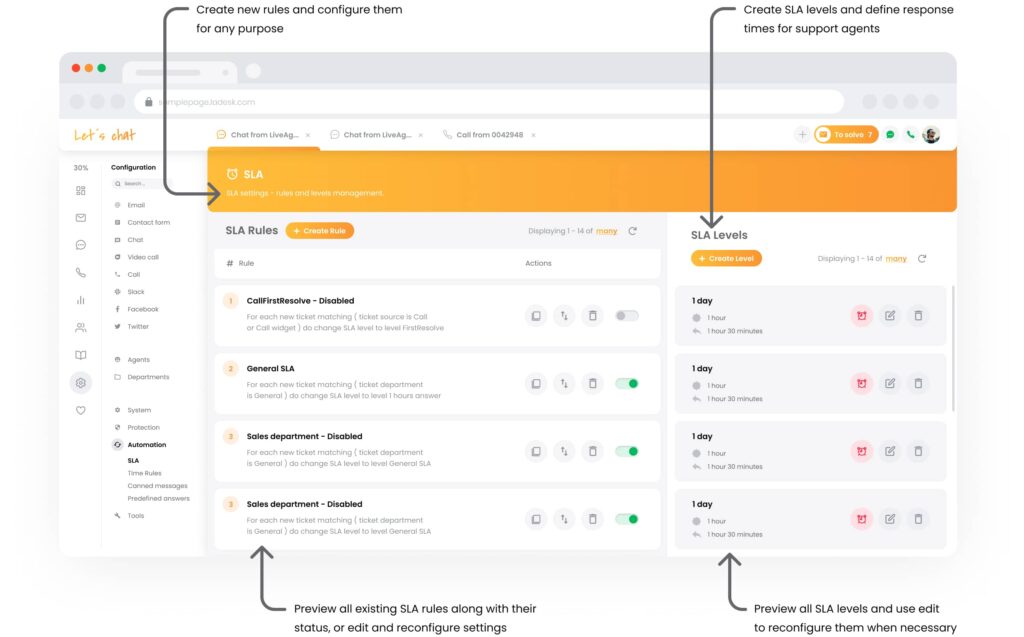
By incorporating SLAs, you create a structured framework that outlines specific expectations for response and resolution times. Simultaneously, you foster a culture of accountability and efficiency within your support operations, adhering to a strict service desk policy. Here’s how SLAs can transform your help desk’s functionality:
SLAs are not just about setting targets; they are about creating a structured approach to customer service that emphasizes timeliness, accountability, and continuous improvement. Implementing these agreements into your help desk strategy ensures that both your team and your customers clearly understand what to expect, leading to improved service experiences, stronger relationships with your customer base, and enhanced overall satisfaction.
Did you know that forming dedicated help desk groups can significantly elevate your customer service capabilities? It’s a strategic move, particularly important for globally active businesses. These groups should consist of well-trained agents proficient in using help desk tools and skilled in communication and customer service, in line with established help desk standards. Adequate staffing ensures timely responses across various time zones and during peak periods, significantly enhancing customer satisfaction and support quality.
By focusing on specialized training and appropriate agent capacity, businesses can better manage customer inquiries and maintain high service standards. Common topics to cover in these training sessions could include:
If you want to incorporate some different methods of training, some effective examples you can add are role-playing exercises, gamification, peer mentoring, and long-term learning programs.
A multi-tier architecture for help desk support helps in efficiently managing different levels of customer inquiries, from basic questions to complex issues. This structure typically includes:
This tiered approach ensures that customer queries are directed to the most appropriate level of support, optimizing resolution times and resource utilization.
Canned responses are pre-formulated replies designed to address frequently asked questions or resolve common issues swiftly. These predefined answers help maintain consistency in responses across different agents, ensuring that all customers receive reliable and uniform support. By incorporating canned responses into their workflow, agents can save significant time, allowing them to handle a higher volume of inquiries without sacrificing the quality of service.
Additionally, when used judiciously, canned responses can prevent agent fatigue by reducing the need for repetitive typing and mental effort. If you want higher job satisfaction and better overall performance, this is definitely one way to enhance your help desk team’s efficiency.
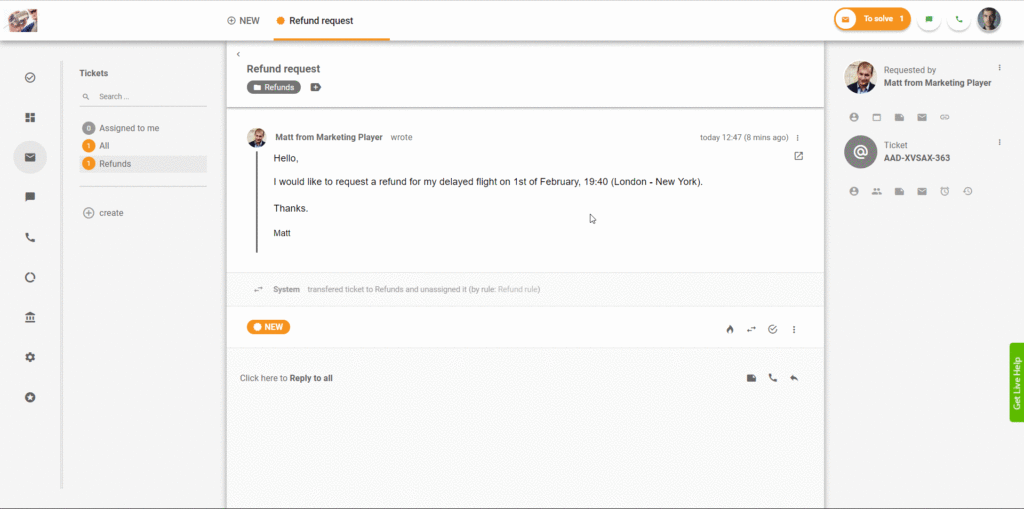
It’s been found that 73% of customers prefer the possibility of solving issues independently, using an online portal for self-service instead of speaking to a representative. Self-service options empower customers to find answers to their questions without direct assistance from a support agent. An up-to-date customer self-service portal featuring FAQs, how-to guides, and troubleshooting tips will give customers what they want, ultimately improving customer satisfaction scores while reducing the workload on your help desk team.
By investing in top-notch self-service software, you can make this whole process even smoother. It fits right in with your current customer service setup, ensuring everything runs super efficiently and user-friendly. Good software keeps things tidy and easy to find, giving users more control and making them happier overall.
A significant percentage of consumers—91%—would use an online knowledge base articles if it were easily accessible and tailored to their needs. This statistic underscores the high value customers place on being able to access information independently and conveniently. Furthermore, 81% of customers engage with FAQs, help centers, or other self-service online resources before reaching out, which illustrates the extensive use and importance of these tools in customer service strategies today.
A well-structured knowledge bases and FAQ section are indispensable for any effective help desk. They provide customers with instant access to solutions and information, reducing the need for direct contact with support agents. Regularly updating these resources ensures that the information remains relevant and useful.

Leveraging data-driven insights is paramount for elevating the effectiveness of your help desk operations. While specific metrics are critical, the broader focus should be on analyzing help desk analytics to identify trends, areas for improvement, and successes. This approach enables you to make informed decisions about strategy adjustments, training needs, and resource allocation. Observing long-term data trends allows you to predict future challenges and opportunities, allowing for proactive rather than reactive management.
Additionally, data insights can highlight the efficiency of communication channels, guiding you to optimize interactions based on customer preferences and behaviors. By integrating comprehensive analytics into daily operations, you not only streamline workflows, but also enhance customer satisfaction and team morale, ultimately fostering a culture of continuous improvement and strategic insightfulness in your organization.
Integrating your help desk or service desk software with third-party applications can significantly extend its capabilities, offering more seamless workflows and an enriched feature set. It also allows for better data synchronization across platforms, reducing the risk of errors and ensuring that customer information is always up-to-date. This connectivity enhances overall operational efficiency, enabling teams to deliver faster and more accurate customer service.
Help desk software supports a wide range of over 200 integrations, enhancing its versatility and utility. The most popular integrations among users include Slack, Shopify, WooCommerce, and Magento. By leveraging these integrations, businesses can provide a more cohesive and efficient service experience.
There is always room for gauging the effectiveness of your help desk support – conducting customer satisfaction surveys is a straightforward yet powerful way to do so. Integrating a continuous improvement philosophy into your feedback loop can significantly enhance service quality. For example, gathering feedback can illuminate the specific training needs of help desk staff, directly linking customer insights to targeted developmental programs.
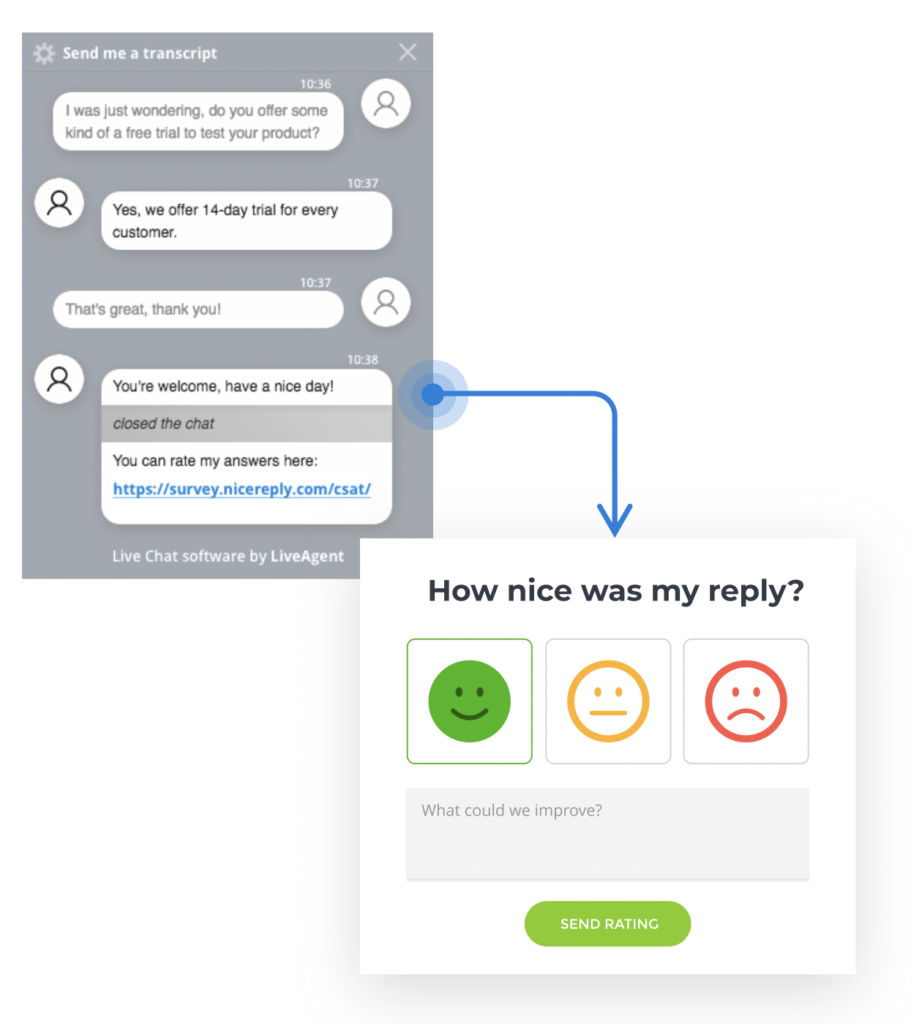
For crafting effective surveys, you can use customer satisfaction survey questions as a guide. You can identify areas for improvement, engage team members in the process, and foster a culture of excellence and adaptability all in one go.
75% of customers expect a quick response from service agents, but in reality, the average response time from a customer service team is a whole 12 hours. This disconnect between expectation and reality is a wake-up call for businesses. This is where 24/7 support fits as a best help desk practice.
Having 24/7 online support enables businesses to offer faster replies and sends a clear message that a company is dedicated to addressing customer needs swiftly and efficiently, ultimately creating stronger customer satisfaction and loyalty.
Customer support automation can reduce response times and improve service quality by instantly handling routine inquiries, allowing agents to focus on more complex customer needs. Additionally, 96% of consumers say the quality of customer service is important in their choice of loyalty to a brand.
There’s no denying that data security and compliance are a must these days, where data breaches can severely impact customer trust and company reputation. Implementing stringent security measures and adhering to regulatory standards are essential for safeguarding sensitive information. Without robust security measures, businesses risk data theft, legal consequences, and severe operational disruptions.
Help desk security features emphasize solid protection for your customer service operations. It utilizes HTTPS encryption to secure data transmissions, ensuring that sensitive information remains private.
Additionally, help desk software supports custom security policies, including IP address restrictions, to further safeguard access. This comprehensive security framework is designed to protect both your data and your customers’ privacy reliably.
Multi-channel support offers customers the flexibility to reach out via their preferred methods: social media, email, phone, or live chat. Engaging with brands on social media platforms is becoming increasingly standard for users.
75% of Twitter users, 59% of Facebook users, and 34% of Instagram users have reached out to engage with brands through the respective platforms.
This makes it essential for businesses to be accessible and meet their customers where they are.
Software allows you to manage tickets from Facebook, Instagram, Twitter, Viber, and WhatsApp from a single place. This conveniently streamlines communication from multiple channels and allows social media support to be leveraged as needed.

Delivering exceptional service cannot be fulfilled without satisfied help desk agents – a.k.a, customers’ primary point of interaction. The best you can do is to keep agents motivated and engaged by setting realistic performance targets, offering a fair reward system, valuing their feedback, and implementing strategies to prevent burnout and overwork.
Some ways to combat these effects are:
Implementing these strategies can help mitigate the effects of burnout and overwork, leading to a more satisfied and productive help desk staff.
Implementing the 17 help desk best practices for 2025 can transform your customer service operations into a powerhouse of efficiency and customer satisfaction. These practices, grounded in extensive experience, emphasize the importance of choosing adaptable help desk software, establishing a single point of contact, and ensuring user-friendly interfaces. Automating routine processes and integrating Service Level Agreements (SLAs) streamline operations and set clear performance benchmarks. Moreover, expanding support across multiple communication channels and offering 24/7 service cater to the modern consumer’s expectations.
By adopting these strategies, businesses can enhance agent productivity, improve customer experiences, and foster enduring customer loyalty. Start your journey to apply these practices today by using a 30-day free trial.
Start your free 30-day trial today and see the difference!
Discover the top 10 free help desk software of 2026! Compare features, benefits, and pricing to enhance your customer support efficiently.

Discover the benefits, functions, and importance of help desks. Enhance customer satisfaction, streamline support, and boost productivity today!

Enhance your customer support with a thorough help desk checklist, covering goals, agent organization, communication channels, workflow automation, and more. Es...
Join our community of happy clients and provide excellent customer support with LiveAgent.

Cookie Consent
We use cookies to enhance your browsing experience and analyze our traffic. See our privacy policy.